Installation and Setup 27
.
1.3 Installation
The V7768/V7769 conform to the VME physical specification for a 6U board. The
V7768/V7769 can be used for the system controller or as a peripheral board. It can
be plugged directly into any standard chassis accepting either type of board.
The following steps describe the GE-recommended method for installation and
powerup of the V7768/V7769:
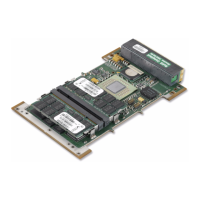
1. If a PMC module is to be used, connect it to the V7768/V7769 prior to board
installation (as shown in Figure 1-4 on page 28). Refer to the Product Man-
ual for the PMC module for configuration and setup.
NOTE
Air flow as measured at the output side of the heatsink is to be
greater than 450 LFM.
2. Insert the V7768/V7769 into a VME chassis system controller or peripheral
slot. While ensuring that the board is properly aligned and oriented in the
supporting board guides, slide the board smoothly forward against the mat
-
ing connector. Use the ejector handles to firmly seat the board.
3. All needed peripherals can be accessed from the front panel or the rear I/O.
Each connector is clearly labeled, and detailed pinouts are in
Appendix A:
Connector Pinouts.
4. Connect a keyboard and mouse if the system has not been previously config-
ured.
5. The V7768 features an optional CompactFlash Disk resident on the board.
Refer to
Chapter 3: Embedded PC/RTOS Features for setup details.
6. If an external drive module is installed, the BIOS Setup program must be
used to configure the drive types. See
Appendix B: AMI BIOS Setup Utility
to properly configure the system.
7. If a drive module is present, install the operating system according to the
manufacturer’s instructions.
1.3.1 BIOS Setup
The V7768/V7769 has an onboard BIOS Setup program that controls many
configuration options. These options are saved in a special non-volatile, battery-
backed memory chip and are collectively referred to as the board’s CMOS
Configuration. The CMOS configuration controls many details concerning the
behavior of the hardware from the moment power is applied.
Details of the V7768/V7769 BIOS setup program are included in
Appendix B: AMI BIOS Setup Utility.


 To Next Page