in.xe TechBook
4343
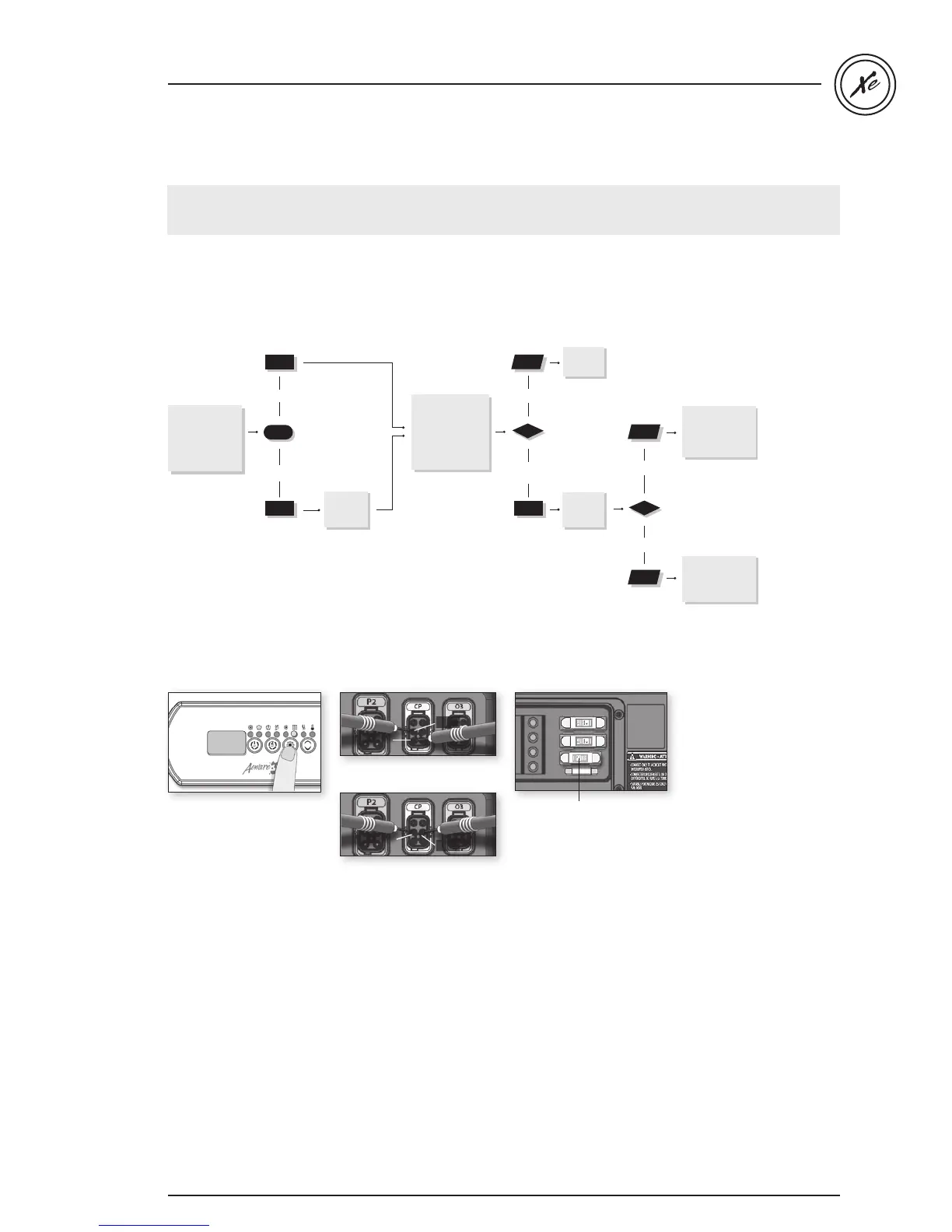
If the ozonator is not working,
follow this troubleshooting flow chart:
Step-by-Step
Ozonator doesn't work / flow chart & step-by-step
Has Filter
Cycle indicator
appeared steady
on keypad
display?
yes
no
Start up a
filter
cycle.
yes
Do you read
120 V for a
120 V ozonator
(or 240 V for 240
V) on
the board?
Replace
ozonator
.
no
yes
Is pump 1
working?
Replace spa pack
if
you still ar
en’t
getting a voltage
re
ading
.
no
Refer to “Pump 1
does not Work!”
section.
Flow chart
Ozonator output will be shut down when pump 1, pump 2 or blower have been turned on manually.
If the ozonator is not
working:
• Verify Filter Cycle
indicator appears steady
on keypad.
• If the filter indicator is
blinking it indicates that
the filter cycle has been
interrupted.
In this case, reset the
breaker by turning the
power off and on again
to resume cycle.
• If not, start up a filter
cycle (see "Programming
filter cycles" section).
• If you don't get a voltage
reading, replace the
accessory fuse.
• If voltage is as it should
be, replace ozonator.
• If not, replace spa pack.
• If ozonator does not
work even when filter
cycle indicator is on,
take voltage reading
on the corresponding
in.link connector:
240 V: Pin 2 & Pin 1
120 V: Pin 2 & Pin 5
Your reading shoud be:
240 V for a 240 V
ozonator
120 V for a 120 V
ozonator
Accessory fuse
240 V at CP connector:
Pin 2 & Pin 1
Pin 1
Pin 2
120 V at CP connector:
Pin 2 & Pin 5
Pin 2
Pin 5


 To Next Page