www.gemu-group.com32 / 71GEMÜ 1435 ePos
16 System mode CLASSIC
changed and adjust this using the and keys. Then
move the cursor to the right-hand bracket using the key
and confirm the set value by pressing the key.
Press the key to switch to the C: CONFIG operating
mode.
16.1.3 Configuration (C: CONFIG)
Various parameter values of the product can be changed in
the configuration menu. To switch to the configuration menu,
select parameter C: CONFIG and then press and hold the
key for longer than 3 seconds.
The parameter value is displayed in the top line, the number
and name of the parameter appear in the bottom line.
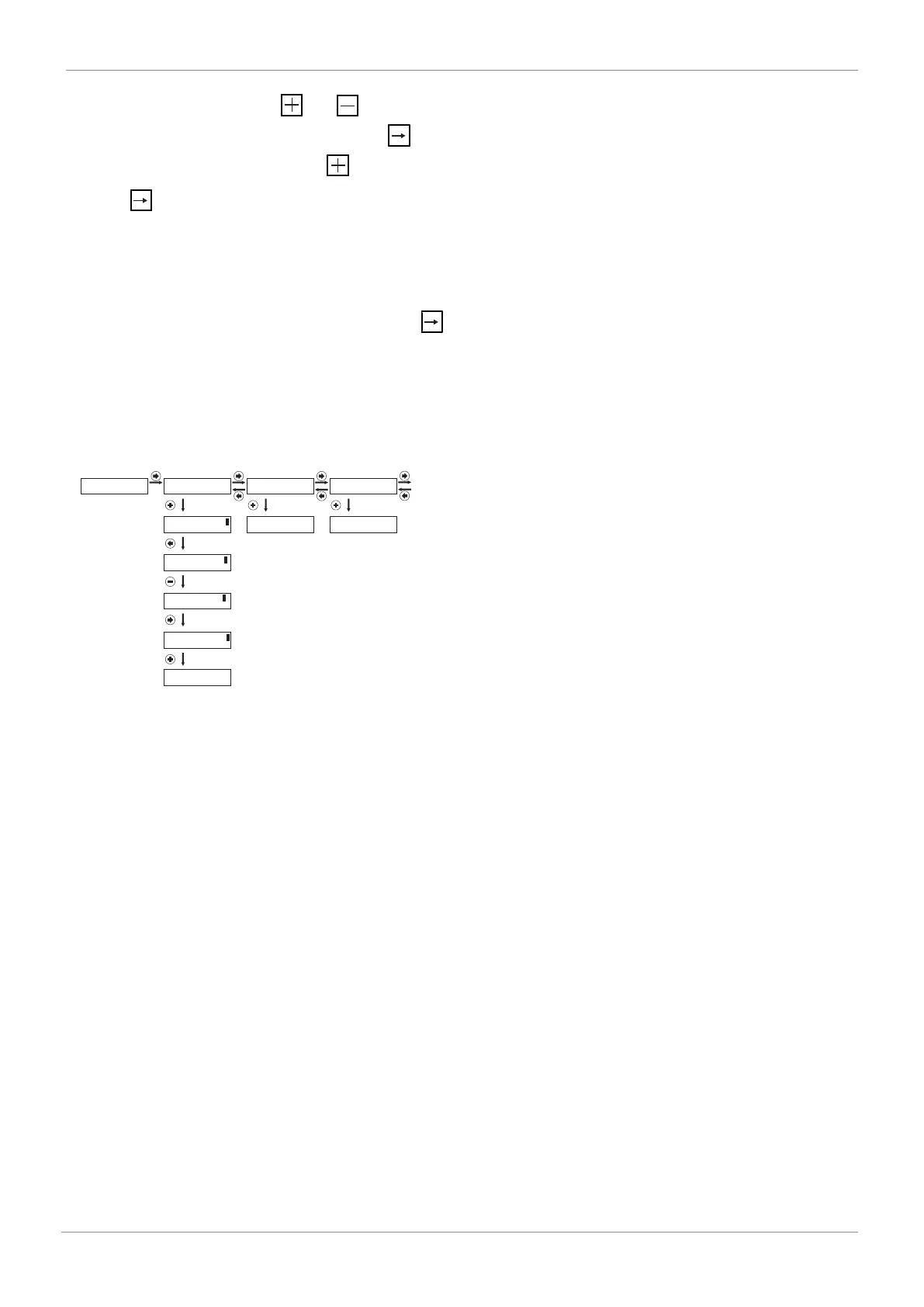
Operation is as shown in the picture below.
Parameter setting:
PRESS -> FOR 3s
C: CONFIG
4...20 mA
1: SETPOINT
NO INIT
2: INIT ALL
Press for more than 3
seconds
[ 4...20 mA]
<- OK ESC
[ 4...20 mA]
<- -> + -
[ 0...10 V ]
<- -> + -
[ 0...10 V]
<- OK ESC
0...10 V
1: SETPOINT
DEFAULT
3: DEFAULT STATE
PRESS -> FOR 3s
2: INIT ALL
PRESS -> FOR 3s
3: DEFAULT STATE
...



 To Next Page