www.gemu-group.com66 / 71GEMÜ 1435 ePos
18 Troubleshooting
18 Troubleshooting
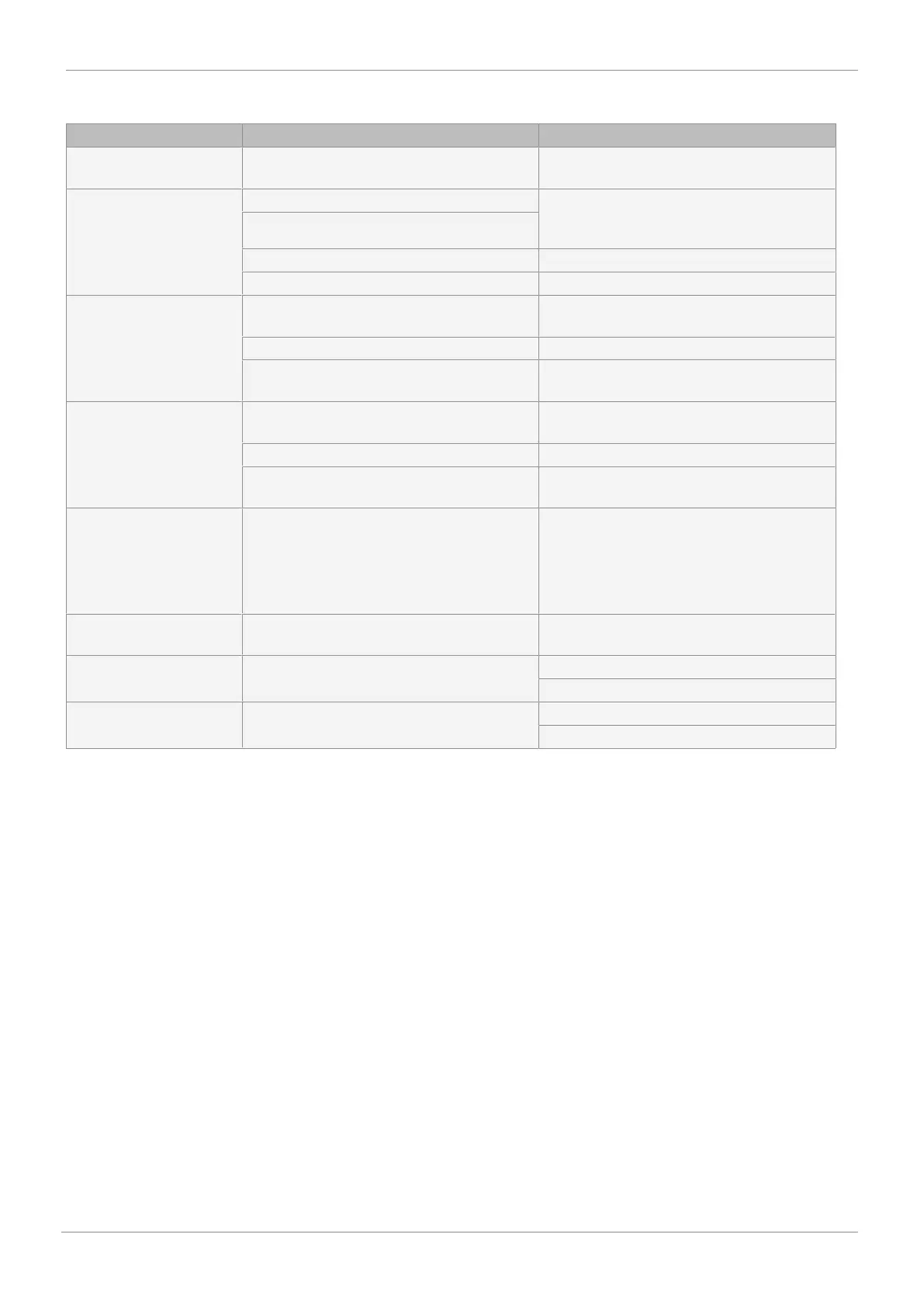
Display Causes of errors Troubleshooting
SetP.Range The set value signal is outside the defined
range.
Check set value signal
Error Run 1 No compressed air supply Check and connect the compressed air supply
(max. 6 bar) and make sure the pneumatic
connection is correct
Control pressure too low
Travel sensor wrongly connected Check the connection assignment
Valve stroke < 3 mm Check the valve stroke
Error Run 2.1 Zero point adjustment could not be carried out. Move the valve to the CLOSED position by
hand, display value must be > 2.0.
Incorrect travel sensor/mounting kit Check the order number
Quarter turn travel sensor incorrectly adjusted Twist the quarter turn travel sensor until P >
2.0
Error Run 2.2 Zero point adjustment could not be carried out. Move the valve to the OPEN position by hand,
display value must be < 98.0.
Incorrect travel sensor/mounting kit Check the order number
Quarter turn travel sensor incorrectly adjusted Twist the quarter turn travel sensor until P <
98.0
AD Nozzle (s) Valve travel time less than 1 second. Adjust throttles D1 and D2 depending on the
control function of the actuator until the travel
time is > 1 second.
Clockwise = travel time longer.
Then press the yellow key.
Leakage Run 4 Leakage in the pneumatic system. Check the external pneumatic system connec-
tions for leakage (tighten the fittings).
Error Drive Actuator does not move. Check the pneumatic system.
Check the mechanical design.
Stroke Error Actuator does not move. Check the pneumatic system.
Check the mechanical design



 To Next Page