www.gemu-group.com 31 / 71 GEMÜ 1435 ePos
14.2 With default setting (positioner supplied mounted
to the valve)
PRESS -> FOR 3s
C: CONFIG
X = 55.5
B: MANUAL W = 55.5
X = 30.5
A: AUTO W = 30.5
X = 55.5
B: MANUAL [W = 55.5]
1. If the positioner is supplied ready for operation, A: AUTO
appears on the display and the positioner reacts to the ex-
ternally specified set value.
2. To manually adjust the valve, press once. B: MANUAL
appears.
3. Press the key. A bracket appears around the preset
value.
4. Press the key until you reach the digit of the value to
be changed and adjust using the or key.
5. Press the key until the cursor reaches the right-hand
bracket and confirm the set value by pressing the
key.
15 Switching the operator interface
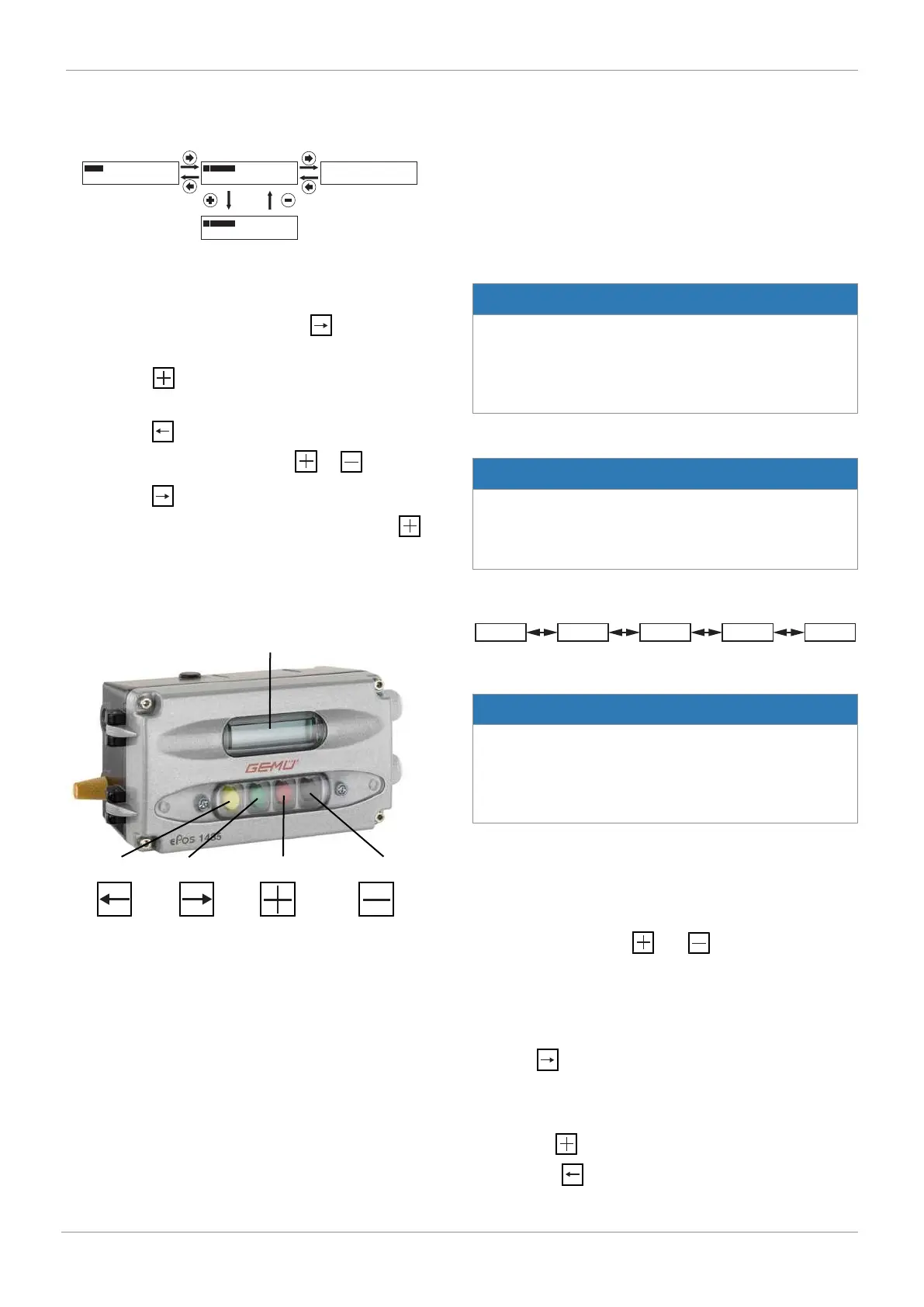
2-line display, 16-digit
Back key
Forward key
Plus key
Minus key
The product offers you the choice between two different oper-
ator interfaces. These can be selected in the System mode
parameter.
In order to switch the operator interface from [CLASSIC] to
[ADVANCED], proceed as follows:
1. Select parameter 50: SYSTEMMODE.
2. Switch from [CLASSIC] to [ADVANCED] and do not exit the
parameter.
3. Switch off the supply voltage (for longer than 3 seconds).
4. Switch on supply voltage.
In order to switch the operator interface from [ADVANCED] to
[CLASSIC], proceed as follows:
5. Select parameter SYSTEMMODE in the SetBasics menu.
6. Switch from [ADVANCED] to [CLASSIC] and confirm with
"OK". Do not exit the parameter.
7. Switch off the supply voltage (for longer than 3 seconds).
8. Switch on supply voltage.
System mode CLASSIC
NOTICE
Voltage cutoff
▶ After a voltage cutoff, the product always starts in operat-
ing mode A: AUTO (if an initialization has already been
carried out) and reacts directly to the external set value
signal.
System mode ADVANCED
NOTICE
Voltage cutoff
▶ After a voltage cutoff, the product always starts in the op-
erating mode which was previously set in the Mode para-
meter.
16 System mode CLASSIC
The CLASSIC system mode offers simple basic functions and
all available parameters are arranged in the form of a chain.
NOTICE
Voltage cutoff
▶ After a voltage cutoff, the product always starts in operat-
ing mode A: AUTO (if an initialization has already been
carried out) and reacts directly to the external set value
signal.
16.1 Operating modes
16.1.1 Automatic operation (A:) AUTO)
Automatic operation is the normal operating mode. The initial-
ized product reacts independently to set value changes and
readjusts the valve. Keys and have no function here.
The current position x is shown as a percentage at the top of
the display and also as a bar chart.
The lower line shows the current operating mode on the left
and the current set value w in percent on the right.
Press the key to switch to the B: Manual operating mode.
16.1.2 Manual operation (B: MANUAL)
In manual mode, the valve can be operated manually. By
pressing the key a bracket opens around the set
value.Use the key to select the digit of the value to be
16 System mode CLASSIC



 To Next Page