24 SmartFan EN
6.2 TOUCH control unit
6.2.1 Control screens
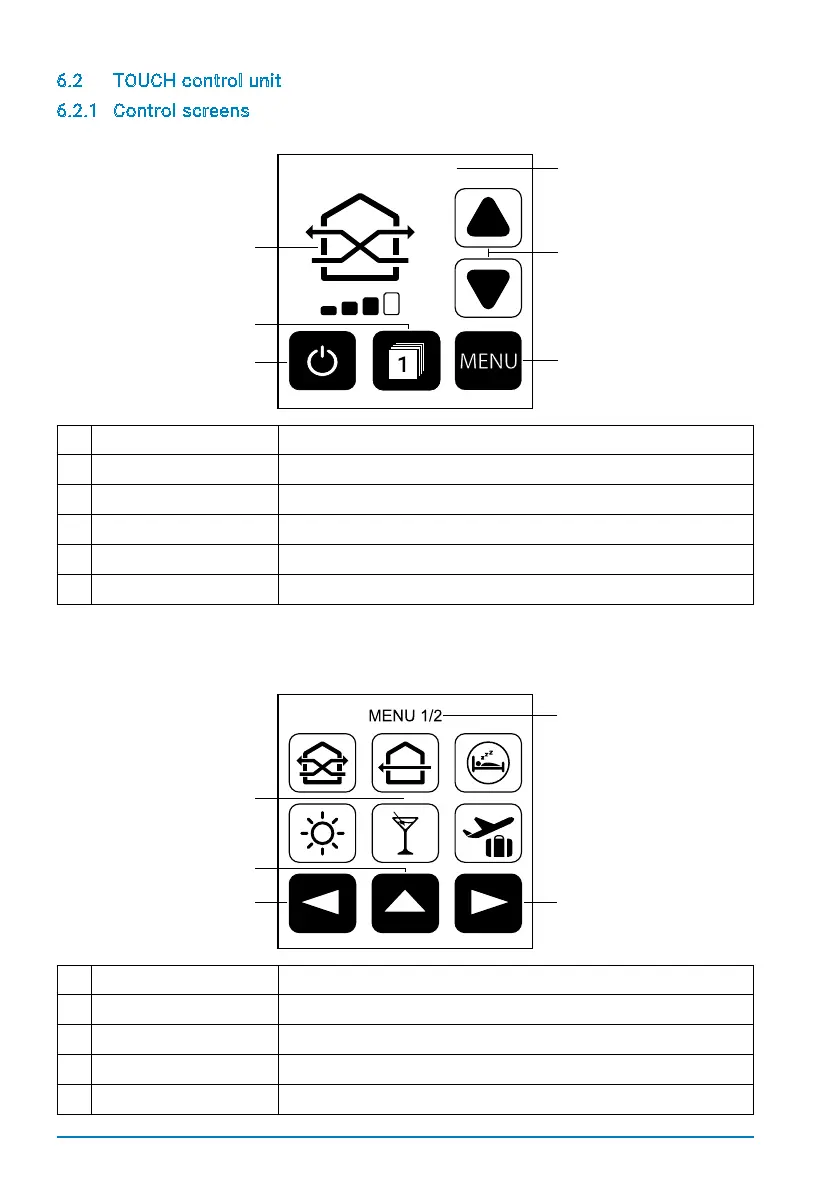
Start screen
1 Information line Shows the current menu item or the active mode.
2 Active mode The icon shows the active mode and the selected fan speed.
3 Fan speed Increases/decreases the fan speed.
4 On / off Starts/stops the system.
5 Zone selection Shows the currently selected zone.
6 Menu Opens the menu.
Menu screen
1 Information line Shows the current menu item.
2 Selection area Activates different operating modes or further menu items.
3 Last menu page Takes you back to the previous menu page.
4 Home Takes you to the start screen.
5 Next menu page Takes you to the next menu page.
ECO-MODE
2
4
5
2
4
3


 To Next Page