31
EN SmartFan
7.2 Maintenance instructions
WHEN CARRYING OUT MAINTENANCE WORK, THE SYSTEM MUST BE SWITCHED
OFF.
WHEN CARRYING OUT MAINTENANCE WORK ON THE FAN UNIT, THE SYSTEM
MUST BE DISCONNECTED FROM THE MAINS.
NEVER PULL THE PLUG OUT OF THE FAN UNIT BY THE CABLE. USE A PAIR OF
PLIERS AND PULL ON THE PLUG.
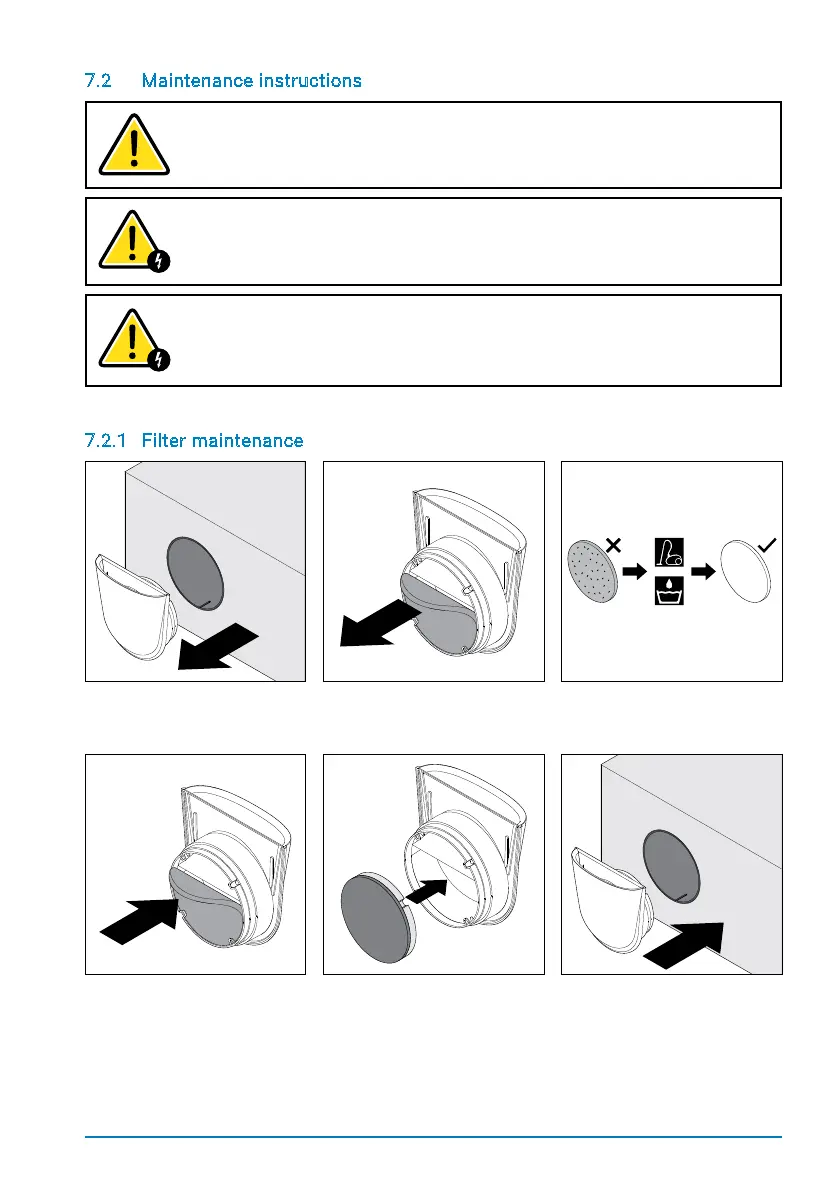
7.2.1 Filter maintenance
Step 1: Pull the inside cover
out of the mounting tube.
Step 2:Removethelter
from its holder.
Step 3: Checkthelter.
When necessary, clean or
replace it.
Step 4a - Dust lter:
Replacethelterinits
holder.
Step 4b - Pollen lter:
Insertthelterunitintothe
holder with the lighter side.
Step 5: Reinsert the inside
cover (with the air intake
pointing upwards) into the
mounting tube.


 To Next Page