33
EN SmartFan
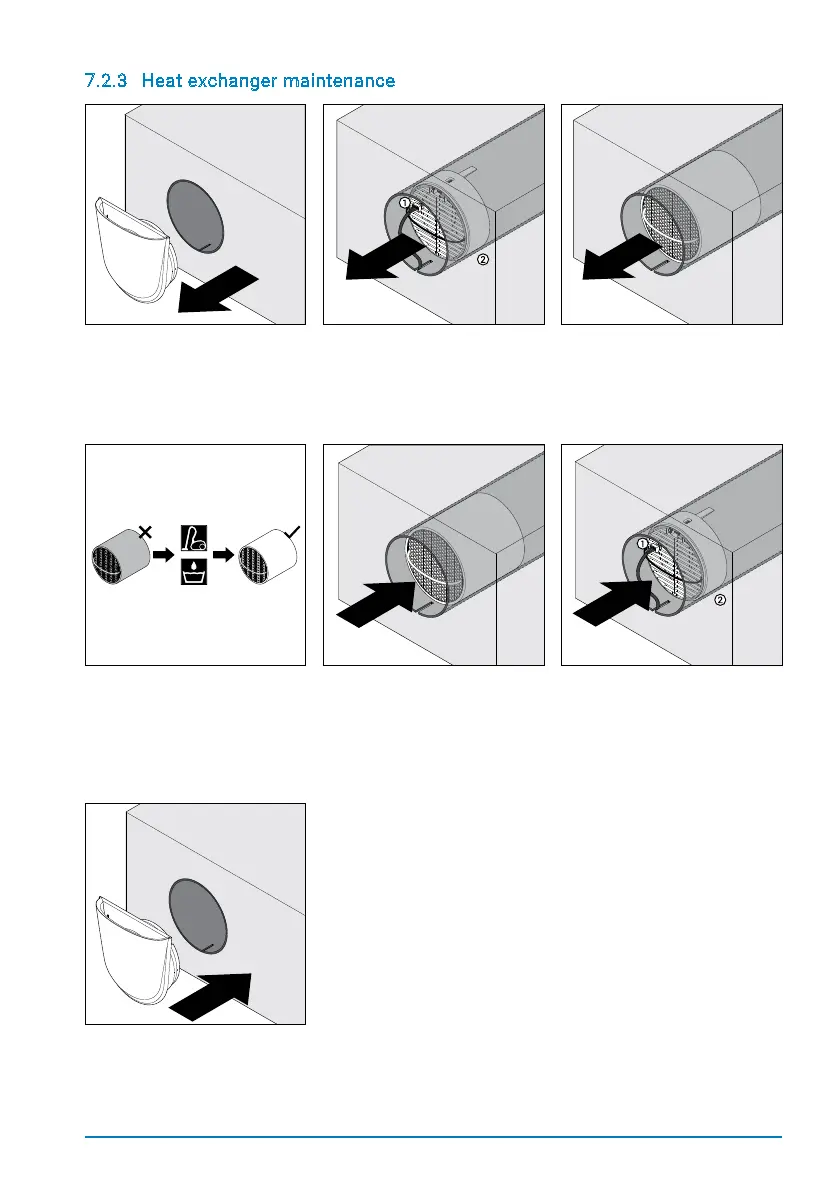
7.2.3 Heat exchanger maintenance
Step 1: Pull the inside cover
out of the mounting tube.
Step 2: Unplug the fan (1)
Pull the fan unit out of the
mounting tube using the
strap (2), taking care that the
power / control cable is not
damaged.
Step 3: Pull the heat
exchanger unit out of the
mounting tube using the
strap (2), taking care that the
power / control cable is not
damaged.
Step 4: Clean the heat
exchanger unit using a va-
cuum cleaner or wash with
warm water. Only clean the
ceramic parts with water!
Let the heat exchanger dry.
Step 5: Reinsert the heat
exchanger into the mounting
tube, taking care not to
damage the cables in the
mounting tube.
Step 6: Reinsert the cleaned
fan unit into the mounting
tube. Plug in the fan (1).
Push the fan unit down into
the mounting tube until
the spacers touch the heat
exchanger (2).
Step 7: Reinsert the inner
cover into the mounting tube
(with the air vent pointing
upwards).


 To Next Page