25
EN SmartFan
6.2.2 System set-up
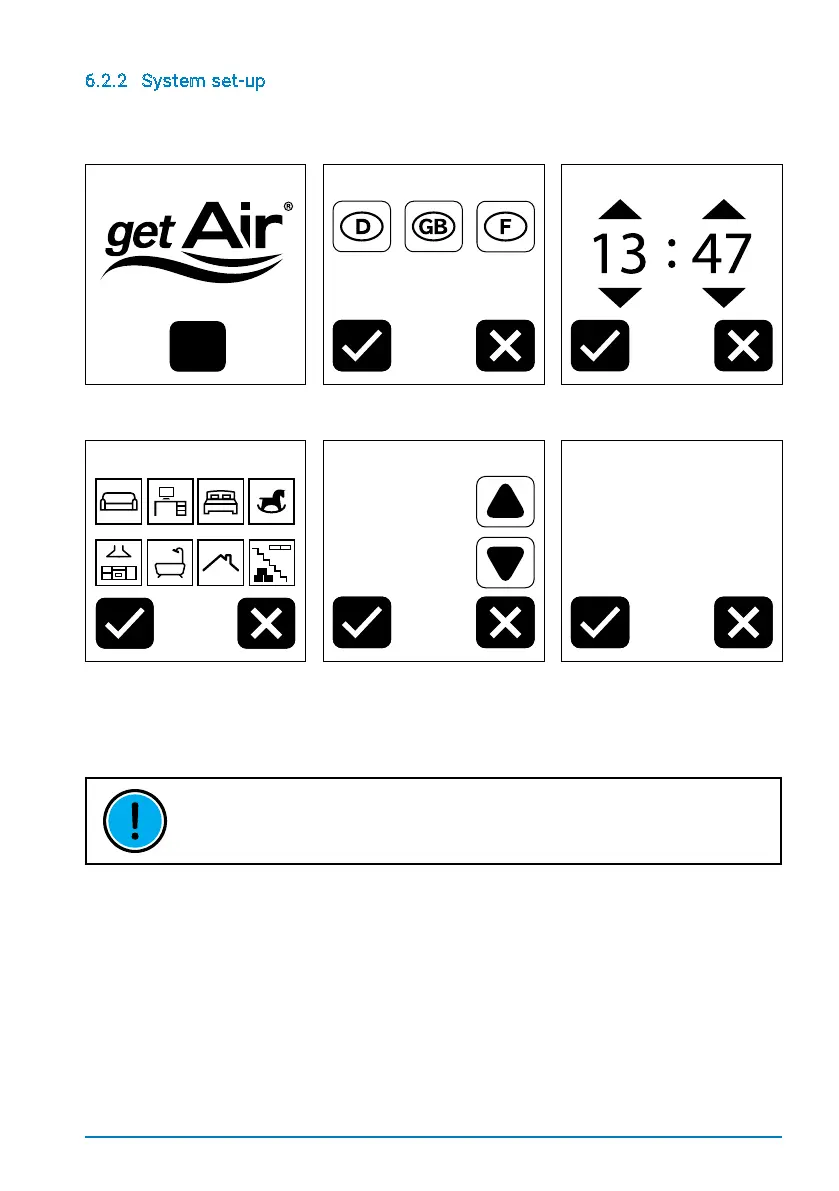
OnstartingtheSmartFansystemforthersttime,anumberofsettingsneedtobemade
to ensure that the TOUCH control unit works properly.
Language Time setting
Step 1: Press START to
begin the set-up procedure.
Step 2: Select the language. Step 3: Set the time.
Room selection Zone 1
Number of units in Zone 1
2
Zone 2
Would you like to add
a 2nd zone?
Pay attention to the
DIP switch settings.
Step 4:
Assign a room to
Zone 1. Multiple assignments
are possible.
Step 5: Select the number of
units in Zone 1.
Step 6: Repeat for
Zones 2 & 3
(where applicable).
THE TOUCH CONTROL UNIT HAS A RESISTIVE TOUCHSCREEN, MEANING THAT
YOU WILL HAVE TO PRESS SOMEWHAT HARDER TO SELECT ITEMS.


 To Next Page