34 SmartFan EN
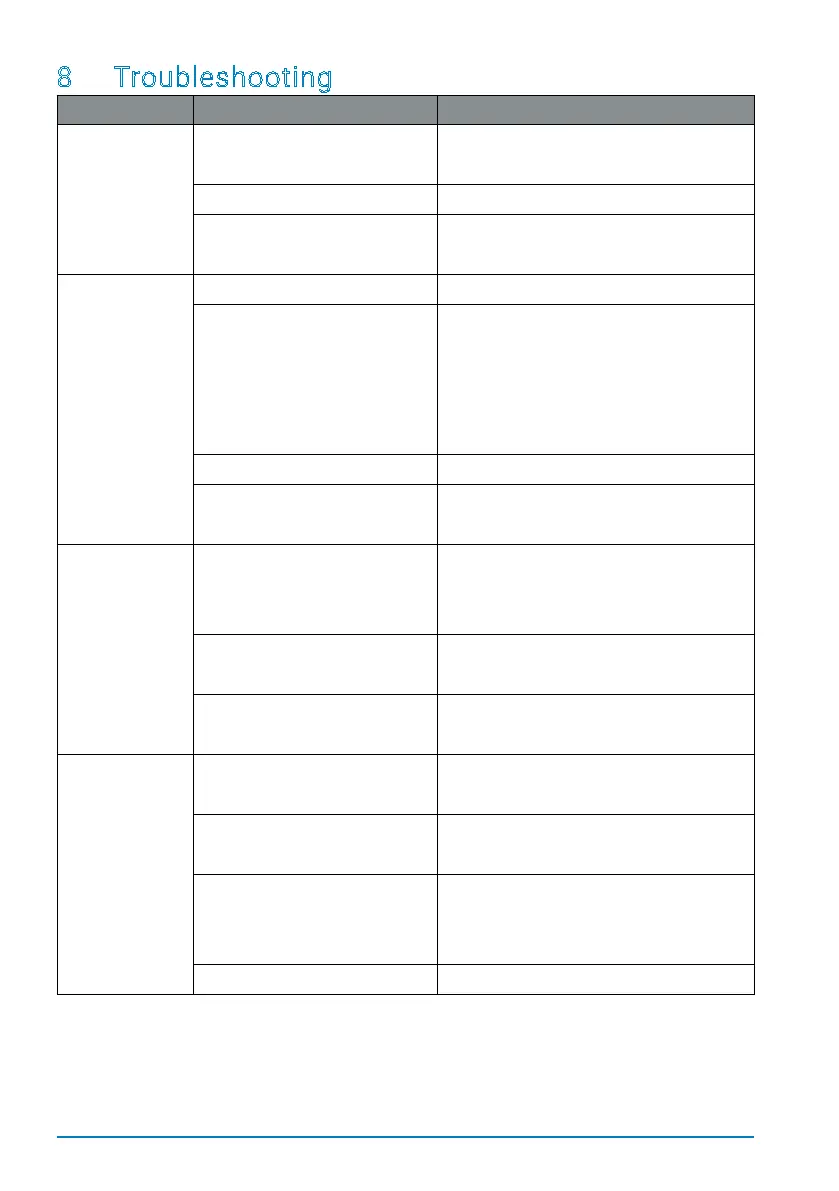
8 Troubleshooting
What's wrong? Cause Remedy
Fan unit does
not change
direction.
Control unit is operating in
"full-blast" mode.
• Set the controls to eco-mode
(heat recovery).
Fan unit not working properly. • Replace the fan unit.
Control unit / power supply
not working properly.
• Replace the control unit / power
supply.
Fan unit not
functioning.
No power supply. • Restore power supply.
Installation error.
• Check the cabling and wiring.
• Check whether all plugs have
been properly connected.
• Check the DIP switch settings on
the fan unit.
Fan unit not working properly. • Replace the fan unit.
Control unit / power supply
not working properly.
• Replace the control unit / power
supply.
Control unit
not
functioning.
Installation error.
• Check the cabling and wiring.
• Check that the control unit is
installed correctly.
Power supply not working
properly.
• Replace the power supply.
Control unit not working
properly.
• Replace the control unit.
Noise level
higher than
normal when
operating in
normal mode.
Rotor blades dirty. • Clean the rotor blades.
• Clean the ventilation unit.
Dirt or other elements in the
fan unit.
• Remove dirt or other elements.
• Clean the ventilation unit.
Distance between the heat
exchanger unit and fan unit
too small.
• check the spacers on the fan unit.
• Increase the distance.
Fan speed too high. • Switch to a lower speed.


 To Next Page