28 SmartFan EN
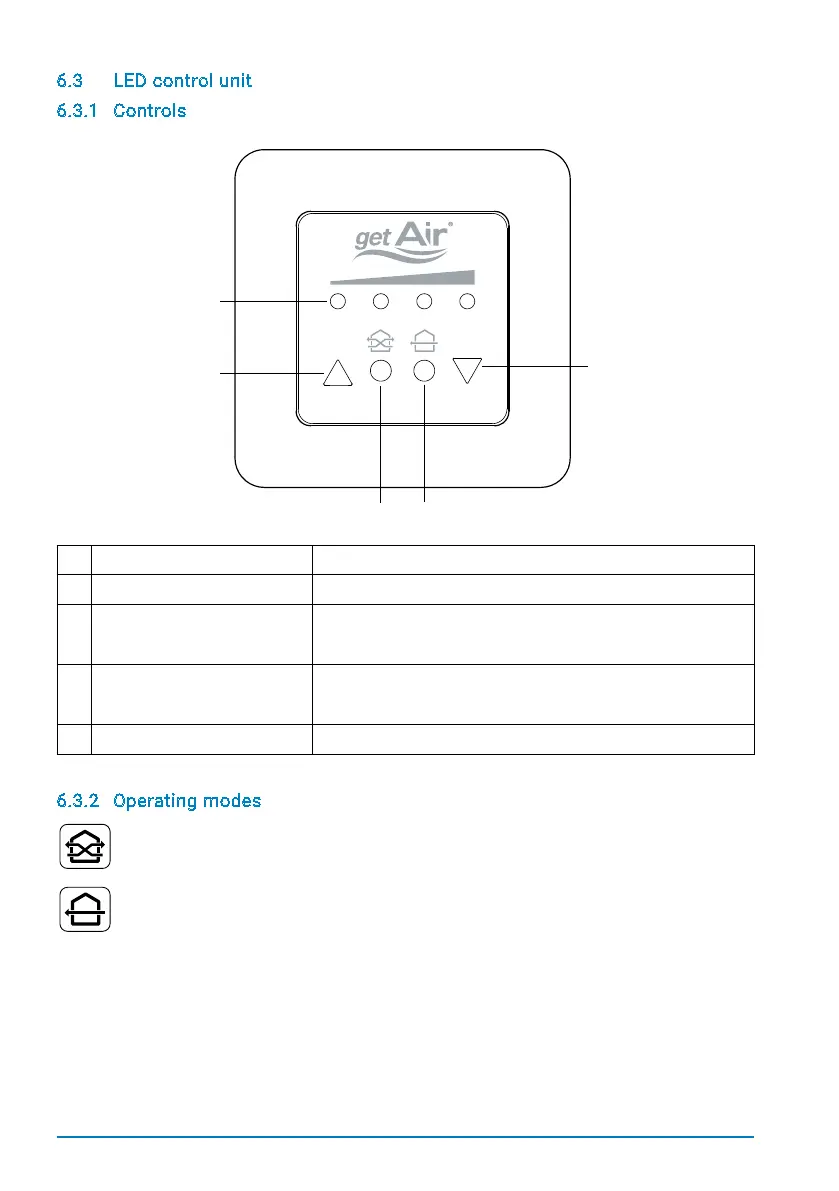
6.3 LED control unit
6.3.1 Controls
1 LEDs The LEDs show the selected fan speed.
2 Arrow pointing upwards Increases the fan speed and/or turns the system on.
3 Eco-Mode Puts the system into heat recovery mode.
The LEDs become green.
4 Full-blast mode Puts the system into full blast mode.
The LEDs become blue.
5 Arrow pointing downwards Decreases the fan speed and/or turns the system off.
6.3.2 Operating modes
Eco-Mode
Every50-70seconds,thefanchangestheairowdirection,ensuringmaximumheatreco-
very. When in this mode, the LEDs will be green.
Full-blast mode
The system runs in just one direction, allowing a room to be thoroughly ventilated. Heat
recovery is not available in this mode. When in this mode, the LEDs will be blue.


 To Next Page