26 SmartFan EN
6.2.3 Operating modes and functions
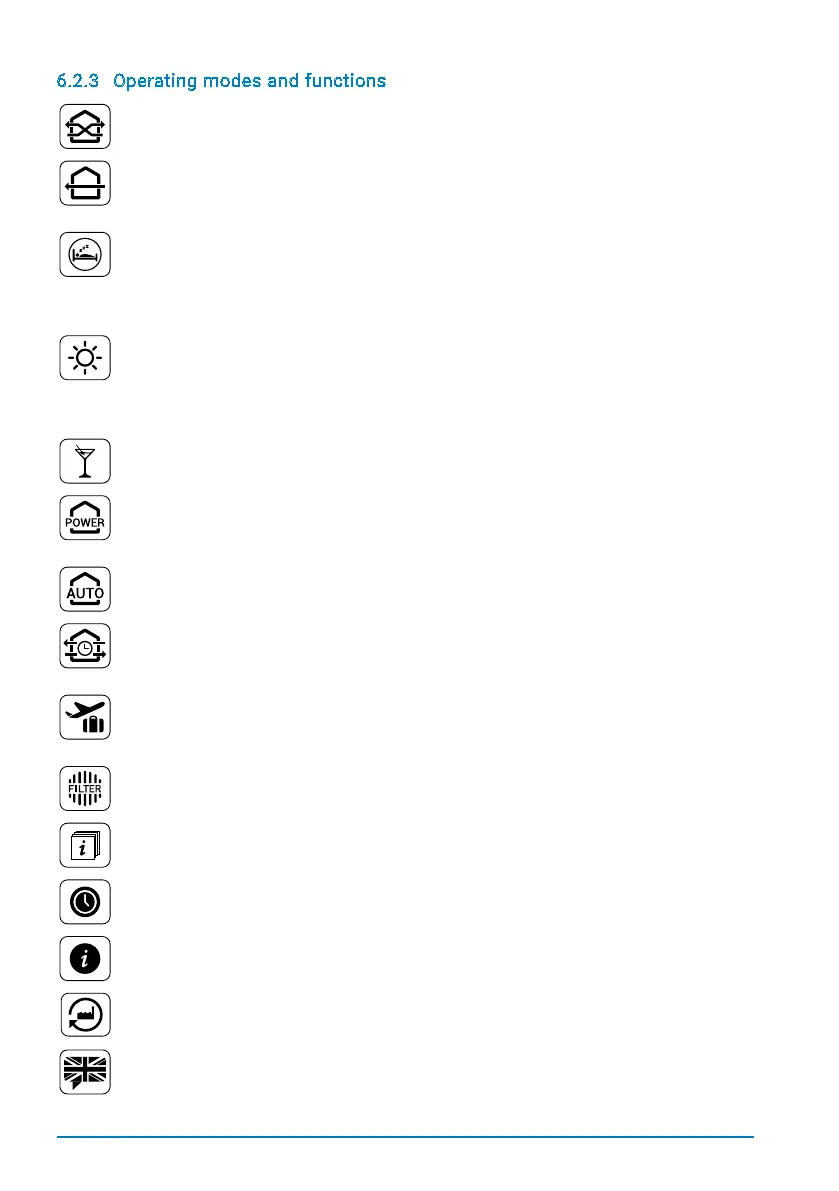
Eco-Mode
Thesystemchangestheairowdirectiononceevery50-70seconds,dependentonthe
selected fan speed, thereby ensuring optimal heat recovery.
Full-blast mode
The system runs in just one direction, allowing a room to be thoroughly ventilated. Heat
recoveryisnotavailableinthismode.Tochangeairowdirection,pressthearrowofthe
large „full-blast mode“ icon on the main menu.
Sleep mode
Thesystemstopsworkingfor1-9hours,givingaroom‘soccupantssufcienttimeto(get
to) sleep.Sleep mode duration can be changed via the large „Sleep mode“ icon on the main
menu. Once the sleep period is over, the system will continue in the previously activated
mode. Should the system have been previously running in Party or Full-blast mode, it will
automatically revert to Eco-Mode with fan speed set to 2.
Summer mode
When operating in summer mode, the eco-mode is active from 7:00 to 21:00, keeping
the cooler air inside the room. From 21:00 to 7:00 the system automatically switches to
full blast mode in order to pump cooler air from outside into the room. By touching the
summer mode icon in the main menu, you can vary the start and end time for the eco
mode by up to 3 hours.
Party mode
In this mode, the room is ventilated at top fan speed, ensuring a maximum of fresh air
when the room is full of people.
Power mode
In power mode, the system runs for at least 15 minutes and up to 5 hours at top fan speed
in heat recovery mode. To adjust the duration, press the „Power mode“ icon on the main
menu.
Automatic mode
Automatic mode is available when a fan unit is equipped with a sensor. Using this mode,
the system automatically adjusts to a room‘s temperature and humidity levels.
Timer mode
Using the timer mode, three time periods (22:00 – 08:00, 08:00 – 16:00 and 16:00 – 22:00)
can be individually programmed for each day of the week, allowing the system to operate
to your needs.
Holiday mode
The system automatically selects fan speed 1 (humidity control), allowing your home to
beoptimallyventilatedwithoutusingmuchenergy.Thisensuressufcientventilationat
times when the rooms are unoccupied.
Filter status
Displaysthecurrentlterstatus.Therearefourlevels:clean,somewhatdirty,verydirty
and clogged up.
Zone information
Shows which rooms are assigned to which zone.
Time set
The system‘s internal clock can be set.
System information
Show‘s the control unit‘s software version, as well as the system‘s ventilation behaviour
in all zones.
Initial settings
Resets the control unit to its initial settings.
Language selection
Changes the system‘s language.


 To Next Page