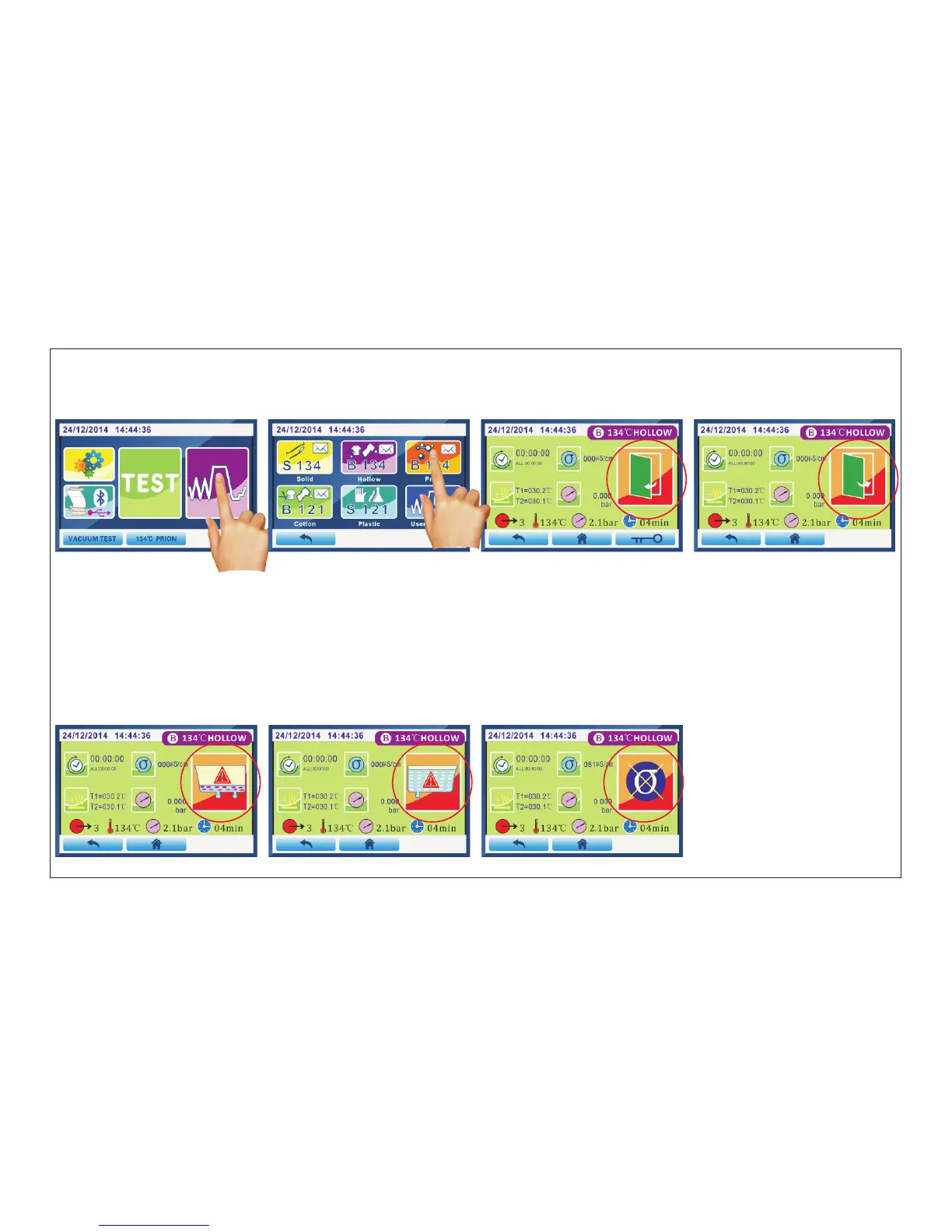
4.3 Warning icon introduction
Press “program ”(Fig.4.3-1),to enter the program interface(Fig.4.3-2).Select the program you want and
enter.
click to
4.3.1 Door status
A)when you turn on the power and the door was closeing,it is show Fig.4.3-3 interface warning.It promps you to
open the the warning will be eliminated.door and close the door again. Then
B)when it shows Fig.4.3-4 interface warning,means that the current sterilizer door is open.Prompts you to close the
door, the warning will eliminated.
4.3.2 water status
A)when it show Fig.4.3-5 interface warning,means that the clean-water tank is lack of water. Prompts you to add distilled
water, the warning will be eliminated.
B)when it show Fig.4.3-6 interface warning,means that the used-water tank is full. Prompts you to drain the waste water,
the warningwill be eliminated.
Page 17 of 58
Fig.4.3-1 Fig.4.3-2 Fig.4.3-3 Fig.4.3-4
Fig.4.3-5 Fig.4.3-6 Fig.4.3-7



 To Next Page