4.4.6.2.Pipeline Cleaning
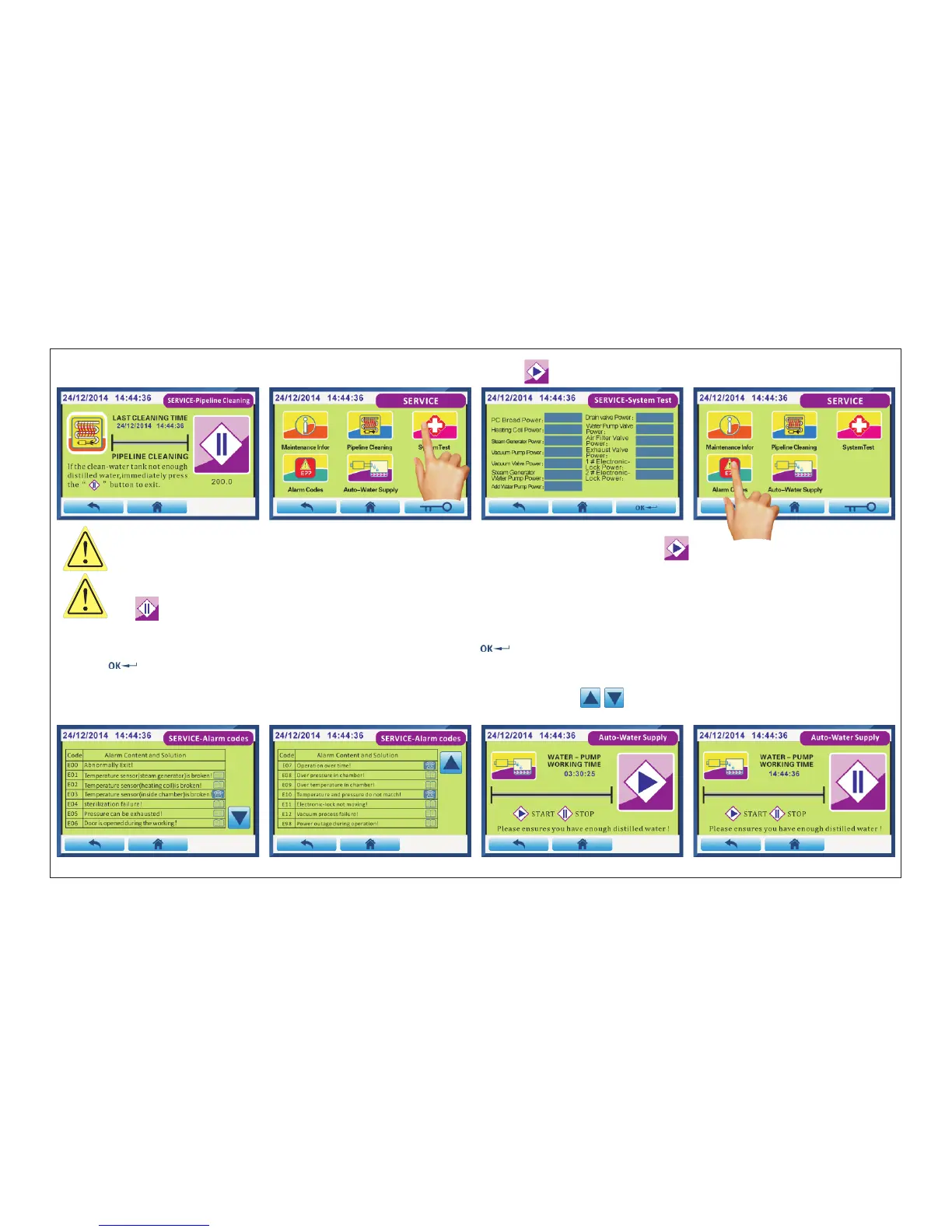
Fig.4.4-25 Fig.4.4-26 Fig.4.4-27 Fig.4.4-28
Click“ Pipeline Cleaning”(Fig.4.4-23) into Fig.4.4-24 interface.Press “ ” buttom will start,into Fig.4.4-25 interface.
WARN:Please after fill with distilled water,closing the door,then press the “ ” button,Start cleaning.
Recommend cleaned once every 3 months.
ATTENTION:Cleaning work will begin only when the steam generator temperature reaches 200℃ below the
“ ” .
4.4.6.3.SystemTest
Click“ System Test”(Fig.4.4-26) into Fig.4.4-27 interface.Press “ ” bottom to start the test.After all the items have been tested,
press “ ” buttom to exit.This function provides maintenance engineer test parts.
4.4.6.4.Alarm Codes
Click“ Alarm Codes”(Fig.4.4-28) into Fig.4.4-29 and Fig.4.4-30 interface.Press “ ” buttom to turn page.
This function is easy to view fault information.
Fig.4.4-29 Fig.4.4-30 Fig.4.4-31 Fig.4.4-32
Page 22 of 58



 To Next Page