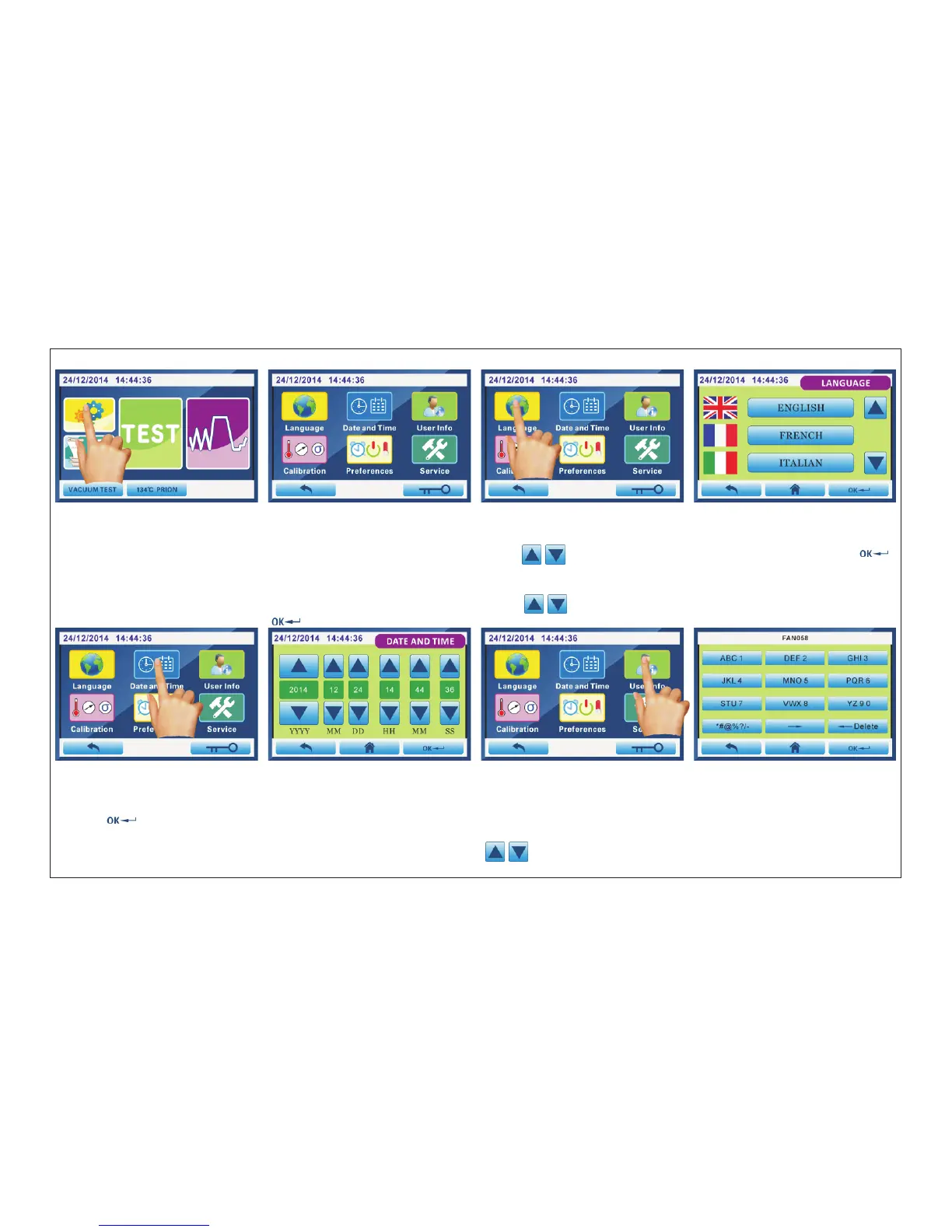
4.4.1.Language:
Fig.4.4-1 Fig.4.4-2 Fig.4.4-3 Fig.4.4-4
Click“SET UP 1”(Fig.4.4-1)into Fig.4.4-2 interface.Select the program you want and click to enter.
Click “LANGUAGE”(Fig.4.4-3) into Fig.4.4-4 interface.click “ ”,Select language you want,then click“ ”
to save and exit.
4.4.2.Date and time
Click “Date and Time”(Fig.4.4-5) into Fig.4.4-6 interface.Click“ ”,change number of “Year,Month,Date,Hour,
Minute,second”,then click “ ”to save and exit.
4.4.3.User information
Click“User info”(Fig.4.4-7) into Fig.4.4-8 interface.Click the corresponding button.After entering the user name,then
click “ ”to save and exit.
4.4.4.Calibration: Temperature/Pressure/Water quality monitoring
Click “Calibration”(Fig.4.4-9) into Fig.4.4-10 interface.Click“ ”to change the number of “T1/T2/Pv/P/σ”.
ATTENTION: That default value only can be adjusted by professional technicians.
Fig.4.4-5 Fig.4.4-6 Fig.4.4-7 Fig.4.4-8
Page 19 of 58



 To Next Page