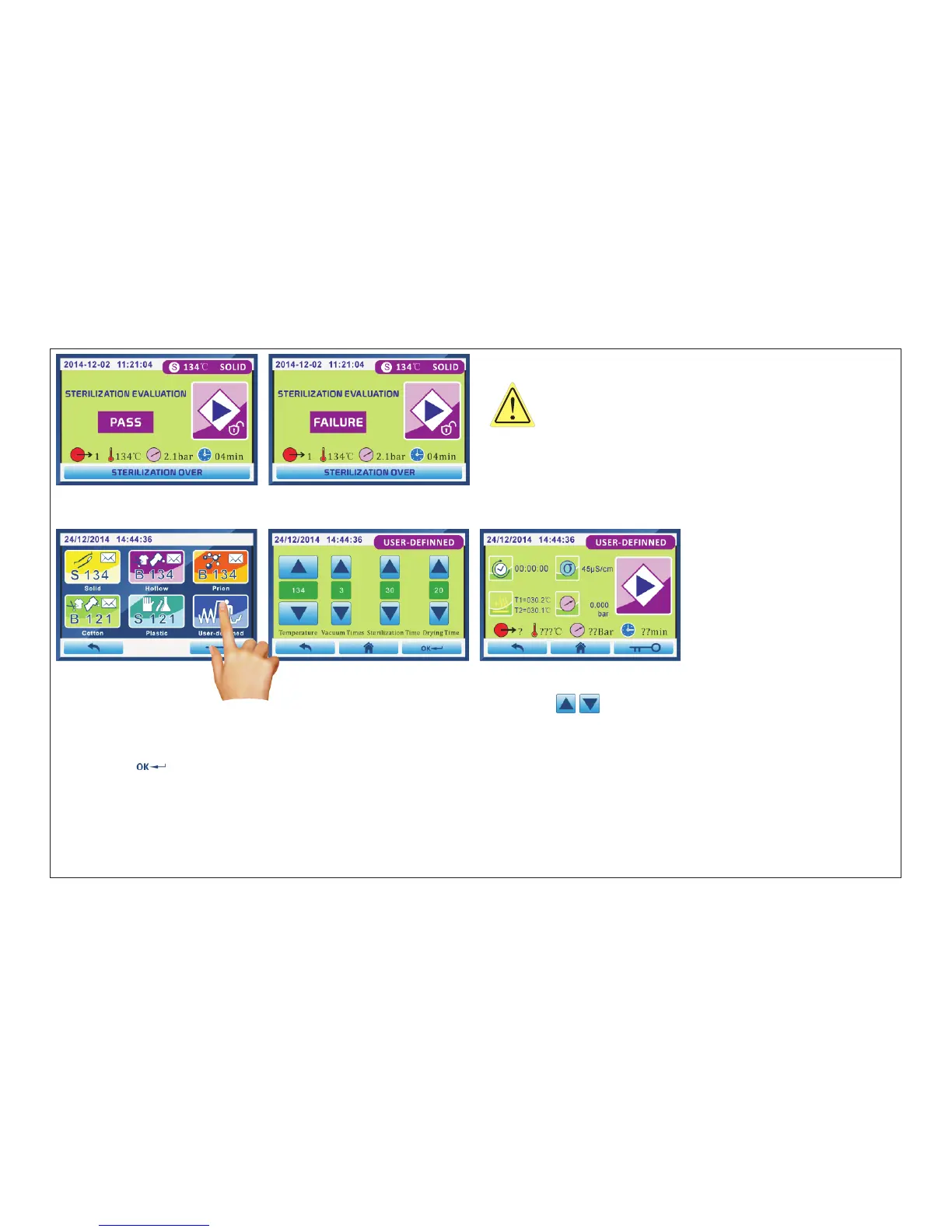
Fig.5.3-31 Fig.5.3-32
5.3.3 USER-DEFINNED PROGRAM
Fig.5.3-33 Fig.5.3-34 Fig.5.3-35
Click “User-definned”(Fig.5.3-33) enter into interface Fig.5.3-34.Press “ ”to change the number of “Temperature/
Vacuum times/Sterilization time/Drying time”.
Temperature range:121℃ or 134℃. Vacuum times range: 1 or 3. Sterilization time range:4~60. Drying time:1~60.
Then click“ ”to save and exit,enter into Fig.5.3-35 interface.Then press “Start”buttom to start.Refer to “chapter
”
5.3.1
or 5.3.2 PRE-VACUUM PROGRAM to check the running state diagram.
WARNNING:
If the result of sterilization is “FAILURE”, medical
instruments of this time can not be used. And it's need to contact
professional engineer to check the machine.
Page 35 of 58



 To Next Page