4.4.5.3.Power Saving
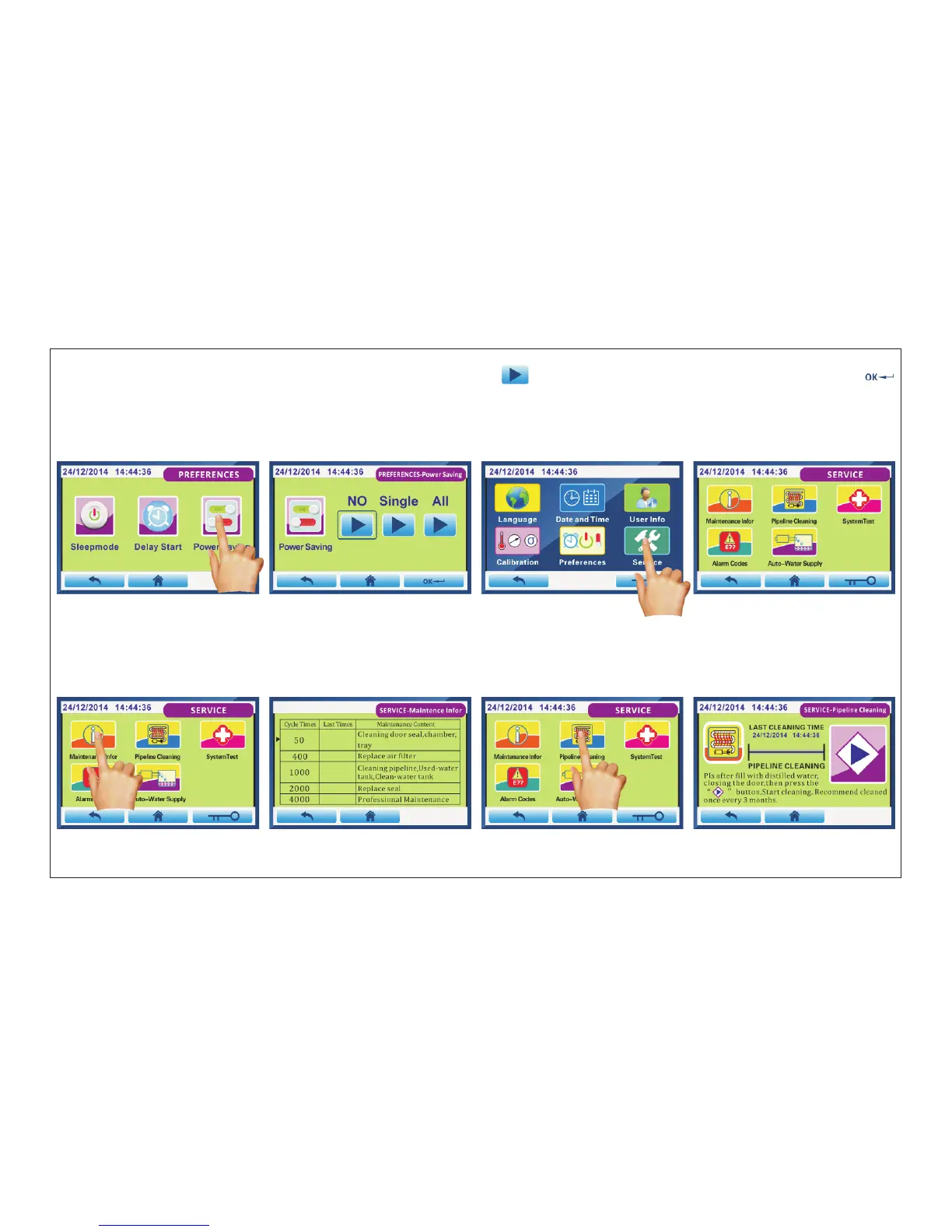
Fig.4.4-17 Fig.4.4-18 Fig.4.4-19 Fig.4.4-20
Click “Power Saving”(Fig.4.4-17) into Fig.4.4-18 interface.Press “ ”to select power saving mode you want,then click“ ”
to save and exit.
“NO”:After each sterilization cycle is completed, the power will not be turn off.
“Single”:The power saving will be activated only for this operation. But not effective for next cycle.
“ALL”:After each sterilization cycle is completed, the power will be turn off.
4.4.6.Service: Maintenance Infor/Pipeline Cleaning/SystemTest/Alarm Codes/ Auto-Water Supply
Click “Service”(Fig.4.4-19) into Fig.4.4-20 interface.
Click“ ”(Fig.4.4-21) into Fig.4.4-22 interface.
When the cycles of sterilization reached the numbers of listed, it was needed to check according the maintenance contents.
4.4.6.1.Maintenance Infor
Maintenance Infor
Fig.4.4-21 Fig.4.4-22 Fig.4.4-23 Fig.4.4-24
Page 21 of 58



 To Next Page