ENGLISH
Bluetooth
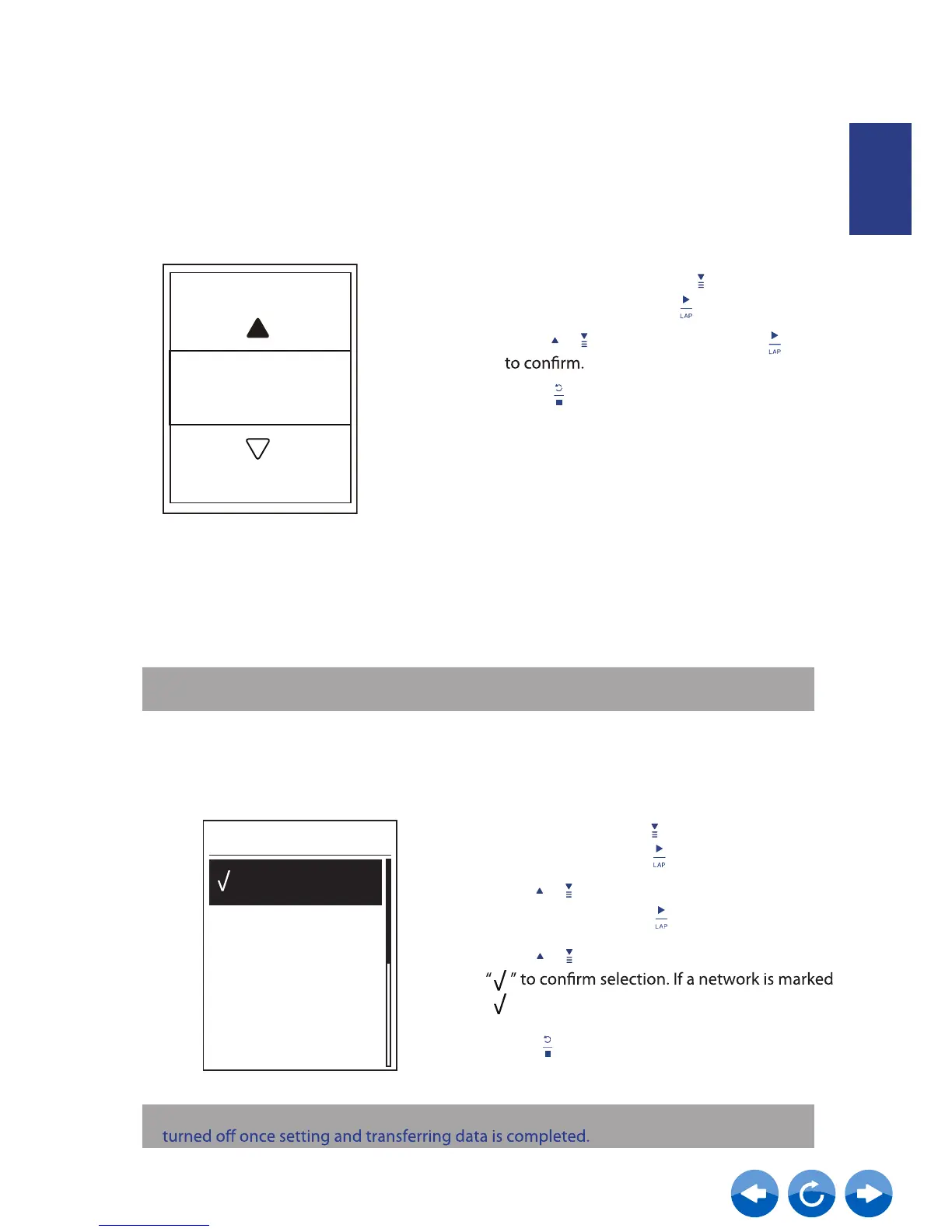
Before pairing Neostrack with your bluetooth enabled mobile phone, make sure the
bluetooth function of your mobile phone and Neostrack is turned on.
Enable Bluetooth
1. In the Setup menu, press to select
Bluetooth and press .
2. Press / to select on and press
3. Press
to exit this menu.
Enable
On
WLAN. With access to the internet
Neostrack supports WLAN. With the access to the internet, the device will automatically sync
data to/from Neostrack App. Once the connection to a network or hotspot is successfully set
up, next time the device will automatically link to the same network or hotspot when
detected. You can also forget a network or hotspot and set up a new one.
Before syncing data, please make sure you have set up a connection to any network
or hotspot.
Connect
Hotspot 1
Hotsport 2
Sweet Home
Connections
1. In Setup menu, press to select Network
>Connect and press .
2. Press
or hotspot and press .
/ to choose one available network
4.
3.
Press
Press to enter password and choose
“ ”, it means this network is successfully set up.
to exit this menu.
/
Note:
Note:
Please refer to page 7 to learn how to sync data via WLAN.
WLAN will be automatically activated during setting and transferring data and



 To Next Page