micro balance Mod. E50S/3
Page 30 of 38
11 Data transfer
For data-transfers to peripheral devices, the balance is equipped with an RS232/V24-interface.
Before the data-transfer, the RS232 interface must be matched with the one in the peripheral device in the
balance configuration menu (see chapter 6.3.7 "Interface functions").
Handshake
The handshake is set to “NO” (none) at the factory. It can be set to software handshake “XON-XOFF”, or
to hardware handshake “HARDWARE”.
Baud rate
Possible baud rates: 300, 600, 1200, 2400, 4800, 9600, 19200 baud.
Parity
Possible parity: 7 even 1 stop, 7 odd 1 stop, 7 No 2 stop, 8 No 1 stop.
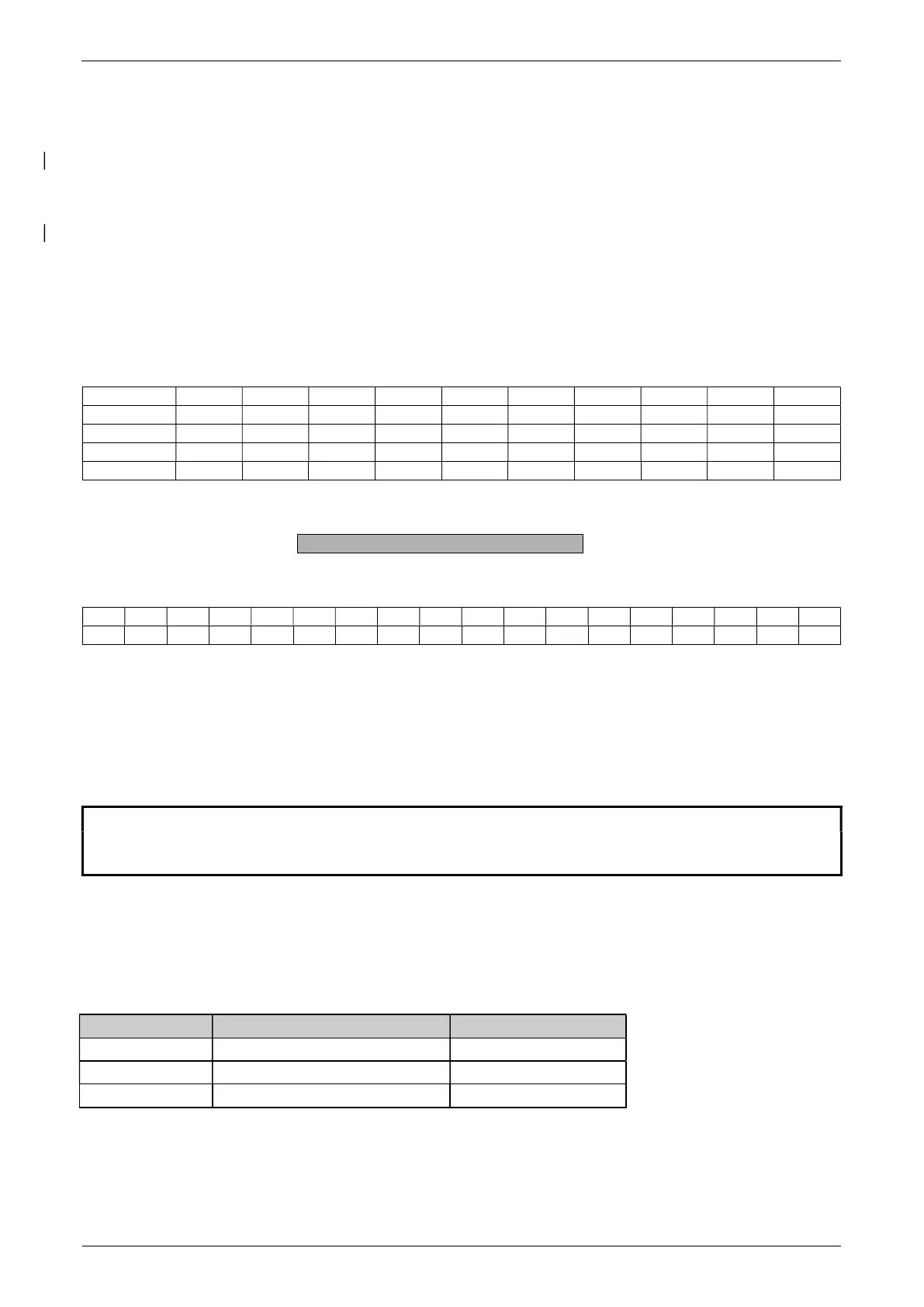
± 12 V SB 1 2 3 4 5 6 7 8 SP
7-even-1 SB 1.DA 2.DA 3.DA 4.DA 5.DA 6.DA 7.DA PB SP
7-odd-1 SB 1.DA 2.DA 3.DA 4.DA 5.DA 6.DA 7.DA PB SP
7-no-2 SB 1.DA 2.DA 3.DA 4.DA 5.DA 6.DA 7.DA 1.SP 2.SP
8-no-1 SB 1.DA 2.DA 3.DA 4.DA 5.DA 6.DA 7.DA 8.DA SP
SB: Start bit PB: Parity bit DA: Data bit SP: Stop bit
Display
S D7 D6 D5 D4 D3 D2 D1 D0 U U U
The data-transfer takes place in ASCII code:
1 2 3 4 5 6 7 8 9 10 11 12 13 14 15 … … …
Blank (space)
Sign (+, ., space)
Decimal point
Digits
Unit (only if the weight is stable, otherwise no unit is send)
Carriage return
Line feed
NOTE
Unused positions are filled with spaces.
The decimal point DP can be between D0 and D7.
11.1 Connection scheme
• Standard duplex connection
Balance DB 9 female D25 / D9 Peripheral device
RS 232 out 2 3 / 2 RS 232 in
RS 232 in 3 2 / 3 RS 232 out
GND
5 7 / 5
GND


 To Next Page