Semi-micro balance Mod. E50S/3
Page 31 of 38
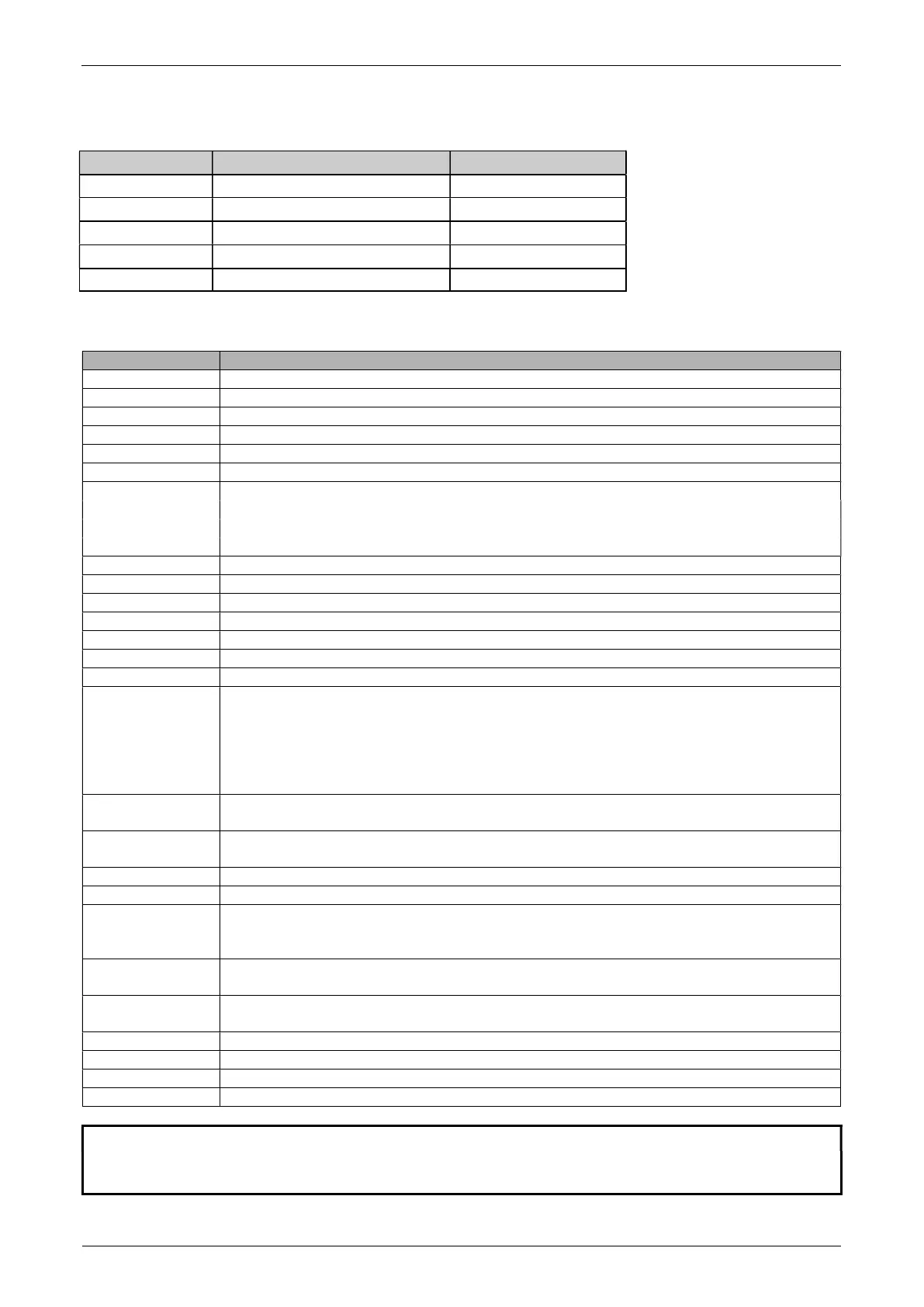
• Standard, duplex connection with additional hardware handshake in the peripheral device
Balance DB 9 female D25 / D9
Peripheral device
RS 232 out 2 3 / 2 RS 232 in
RS 232 in
3 2 / 3
RS 232 out
GND
5 7 / 5
GND
CTS
4 20 / 4
DTR
DTR 8 5 / 8 CTS
11.2 Remote control-commands
ACK Acknowledge n=0 off; n = 1 on
CAL Start calibration
D.......... Describe weight display (right-aligned)
DN Reset weight display
@......... Describe Info display
@N Reset Info display
In Set FLOATINGDISPLAY time
nn=0
t=0.04 s
n=1
t=0.08 s
n=2
t=0.16 s
n=3
t=0.32 s
N Reset balance
OFF Switch off balance
ON Switch on balance
PCxxxx Enter anti-theft code
PDT Print out date and time
PRT Start printing (Press «
» key)
PST Start print status
Pn (ttt.t) Set print mode
n=0 Individually print each value (unstable)
n=1 Individually print each value (stable)
n=2 Print after change of load
n=3 Print after each integration period
n=4 Print on time basis in s (ttt.t)
R%k Set current weight=100%
with k=0...7 decimal places (k=A: use automatic positioning of decimal point)
REF%k rrr Set reference weight rrr for 100%
with k=0...7 decimal places (k=A: use automatic positioning of decimal point)
Rnnn Set current weight=nnn items
REFrrr Set reference weight rrr for 1 item
Sn Set stability n n=0 low
n=1 medium
n=2 high
SDTttmmjj
hhmmss
Set date and time (German) (Tag, Monat, Jahr, Stunde, Minute, Sekunde)
SDTmmddyy
hhmmss
Set Date and Time (English) (Month, Day, Year, Hour, Minutes, Seconds)
T (ttt) Tare or set tare to a specific value
Uxnn Set unit x (1...4) of the balance with nn (0=g, 1=mg, 2=kg, ...)
UxS Switch balance to unit x (1...4)
ZERO Zero balance (provided weight is stable and within the zero position range)
NOTE
Each remote control-command must terminate with «CR» «LF».
The commands are acknowledged if required.


 To Next Page