75
Defining handset settings
Gigaset SL400-SL400A / EN for IM-Nord / A31008-M2103-R201-3-SM19 / registr_sett.fm / 01.02.2011
Version 4, 16.09.2005
Deactivating the ringtone
permanently
* Press and hold the star key.
The
ó
icon appears in the display.
Reactivating the ringtone
* Press and hold the star key.
Deactivating the ringtone/silent alert
for the current call
§Silence§ Press the display key.
Activating/deactivating the alert
tone
In place of the ringtone, you can activate an
alert tone. When you receive a call, you will
hear a short tone ("Beep") instead of the
ringtone.
* Press and hold the star key and
within 3 seconds:
§Beep§ Press the display key. A call will
now be signalled by one short
alert tone.
ñ
appears in the display.
Using the Resource Directory
The resource directory on the handset man-
ages sounds, which you can use as ring-
tones, and pictures, which you can use as
caller pictures or as screensavers. Prerequi-
site: Calling Line Identification Presentation
(CLIP). The resource directory can manage
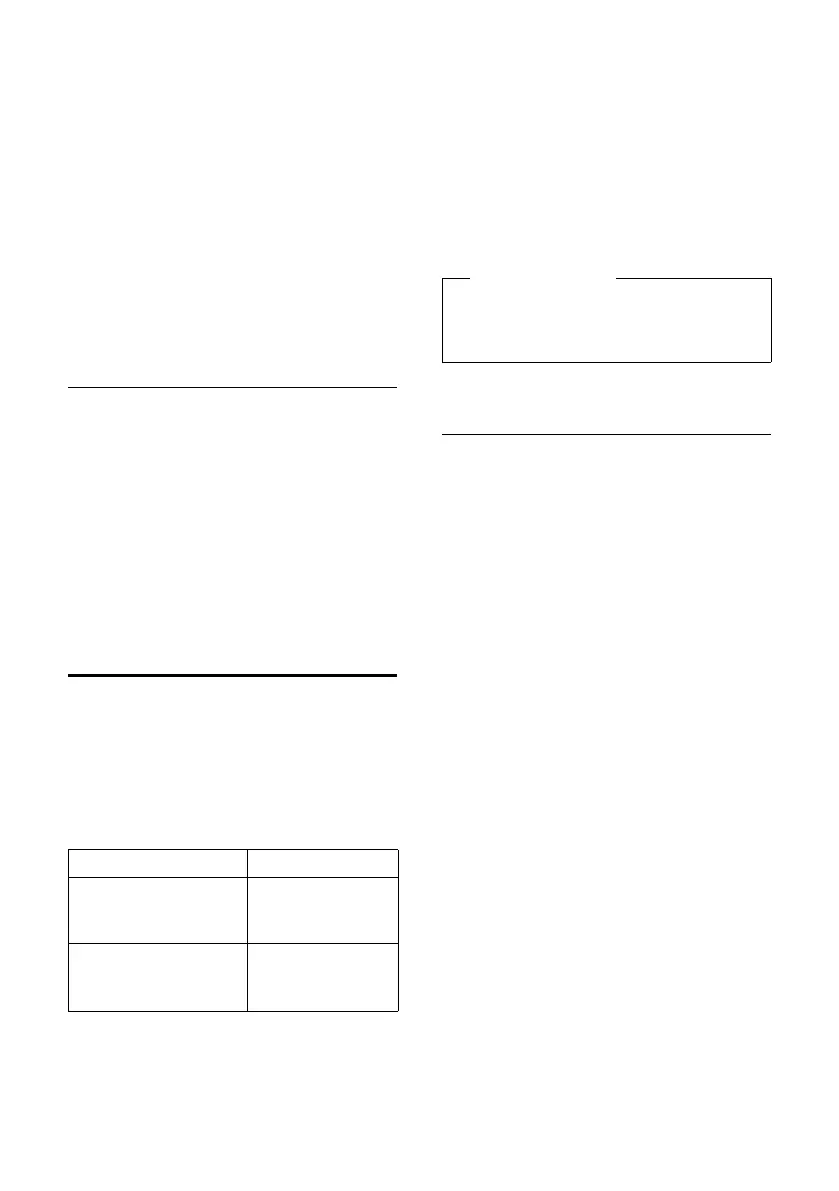
the following media types:
Various mono and polyphonic sounds and
pictures are preconfigured on your handset.
You can listen to the available sounds and
view the pictures.
You can download pictures and sounds from
a PC (
¢ page 87). If there is not enough
memory available, you must first delete one
or more pictures or sounds.
Playing back sounds/viewing caller
pictures
v ¢ É ¢ Resource Directory
¢ Screensavers / Caller Pictures /
Sounds (select entry)
Pictures:
§View§ Press the display key. The
selected picture is displayed.
Switch between pictures using
the q key.
If you have saved a picture in an invalid file
format, you will see an error message after
selecting the entry.
Sounds:
The selected sound is played back immedi-
ately. Switch between the sounds using the
q key.
You can set the volume during playback.
§Options§ Open menu.
Volume Select and press §OK§.
r Set volume.
§Save§ Press the display key.
Type Format
Sound
– Ringtones
– Imported sounds
Internal
WMA, MP3, WAV
Picture
– Caller picture
– Screensaver
BMP, JPG, GIF
128 x 86 pixels
128 x 160 pixels
Please note
The memory for screensavers, sounds
and caller pictures is separated from the
memory for the directory.



 To Next Page