Repair
332144E 45
Motor Control
Power Bootup Check
NOTE: Power must be on to check. See FIG. 11 or loca-
tion. Function is:
• Motor ready: LED on.
• Motor not ready: LED off.
• Status code (motor not running): LED blinks status
code.
• Multiple status codes are separated by a longer
LED off duration.
Control Board LEDs
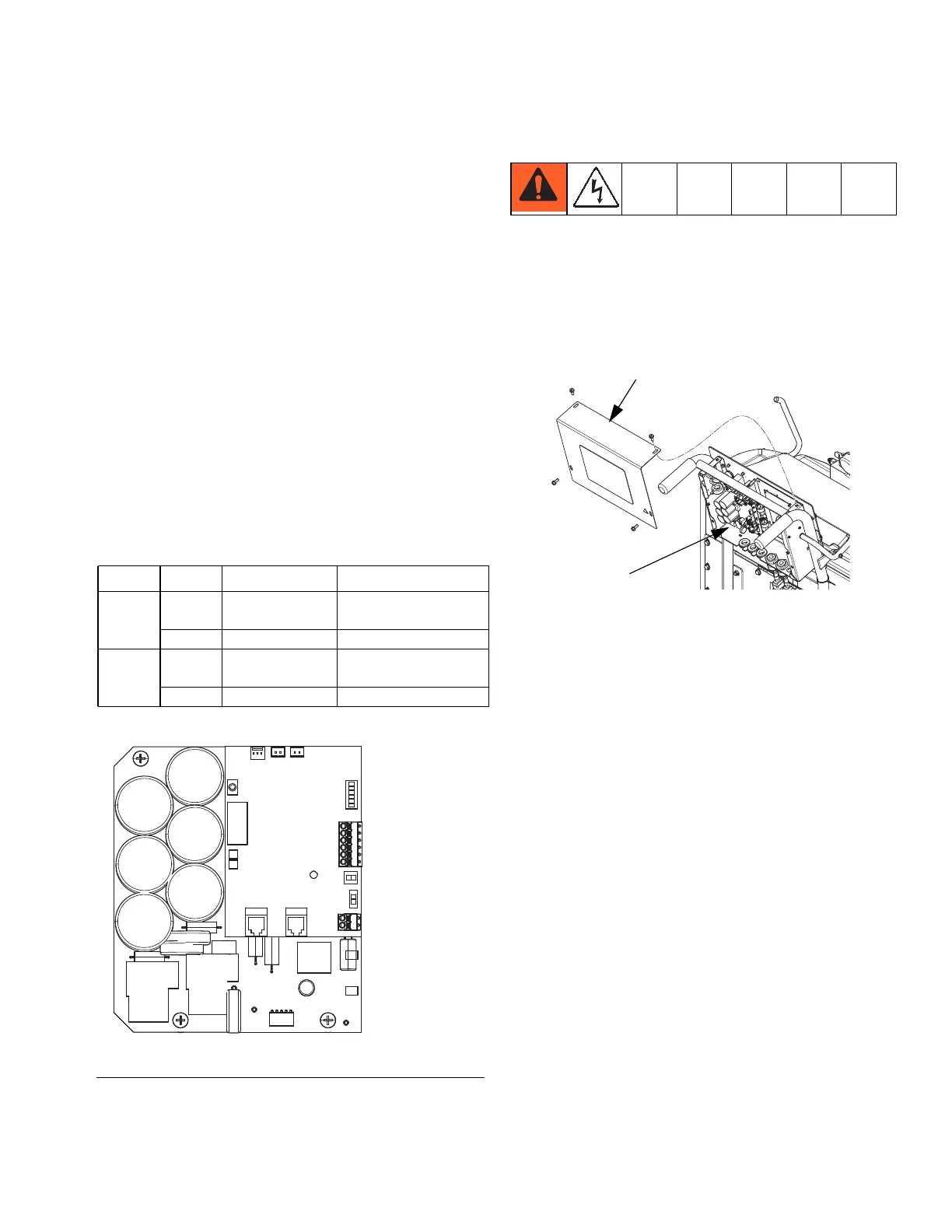
If LEDs on bottom board are on and the top board LEDs
are off, the following may have occurred:
• A pressure transducer shorted out.
• A short occurred between the power and ground pin
of the potentiometer.
Replace Control Board
NOTE: Check motor before replacing board. See Test
Motor, page 54.
1. See Before Beginning Repair, page 40.
2. Remove access cover (26) on back of cart to
expose control board (354).
3. Disconnect all cables and connectors from board
(354). See Table 8, page 46.
4. Remove six nuts (363) and remove board from con-
trol board (354). See FIG. 10, page 44.
5. Install new board in reverse order.
Board LED State Description
Top R4 Red: on Hardware or software
failure
G1 Green: on Power on
Bottom D4 Red: on Hardware or software
failure
D16 Green: on Power on
FIG.11
J1
J6
J9
J8
J10
J11
J12
J5
J4
J3
J2
J98
R4
D16
D4
G1
(under C52)
(bottom side
of board)
ti21923a
26
354



 To Next Page