41
In Public Safety, the sub bands are defined as follows:
0: 33.420-46.5 MHz VHF Low Band
1: 151.820-170.150 MHz VHF High Band
2: 453.0375-467.7125 MHz UHF Band
3: 764.003125-766.996875 MHz 700 MHz Band
769.003125-775.996875 MHz
794.003125-796.996875 MHz
4: 806.0125-868.9875 MHz 800 MHz Band
Sub bands can be selected and deselected by using the
34
keys to scroll
through the sub bands, and pressing the SEL key to toggle the selected sub
band on or off. An asterisk character (*) indicates that the sub band is en-
abled.
Be sure to provide a name for your SWPR object in the
Tag:
field. When
finished, press the
Save
softkey to store your SWPR search as a new ob-
ject.
Once your SWPR object is saved, you can use it while scanning, or launch
the Spectrum Sweeper object by itself by pressing the
SWPR
softkey after
navigating to the SWPR object in Manual Mode.
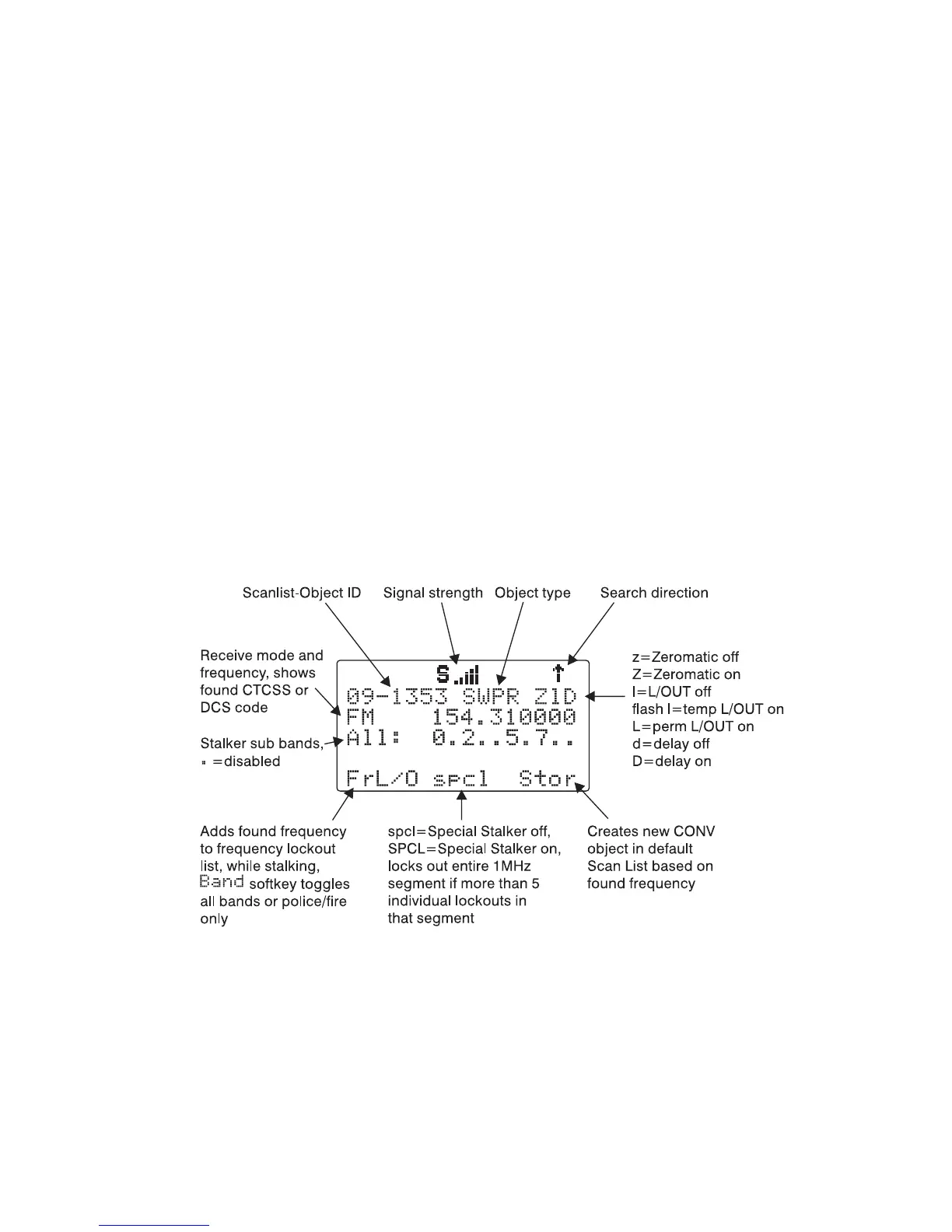
When the SWPR object stops on an active frequency, the display will appear
as follows:
Service Search Object (SRVC)
A Service Search Object (SRVC) is similar to a LMIT search but is optimized
for a specific radio service, and can search for activity associated with a type
of service across multiple frequency bands.



 To Next Page