68
Using dedicated Limit and Service search modes
The SRCH key provides immediate access to the dedicated search modes
of your PSR-410. Pressing the SRCH key cycles through each search mode
in this order: Limit, Railroad, Public Safety, Aircraft, Ham, CB, Marine, and
FRS/GMRS/MURS/DOT.
LMIT Search Mode
Your scanner's dedicated LMIT search mode provides you with the ability
to create a limit search with a search frequency range between upper and
lower limit frequencies that you specify and perform the limit search directly
without creating a new LMIT object. You can then monitor that frequency
range for transmissions.
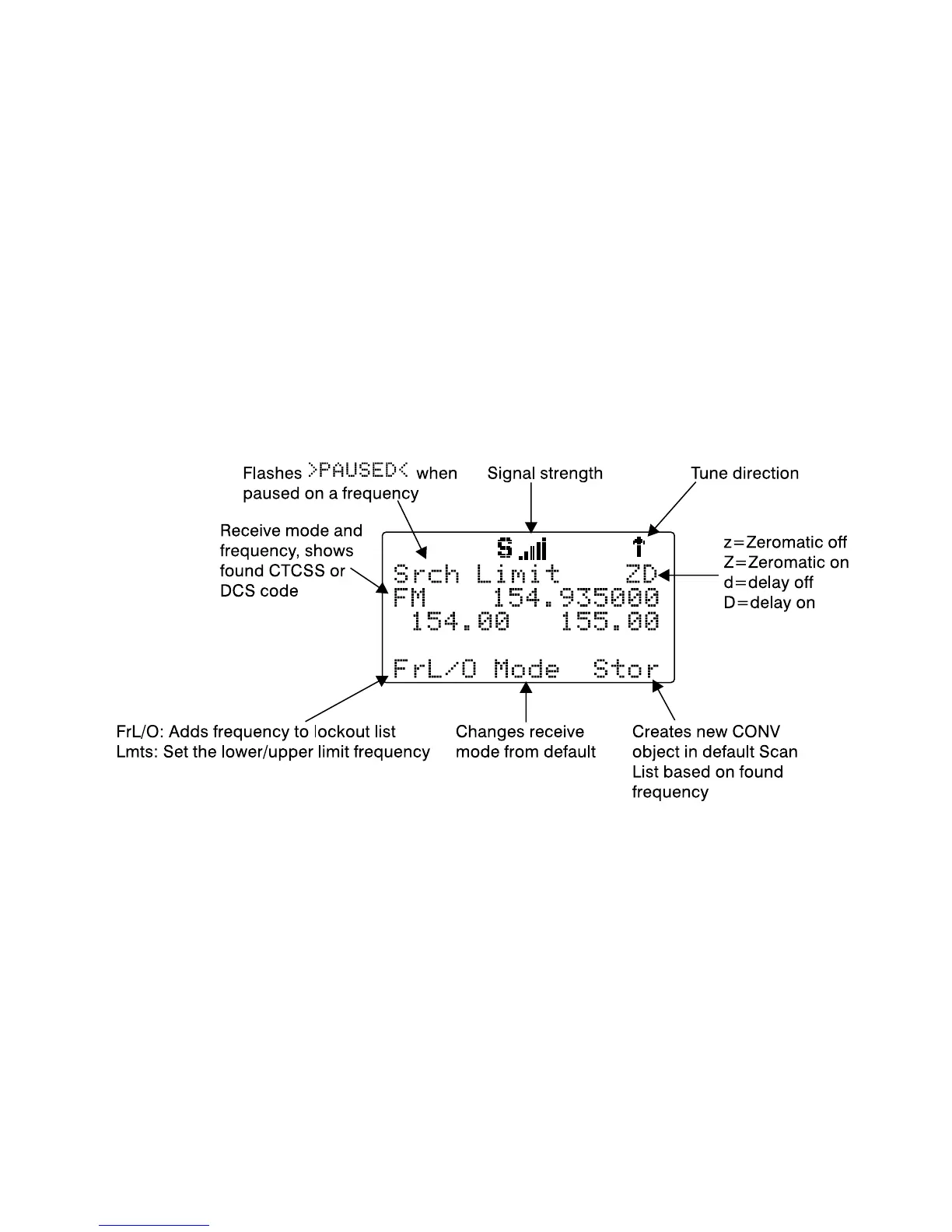
To enter LMIT mode, press the SRCH key on the keypad repeatedly until
the display indicates LMIT search as follows:
Use the
Lmts
softkey to set the lower and upper frequency limits for your
limit search.
NOTE: When a signal is being received, the
Lmts
softkey (F1) changes
to
FrL/O
. You can access the
Lmts
softkey by pressing FUNC F1 when
the F1 key function is
FrL/O
.
Press the
5
or
6
keys on the 5-way pushbutton pad to change the search
direction.
Press the
MODE
softkey to change the receive mode (AM, FM, NFM) from
the default for the current frequency range (au).
Press the
FrL/O
softkey to add a found frequency to the lockout list.



 To Next Page