Greenlee Textron / Subsidiary of Textron Inc.
33
4455 Boeing Dr., Rockford, IL 61109-2988 815/397-7070
855 Smart Bender™
Rotary Selector Switches
CONDUIT SIZE
CONDUIT TYPE
DECAL NO. 500 8896.7
1/2
3/4
1
1-1/4
1-1/2
2
D
EC
A
L N
O
. 500 1
487
.0
R
IG
ID
A
LU
M
P
VC
IM
C
EM
T
Use lifting eyes for hoisting
L
ift o
nly w
ith
b
end
ing
he
ad
in
a ho
rizo
nta
l pos
itio
n
w
ith th
e 1
-1/2" an
d
2" s
ide up
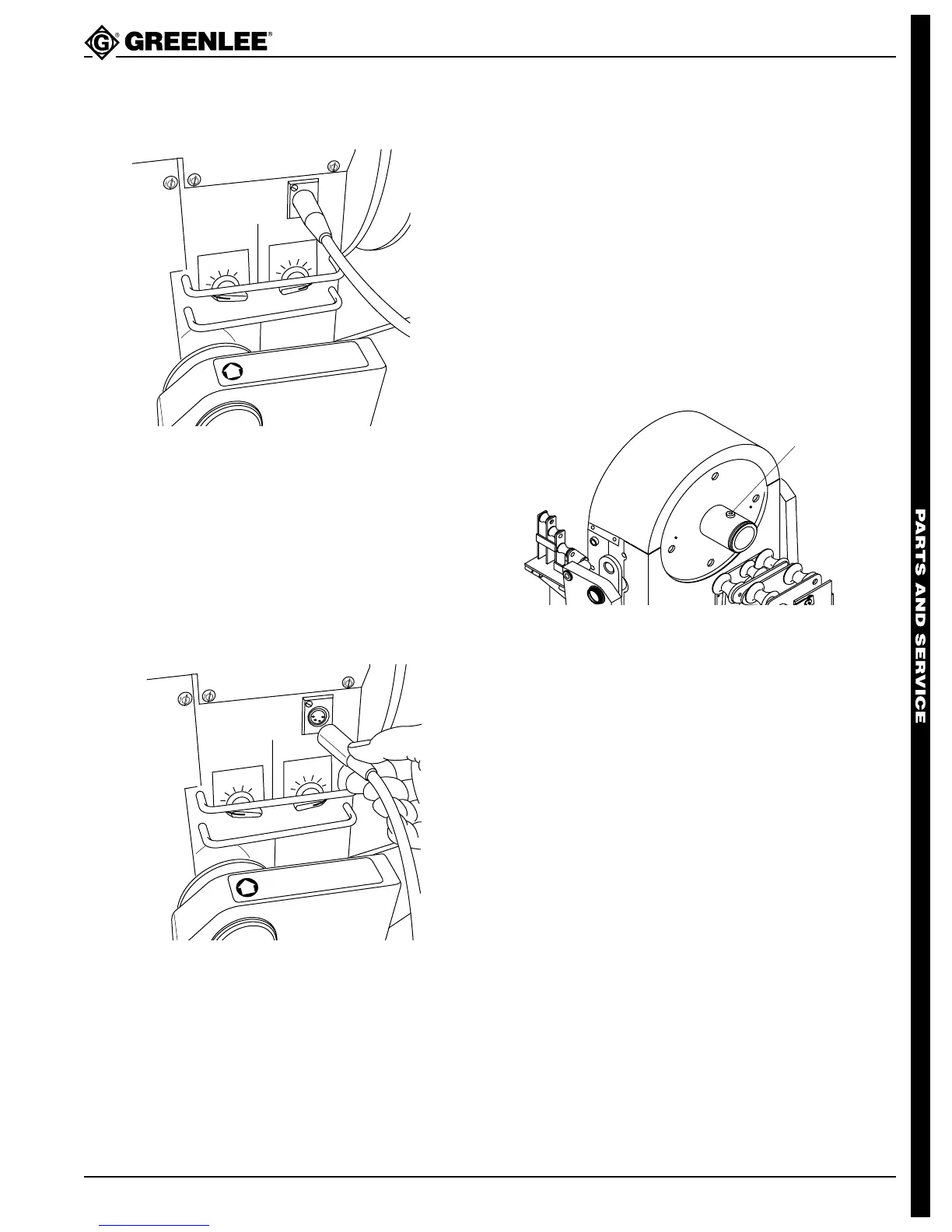
1. Remove four screws securing top round cover and
remove cover.
2. Unplug selector switch unit (22).
3. Loosen set screws and remove knobs.
4. Remove two hex nuts.
5. Pull out selector switch unit.
6. Reassemble in reverse order, noting that flats on
shafts go to the bottom.
Pendant Receptacle
C
O
N
D
U
IT
T
Y
P
E
D
E
C
A
L
N
O
. 5
0
0
1
4
8
7
.0
R
IG
ID
A
L
U
M
P
V
C
IM
C
E
M
T
C
O
N
D
U
IT
S
IZ
E
DECAL NO. 500 8896.7
1
/2
3
/4
1
1
-1
/4
1
-
1
/2
2
U
se lifting eyes for hoisting
Lift only with bending head in a horizontal position
with the 1-1/2" and 2" side up
1. Remove four screws securing top round cover and
remove cover.
2. Unplug receptacle unit (4).
3. Remove two screws securing receptacle and
remove receptacle.
4. Reassemble in reverse order.
Bender Head Disassembly (cont’d)
SHOES
Removing and Installing Shoes
1. Disconnect power to unit.
2. Remove the retaining ring securing the shoe to be
removed with retaining ring pliers.
3. Use both hands to hold onto both sides of the shoe
and pull it off the spindle.
4. Assemble in reverse order, noting the following:
Align the slot in the shoe bore with the screw head
on the spindle.
Align the slot in
the shoe bore with
the screw head
on the spindle.



 To Next Page