Model T33903/T33904 (Mfd. Since 07/23)
-45-
To replace LED:
1.
DISCONNECT MACHINE FROM POWER!
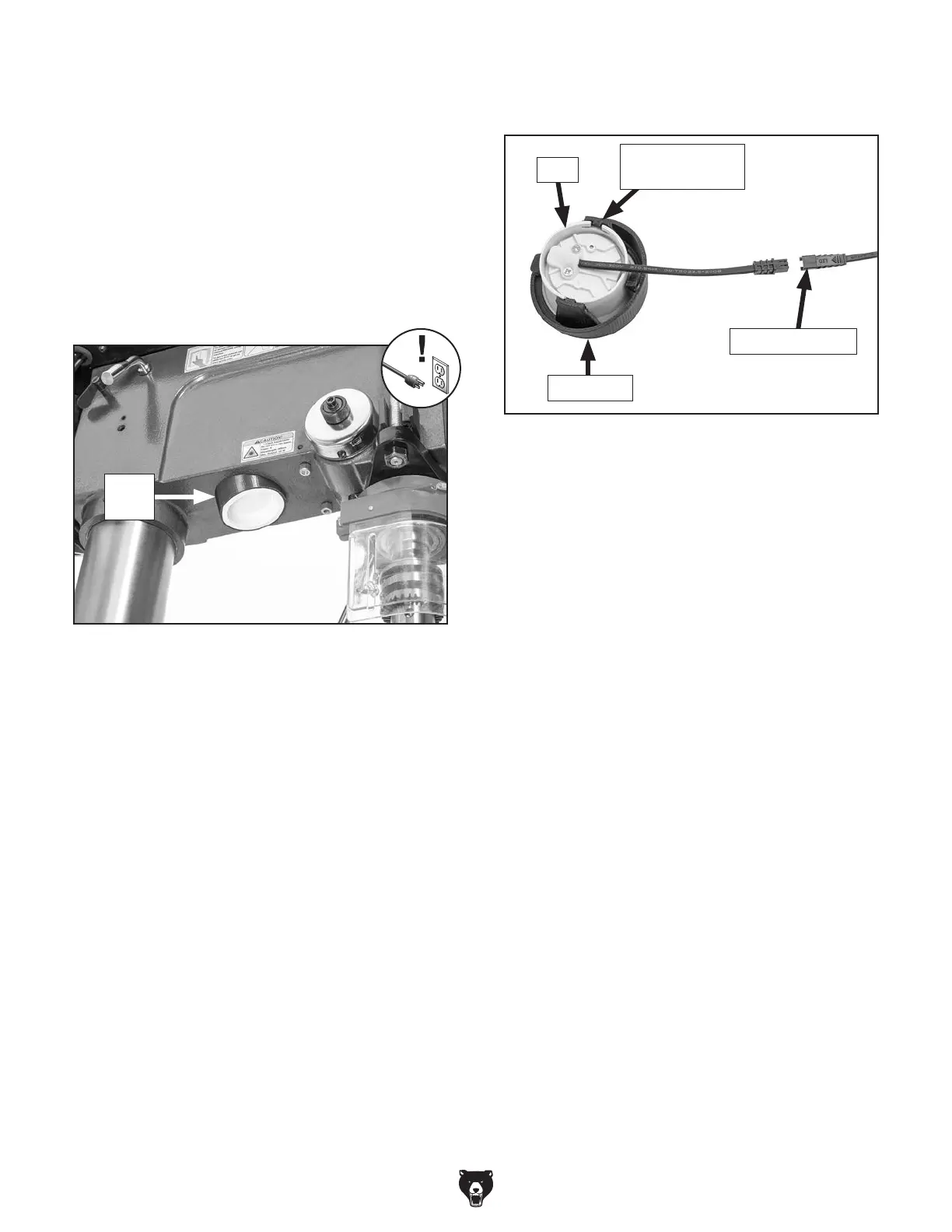
2. Turn light seat counterclockwise to release
seat and pull it down through headstock hole
(see Figure 64).
Figure 64. Location of light seat.
Light
Seat
3. Move light seat tabs away from LED to
remove LED from light seat (see Figure 65).
Replacing LED
Items Needed Qty
Replacement LED (#PT33904106-1) ................. 1
Electrical Tape or Cable Ties
............ As Needed
5
. Install new LED in light seat.
6. Bind any stray laser module or LED wires and
cords together with electrical tape or cable
ties to keep electrical components from being
caught in moving headstock parts.
7
. Feed laser module and LED wires and cords
back into headstock, install light seat in head-
stock, then turn clockwise to secure.
Figure 65. LED disconnect components.
Light Seat
LED
Light Seat Tab
(1 of 2)
Wire Connector
4. Disconnect LED from wire connector shown
in Figure 65 and replace with new LED.


 To Next Page