EasyManua.ls Logo

Hach CL17 - User Manual

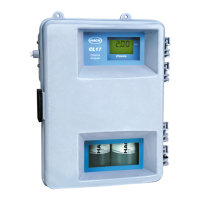
Hach CL17
74 pages
Print Icon
To Next Page IconTo Next Page
Loading...
Catalog Number 54400-18
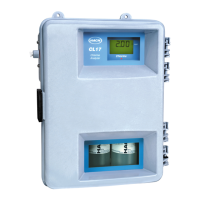
CL17 CHLORINE ANALYZER
INSTRUMENT MANUAL
06/04 4ed

Table of Contents

Questions and Answers

  • S
    Samantha HawkinsSep 2, 2025
    What to do if the display doesn't light but the pump motor operates on my Hach CL17 Measuring Instruments?
    • T
      tparkerSep 2, 2025
      If the display does not light but the pump motor is running on your Hach Measuring Instruments, the problem might be with the power supply. In this case, replace the main circuit board.
  • K
    Keith GrayAug 31, 2025
    What to do if the display lights but the pump motor doesn't operate on my Hach CL17 Measuring Instruments?
    • J
      jeremy97Aug 31, 2025
      If your Hach Measuring Instruments has the display on, but the pump motor isn't running, it could be due to several reasons: low operating power (verify the line voltage is within specifications), an incorrect line voltage selector switch setting (check the switch position), a motor cable that's not connected to the circuit board (check the connection), or a defective motor (replace the motor).
  • Z
    zflemingAug 29, 2025
    Why am I getting a zero reading on my Hach Measuring Instruments?
    • K
      Kimberly VillanuevaAug 30, 2025
      If you're getting a zero reading on your Hach Measuring Instruments, it could be due to several reasons. Make sure there is a stir bar inside the colorimeter. Ensure the pinch plate thumb screws are fully tightened. Check the sample conditioning and supply lines to ensure the sample is flowing to the instrument. Also, verify that there is only one stir bar inside the colorimeter; remove any excess stir bars.
  • A
    asmithAug 28, 2025
    What to do if my Hach CL17 Measuring Instruments displays an 'SCR Error'?
    • N
      Nicholas HernandezAug 28, 2025
      If your Hach Measuring Instruments is showing a 'SCR Error', it means that the cycle motor does not turn off at the appropriate time, resulting in a short total cycle time. Press the EXIT key to restart the instrument. If the problem happens again, replace the main circuit board.
  • B
    Brian CarrollAug 27, 2025
    What to do if my Hach CL17 Measuring Instruments shows a 'Motor Failure'?
    • A
      April AdamsAug 27, 2025
      If your Hach Measuring Instruments displays a 'Motor Failure' error, it means the pump motor's home position flag was not detected. First, restart the instrument by pressing the EXIT key. If the problem continues, and the motor isn't turning, check that the motor is plugged into the main circuit board, then try replacing the motor or the main circuit board. If the motor runs but the motor coupler is turning, check that the optical switch is properly plugged into the main circuit board and correctly located in the chassis, then try replacing the optical switch or the main circuit board.
  • J
    James PerezAug 25, 2025
    What to do if my Hach Measuring Instruments shows an 'A2D Error'?
    • P
      pearsonbobbyAug 25, 2025
      If your Hach Measuring Instruments displays an 'A2D Error', it indicates the colorimeter is reading zero light throughput. Press the EXIT key to restart the instrument. If the problem persists, inspect the connector pins between the instrument and the colorimeter, straighten them if necessary, and reinstall the colorimeter. If the issue remains, replace the colorimeter.
  • A
    Amber LaneAug 22, 2025
    What to do if my Hach CL17 displays an 'EE Error'?
    • K
      Kathleen HoltAug 22, 2025
      If your Hach Measuring Instruments shows an 'EE Error', it means the device is unable to write to the EE ROM. Try pressing the EXIT key to restart the instrument. If the problem continues, the main circuit board may need replacement.

Summary

Specifications

Section 1 Installation

1.1 Unpacking the Instrument

Inspect analyzer, check kits, report damage.

1.2 Instrument Environmental Considerations

Enclosure rating, temperature range, and resistance.

1.3 Mounting the Instrument on the Wall

Wall mounting process and clearance for connections.

1.6 Sample Conditioning

1.6.1 Assembling the Sample Conditioning Kit

Tips for kit assembly and tubing preparation.

1.6.2 Using the Sample Conditioning Kit

Adjusting valves and observing bypass flow.

1.8 Electrical Connections

1.8.1 Power Connections

Making power connections at the terminal strip and conduit requirements.

1.8.2 Wiring the Instrument

Connecting wires to the power terminal and wire color codes.

1.8.3 Voltage Selection for Alternate Voltage Operation

Setting the voltage selector switch for 115V or 230V operation.

1.8.4 Alarm Connections

Connecting alarm relays, limits, and power removal methods.

1.8.5 Recorder Output Connections

Making recorder output connections with shielded cable and wire preparation.

Section 2 OPERATION

2.1 Keypad and Display Information

Explains keypad and display functions, listing keys and their descriptions.

2.3 Installing the Reagents

Details reagent requirements and installation steps.

2.7 Instrument Menu Structure

Overviews major menus and how to access them.

Section 4 Troubleshooting

4.1 Troubleshooting Guide

Guide to isolate instrument problems by symptom and cause.

Hach CL17 Specifications

General IconGeneral
Power Requirements100-240 V AC, 50/60 Hz
Outlet PressureAtmospheric
Measurement MethodColorimetric DPD method
Sample Interval2.5 minutes
Operating Temperature5 - 40 °C (41 - 104 °F)
ParameterFree or Total Chlorine
Operating Humidity5 - 95% non-condensing
Sample Temperature0 to 40°C (32 to 104°F)
Sample Flow Rate200 to 500 mL/min
Power ConsumptionApproximately 50 W
Output4-20 mA, RS-232
RelaysTwo relays
EnclosureNEMA 4X
Resolution0.01 mg/L
Accuracy±5% or ±0.03 mg/L (whichever is greater)

Related product manuals