EasyManua.ls Logo

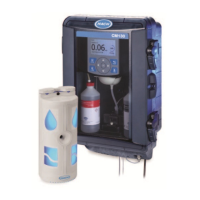
Hach CM130 - User Manual

Hach CM130
112 pages
Print Icon
To Next Page IconTo Next Page
Loading...
DOC023.53.80540
CM130
11/2018, Edition 5
User Manual

Table of Contents

Questions and Answers

  • K
    Kevin HowardAug 13, 2025
    How to fix 'Ethernet disconnected' error on Hach Measuring Instruments?
    • S
      Sonya SmithAug 13, 2025
      If you see an 'Ethernet disconnected' error, it means the analyzer isn't connected to the network or there's a network issue. First, ensure the Ethernet cable is securely connected. Then, shut down the analyzer by going to Menu > Power > Shut down, and disconnect the power cord. Reconnect the Ethernet cable, making sure you hear a click. If connecting to a network isn't needed, link the analyzer to a powered network switch to clear the alert. Note that the error message will remain until the next measurement is done (up to 5 minutes).
  • C
    Cynthia KimAug 16, 2025
    What to do if there is insufficient sample flow in Hach CM130 Measuring Instruments?
    • S
      Sandra LewisAug 17, 2025
      If you're getting an 'Insufficient sample flow' error, it indicates the sample flow rate is too low. Make sure the sample source valve and the shut-off valve for the analyzer are fully open. Also, ensure the sample line is properly connected to the sample source. Adjust the sample pressure to meet the instrument's requirements. If the sample pressure is correct, verify the sample filter is correctly installed. If the issue persists, consider replacing the sample conditioning module.
  • W
    Wendy BergerAug 21, 2025
    What to do if chlorine is above the measurement range in Hach CM130?
    • J
      Joseph MorrisAug 21, 2025
      If the chlorine level is above 0.20 mg/L (ppm), consult your clinic's operating procedures. If this occurs after monthly maintenance, add 200 mL (or more) of RO (reverse osmosis) water through the sample funnel. Flush the colorimeter three times to remove any chlorine added during disinfection by selecting Menu > Maintenance > Flush Colorimeter. Be aware that other substances can interfere with chlorine measurements, so determine if any are present in the sample water.
  • B
    Brian EllisAug 25, 2025
    How to resolve 'Bubbles detected!' alarm on Hach CM130?
    • M
      michaelbrownAug 25, 2025
      If you're seeing a 'Bubbles detected!' alarm, it means there are bubbles or turbidity in the sample. Try decreasing the sample water temperature, if possible. Make sure that the sample water is not turbid and that no light source is pointed at the colorimeter. If the alarm continues, biological growth may be present in the colorimeter, so perform all steps of the monthly maintenance. If the problem persists after monthly maintenance, do periodic maintenance to replace the colorimeter. It is possible that the analyzer is exposed to a combination of air bubbles and chlorine below the limit of detection.
  • R
    Robert AlexanderAug 28, 2025
    What does 'Condensation detected!' mean on Hach CM130, and how to fix it?
    • R
      Renee KimAug 28, 2025
      A 'Condensation detected!' message indicates condensation on the colorimeter's optical surfaces. Ensure the temperature and humidity in the room are within the specified limits. If the issue isn't constant, return the analyzer to measurement mode. If it's continuous, perform periodic maintenance.
  • P
    Patrick DanielsSep 1, 2025
    What to do if the remote indicator is not detected by Hach Measuring Instruments?
    • A
      Alexis BoltonSep 1, 2025
      If the remote indicator is not detected, first, verify that the remote indicator cable is properly connected to both the analyzer and the remote indicator. If the problem persists, try replacing the remote indicator. If the issue remains after replacing the remote indicator, it may be necessary to replace the analyzer. Contact technical support.
  • L
    Lori ManningSep 4, 2025
    Why does my Hach CM130 Measuring Instruments say 'Monthly maintenance required!'?
    • T
      Tony PerezSep 4, 2025
      The 'Monthly maintenance required!' message appears when the reagent level is at 0% or the reagent has been installed for more than 35 days. Perform the monthly maintenance.
  • N
    Nicholas SalinasSep 8, 2025
    Why is my Hach Measuring Instruments remote indicator beeping continuously?
    • L
      Lisa LyonsSep 8, 2025
      A continuous sound from the remote indicator means that the battery life is low. Replace the battery.

Summary

Specifications

Measurement Specifications

Technical details related to the analyzer's measurement capabilities and performance.

General Information and Safety

Safety Information

Crucial safety guidelines, warnings, and hazard information for operating the device.

Hazard Information and Labels

Explanation of hazard symbols (Danger, Warning, Caution, Notice) and precautionary labels.

Installation

Analyzer Mounting and Plumbing

Instructions for physically securing the analyzer and connecting sample/drain tubing.

Remote Indicator and Electrical Installation

Steps for installing the remote indicator and connecting analyzer cables.

Configuration

Colorimeter and Reagent Installation

Guided Setup and Component Installation

Initiating setup and physically installing the colorimeter and reagents.

Maintenance

Schedule and Procedures

Overview of maintenance tasks, including monthly and periodic procedures.

Troubleshooting

Indicator and Alarm Diagnostics

Troubleshooting remote indicator issues and understanding analyzer alerts/alarms.

Hach CM130 Specifications

General IconGeneral
DisplayLCD
Parameter MeasuredConductivity
Resolution0.1 µS/cm (conductivity), 0.1 mg/L (TDS), 0.1 ppt (salinity)
Accuracy±1% of reading
Operating Temperature0 to 50 °C
Cell ConstantK = 1.0
Operating Conditions0 to 50°C (32 to 122°F), 0 to 95% relative humidity (non-condensing)

Related product manuals