6.5 Replace the wiper
To make sure that the vial is cleaned fully, replace the wiper periodically.
1. Push menu.
2. Select SENSOR SETUP>[select analyzer]>DIAG/TEST>MAINTENANCE>WIPER REPLACE.
3. Stop the sample flow.
4. Remove the cleaning module.
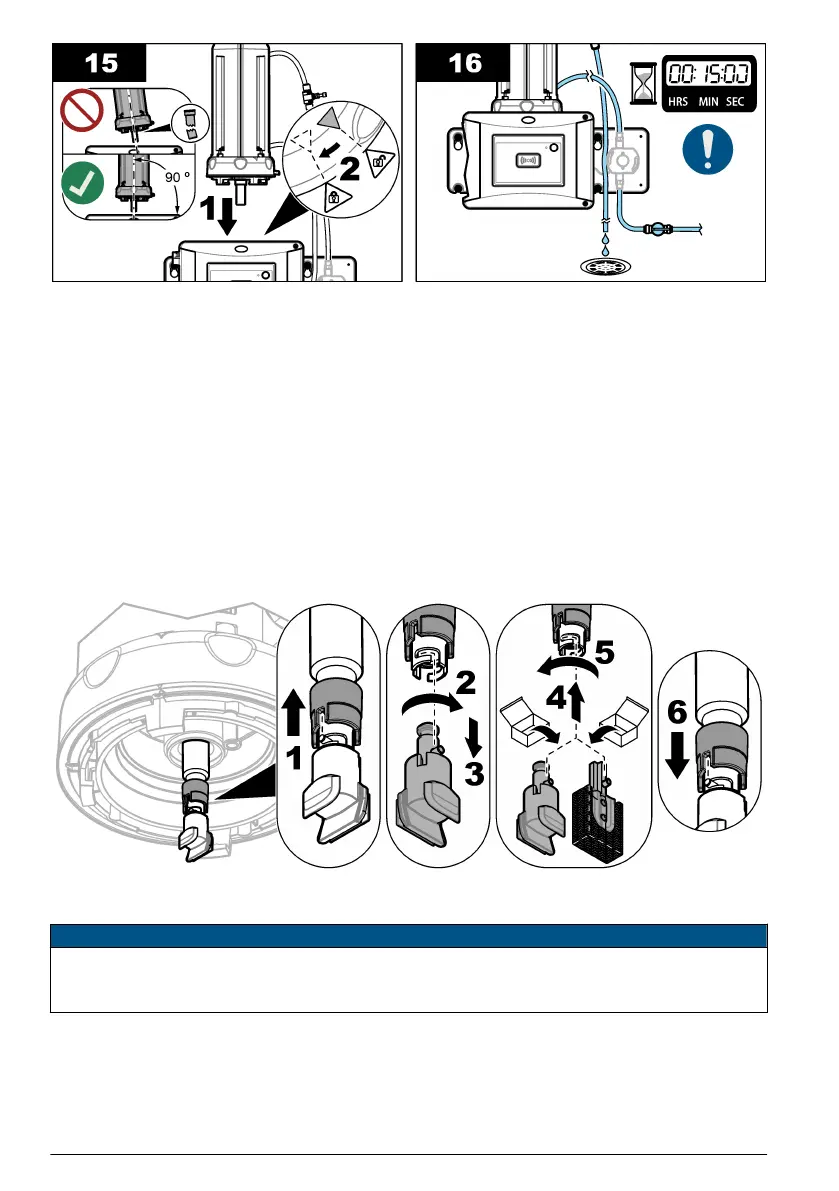
5. Remove the vial. Refer to steps 1 to 5 of Replace the vial on page 15.
6. Complete the steps that show on the controller display. Install the vial wiper (silicone or fiber) that
is applicable to the sample type. Refer to the illustrated steps that follow.
The date that the wiper was replaced is automatically saved after the last screen shows.
7. Install the vial. Refer to steps 8 to 12 of Replace the vial on page 15.
6.6 Replace the tubing
N O T I C E
Keep water out of the vial compartment or instrument damage will occur. Before the automatic
cleaning module is installed on the instrument, make sure that there are no water leaks. Make sure
that all tubing is fully seated. Make sure that the vial nut is tight.
Replace the tubing when the tubing has a blockage or has damage.
1. Set the flow shut-off valve to off. Install the automatic cleaning module on the service bracket.
Refer to steps 1 to 3 of Replace the vial on page 15.
2. Replace the tubing.
18
English


 To Next Page