20 Chapter 2, TEG
®
Analyzer Description
P/N 115191-IE, Manual revision: AB Haemonetics
®
TEG
®
6s User Manual
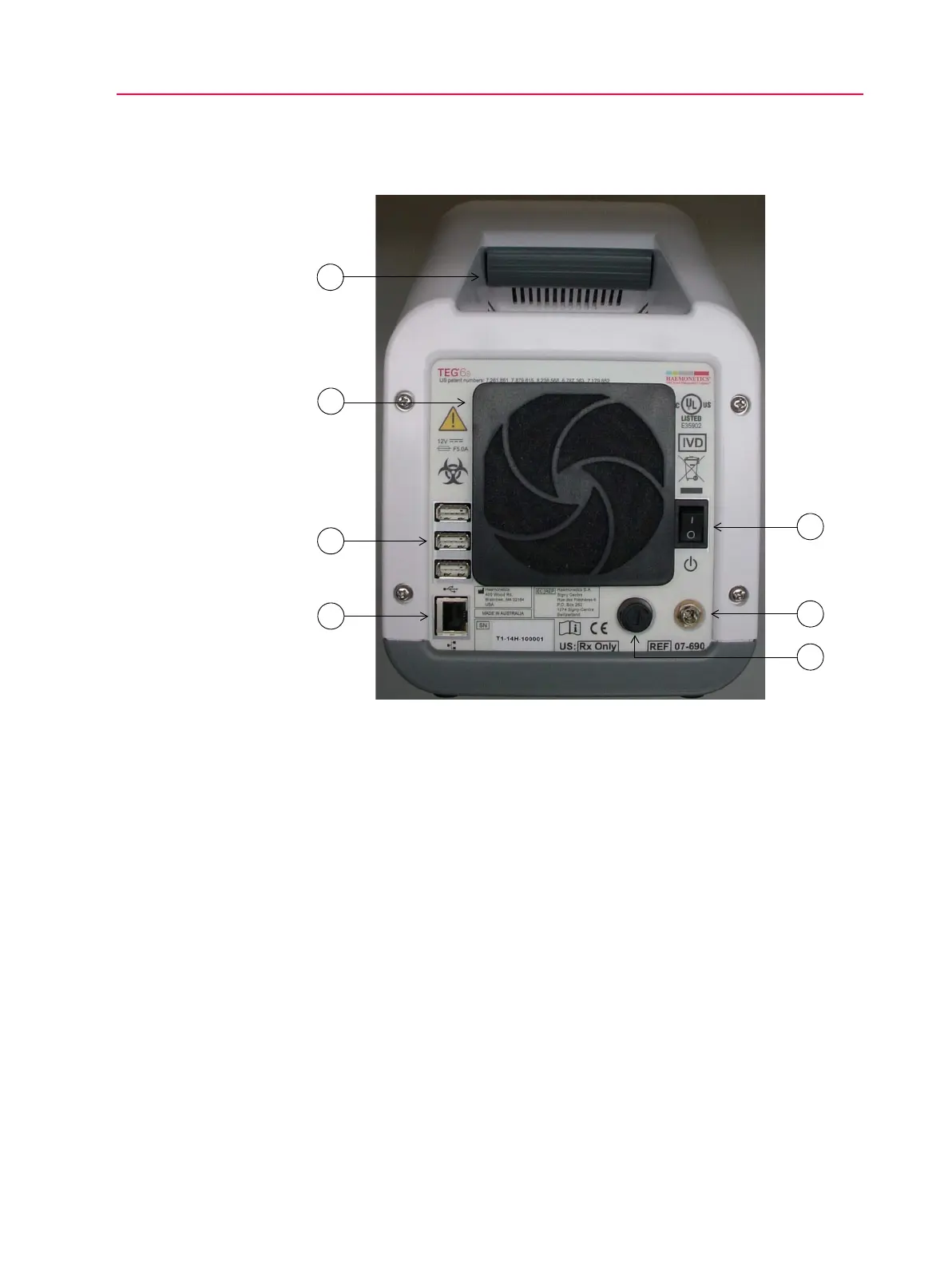
Exterior Back Components
Figure 2-2, TEG analyzer, exterior back view
Carrying handle The integrated carrying handle is located near the top of the analyzer and
allows the unit to be lifted and moved securely.
Cooling fan The fan on the back of the analyzer ensures that the internal temperature of the
analyzer remains close to the ambient temperature. This allows the widest
possible range of sample temperatures to be selected without requiring active
cooling in the analyzer.
USB ports Three Standard Type A USB ports are located to the left of the cooling fan and
can be used to attach a peripheral device, such as a printer or barcode
scanner, to the analyzer.
1. Carrying handle
2. Cooling fan with filter
3. USB ports
4. Ethernet port
5. Fuse
6. Power jack
7. On/off switch



 To Next Page