EB+ Soft Docking Installation guide
44
Innovative Vehicle Solutions 2020
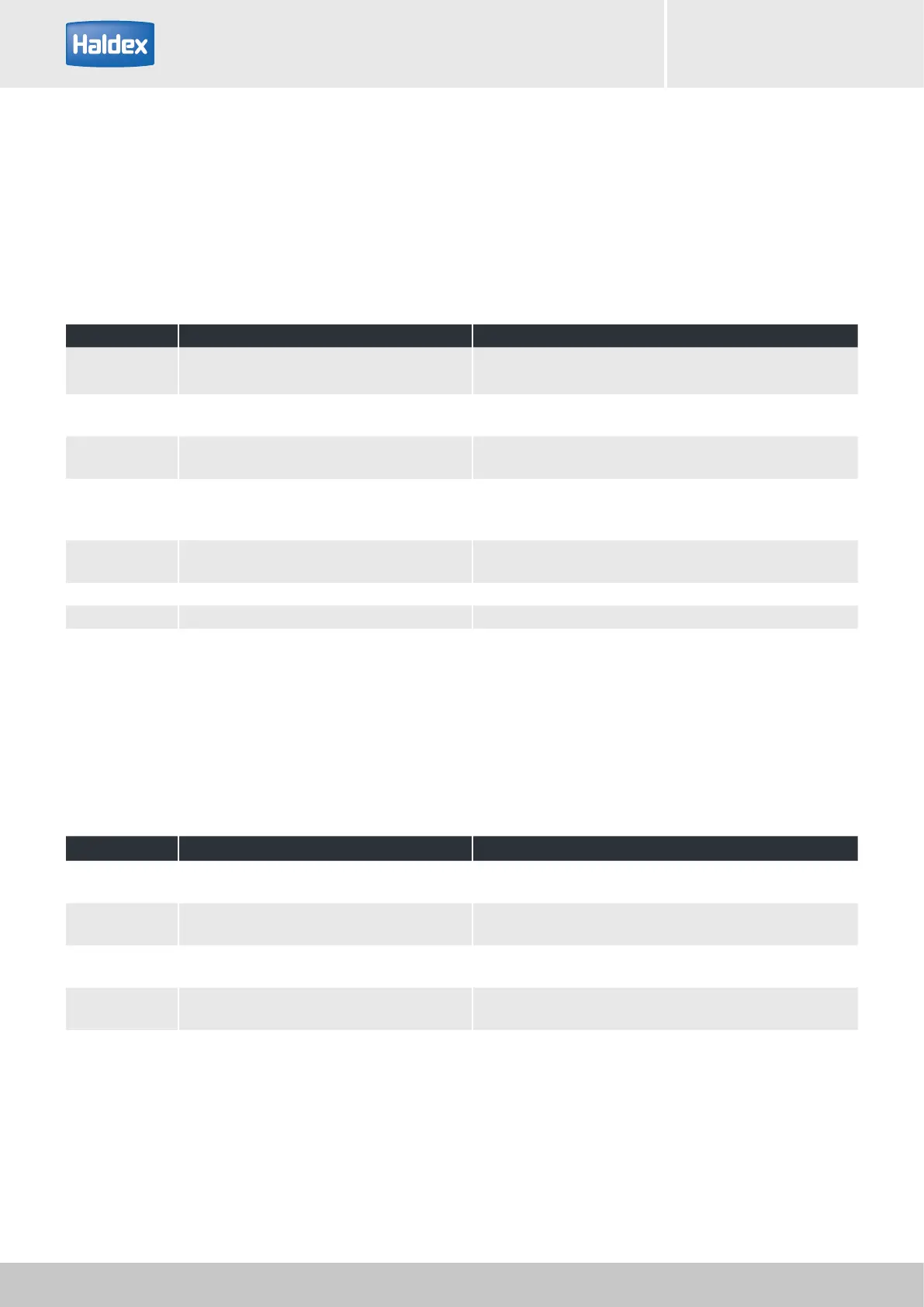
Step Activity Results
1 Ignition on / tail light on
LED outline marker has to shine.
Note: to work corrctly ensure that the EB+ is also powered
2 Engage reverse gear
LED outline marker is deactivated when the radar is at 3 m
from the obstacle
3
Place the test sample perpendicular to a sensor
within a range of 3 m behind the vehicle
LED outline marker: slow flashing frequency
Reverse alarm: slow beep
4
Remove the test sample from the vehicle
until the beeping and LED outline are
extinguished.
Completed phase 1 (see picture below) (area greater than 3
m)
5
Move the test sample slowly inwards towards
the trailer sensor
Run through the complete range of phases as shown within
diagram below.
6 Repeat step 4 with other sensor See step 4
7 Repeat step 5 with other sensor See step 5
Step Activity Results
8
Place the test sample in the distance as in step
3.
9
Engage the reverse gear twice
(within 2 seconds)
LED outline marker: slow flashing frequency
Reverse alarm: no signal
10
Let the system work for minimum 10 seconds.
After this, disengage the reverse gear.
11
Engage reverse gear once only. LED outline marker: slow flashing frequency
Reverse alarm: returns to slow beep frequency
Testing of the silent mode (night silent switch off)
Functional test
After the successful completion of the DIAG+ EOLT, you should test the system thoroughly. For this test you
require a test sample (preferred material is a cardboard box approx. 500 x 500 mm, if there is no box available,
you can use a similar object material with a smooth surface). Please ensure that there are no obstacles situated
within the range of 4 m x 4 m behind the vehicle. The test procedure must be carried out in the following steps:



 To Next Page