LCD Display & Programming Functionality
Default Display Modes
The user can set either of the following as the ‘Default’ display mode:
• Battery Level (the factory setting for the Default Display Mode); or,
• Number of Lifts.
Battery Level Mode
The lift will:
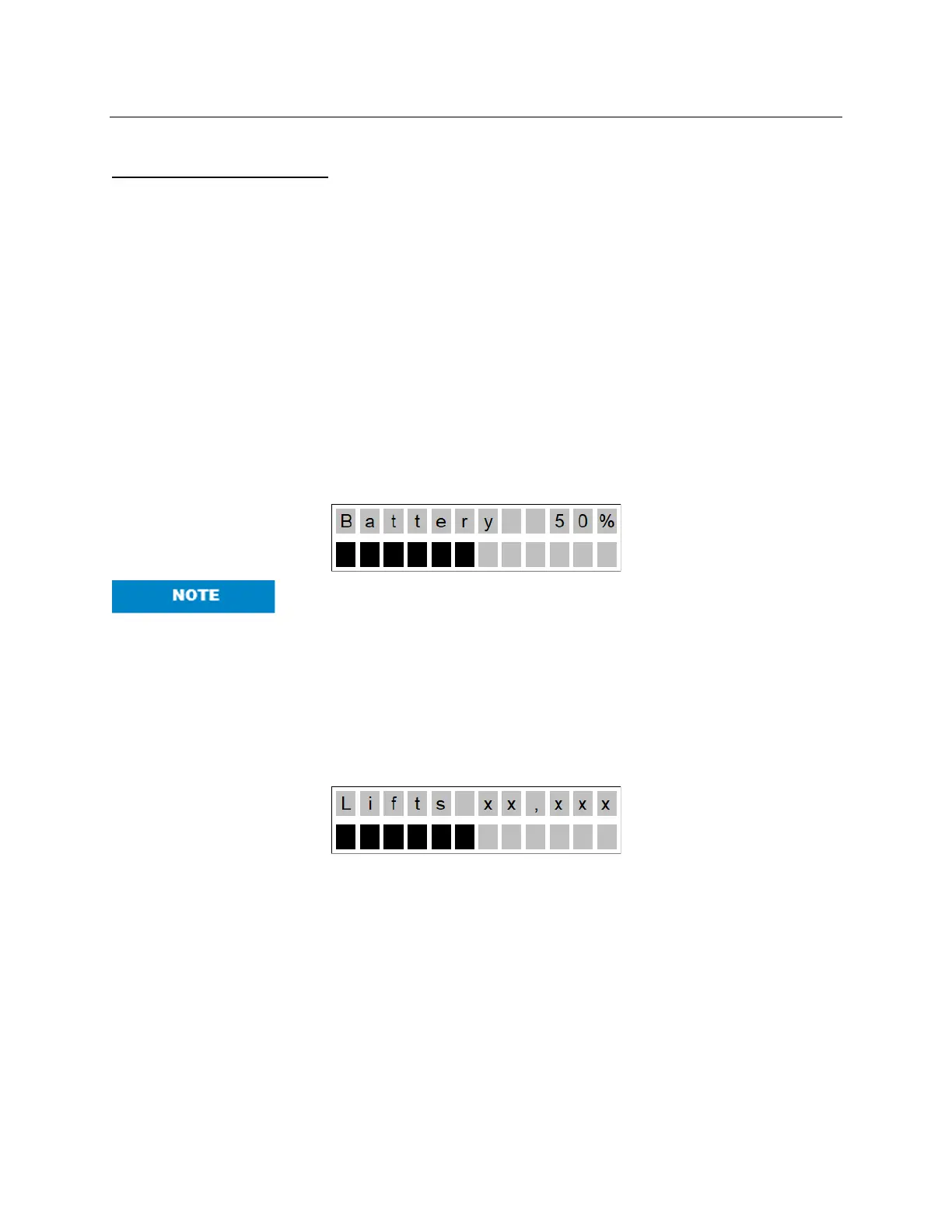
• Display the word, “Battery”, with the percentage charged (in 10% increments) in the top
row of the display (e.g., “Battery Level 60%”).
• Display a “Bar Graph” of the battery level in the second row of the display by displaying
the appropriate number of fully blackened rectangles as in the following diagram (note:
as there are 12 characters, the charge percentage will be divided by 8.333 and rounded
DOWN to determine how many rectangle characters are shown):
As the lift is initially switched on, the level of battery charge displayed
may be incorrect. However, as soon as the lift is actually operated, the
charge level will update to the correct level.
Number of Lifts Mode
The lift will:
• Display the word, “Lifts”, with the number of lifts completed in the top row of the display
(e.g., “Lifts 500”) and a bar graph to indicate the battery level as in Battery Level Mode:
Low Battery Mode
In any ‘Default display mode’, if the battery levels fall below 25%, the lift will go into Low Battery
Mode. The lift will then:
• Make an audible beeping sound every ten (10) seconds.
• The display should flash “Low Battery” in the first line.
• The bars indicating charge level should flash on and off.



 To Next Page