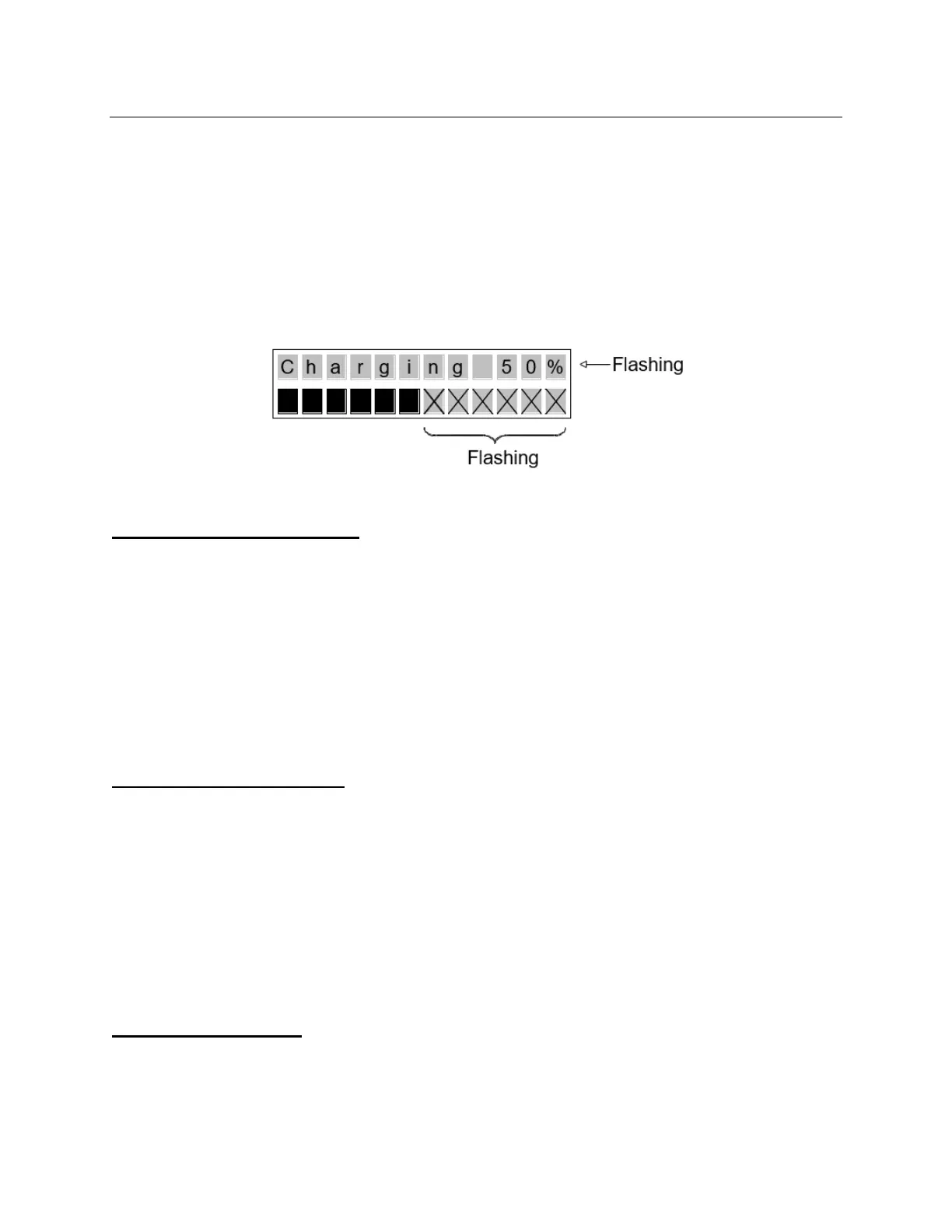
Charging Display Mode
In any ‘Default display mode’, if the unit is in the charger the lift will go into Charging Display
Mode regardless of what the user has selected as ‘Default Display Mode’. Charging Display
Mode should over-ride Low Battery Mode.
The lift will then:
• Display a flashing “Charging” with the percentage charged (in 10% increments) in the
top row of the display (e.g., “Charging 60%”).
• Show the appropriate number of fully blackened out cells, with the remaining cells in the
bottom row flashing.
Enter Programming Mode
Hold the ‘Up’ and ‘Down’ buttons simultaneously for three (3) seconds.
The lift will then:
• Beep three (3) times. Display a flashing “Entering Programming Mode” for two (2)
seconds.
• Go to the first programming option.
• If the user continues to hold the ‘Up’ and ‘Down’ buttons for longer than the display
flashes, “Entering Programming Mode”, the unit will exit the programming mode
Exit Programming Mode
If no buttons are pressed for ten (10) seconds, the unit exits the programming mode
automatically.
The lift should then:
• Beep three (3) times. (The beep should be as loud as the existing emergency down
alarm)
• Display a flashing “Exiting Programming Mode” for two (2) seconds.
• Go back to the standard display mode.
Programming Mode
• Whenever in Programming Mode, the top line of the display should read, “PROGRAM
MODE”. Depending on what is being programmed, the second line should then change:



 To Next Page