-CS -18
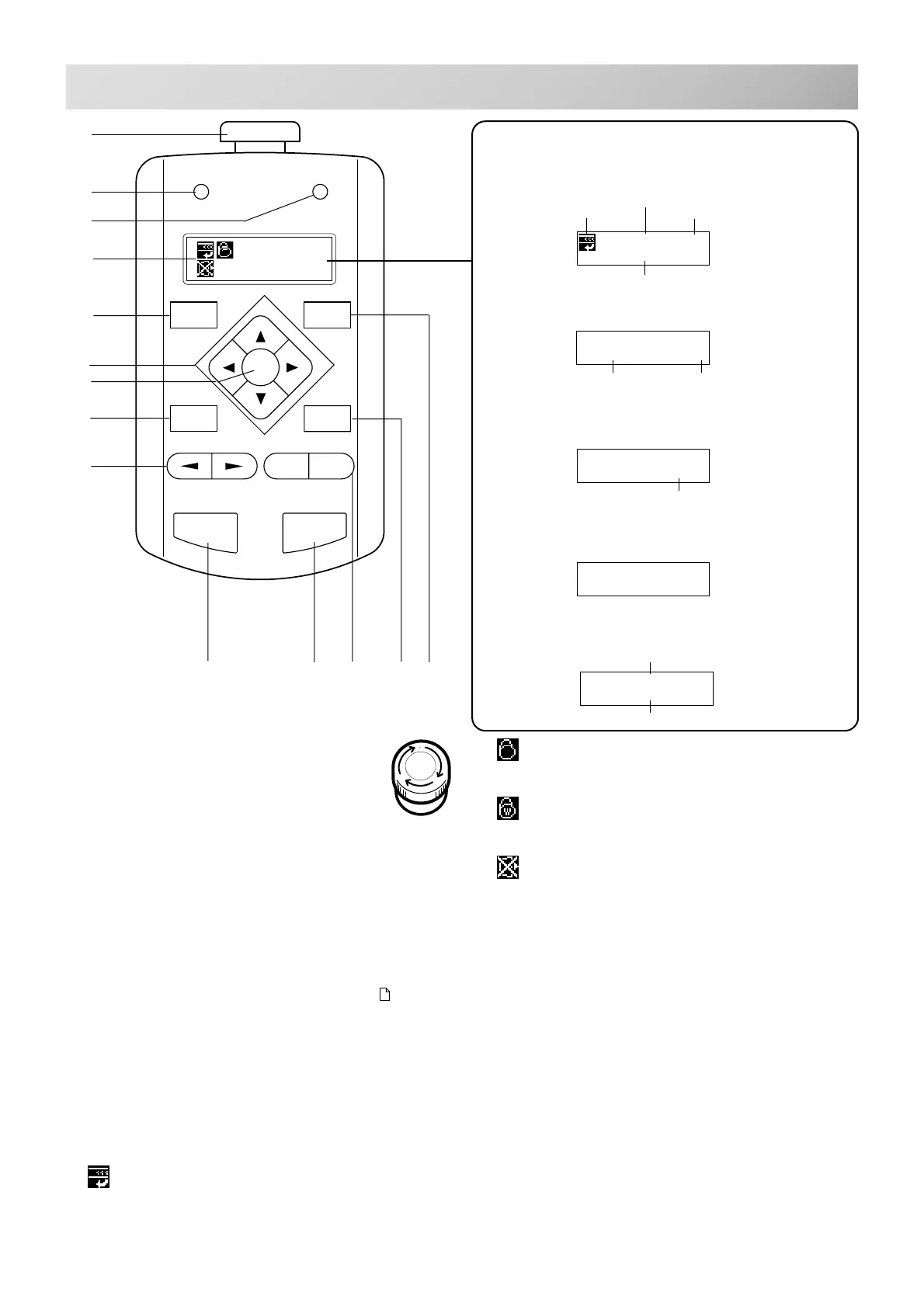
FUNCTION OF THE CONTROL BOX
A. Emergency stop button
When you press this button, the power is
switched off and the machine stops.
The Emergency button will be locked,
whenever it is pushed.
To unlock, turn the emergency button to the right
(Arrow direction) then release and the button will
unlock.
Please use this button only for emergency.
B. Drive lamp
Green .................... You can start embroidery.
Red ........................ You have a machine error.
an error number will be shown
on the LCD screen. 10-3
C. Thread break lamp
Blinking red lamp ... Indicates the upper thread has
broken or the Bobbin thread
has run out.
D. Display
Shows the embroidery design name, the number of
the current needle and other machine generated
messages.
Top
This icon when displayed indicates that the ma-
chine is ready to start sewing from the top of the
design.
3-7
Normal cap frame
Shows cap drive frame is set and normal cap
frame is available.
Wide cap frame
Shows cap drive frame is set and wide cap frame
is available.
Do Not Remove the memory media
Please do not remove memory media when this
icon is displayed.
If you remove the memory media when this Icon
is displayed, it is possible to corrupt the design
data in the machine memory and on the memory
media.
E. Menu button
Displays the function menu for the machine set-
tings and the design set-up.
F. Arrow button (Up, Down, Left, Right)
The frame moves toward direction of the arrow
mark on the pressed button.
G. Enter button
If you depress this button while also pressing an
arrow button, the frame will move more quickly.
H. Pressure foot button
You can raise or lower the presser foot .
ID:10 Nd:12
FLOWER
ID:10 Nd:12
123456
ID:10 Nd:12
123456 1000
X:-234.5
Y: 123.8
Selected memory registration number
Present needle number
Number of stitches
sewn up to now Speed
Speed
Number of stitches sewn up to now
Selected pattern name
Top
Moving distance of X
Moving distance of Y
When beginning an embroidery
While embroidering
Nd:12
HAPPY
Machine stopped during embroidering
Display if the machine has no design
in memory
Display when manually moving the
hoop
Showing distance
on X and Y from
origin point
Display example
A
N
F
G
H
I
B
D
E
M
L
JK
C
FORW ARD
MENU
P.FOOT
T.CUT
ENT.
START STOP
+
-
T.BREAKDRIVE
ERROR
3_7 H701



 To Next Page