-CS -88
P.FOOT T.CUT
MENU
FORW ARD
ENT.
P.FOOT T.CUT
MENU
FORW ARD
ENT.
P.FOOT T.CUT
MENU
FORW ARD
ENT.
P.FOOT T.CUT
MENU
FORW ARD
ENT.
P.FOOT T.CUT
MENU
FORW ARD
ENT.
P.FOOT T.CUT
MENU
FORW ARD
ENT.
P.FOOT T.CUT
MENU
FORW ARD
ENT.
11-3
CHANGE OF THREAD BREAK DETECTION
11_3 K101
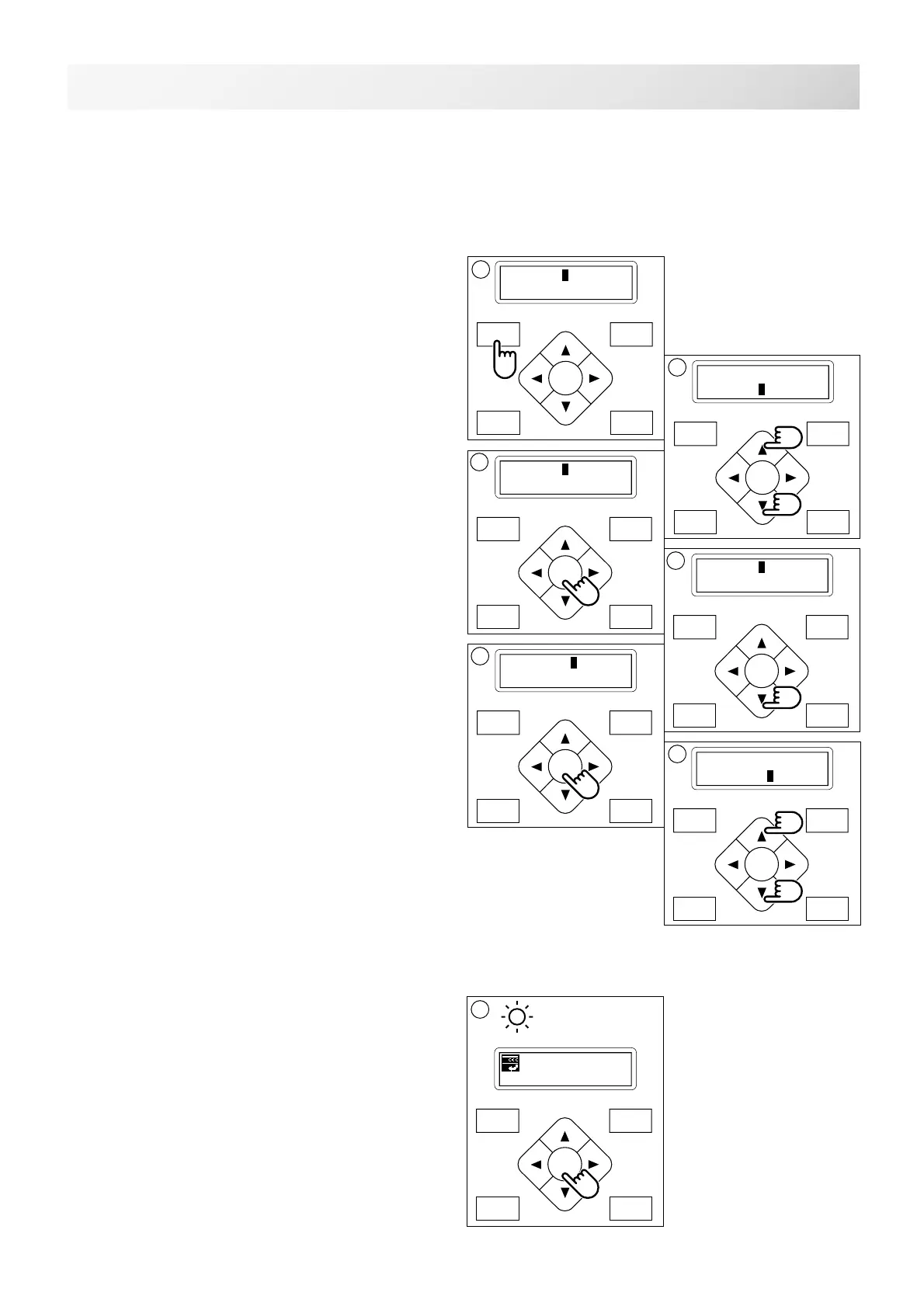
1. Press the "MENU" button until [MENU] is
showing when the machine is stopped.
2. Press the ”Up” or “Down” arrow button until
the cursor points to "Other".
3. Press the "ENT." button when showing
[OTHER].
4. Select "Detect" by press down "Arrow"
button.
5. Press the "ENT." button.
6. Pressing the “Up” or “Down” arrow button,
moves the cursor to the selected sensitivity.
Off : Detect system off
Slow3 : Lower sensitivity detection 3
Slow2 : Lower sensitivity detection 2
Slow1 : Lower sensitivity detection 1
Normal: Standard sensitivity detection
Quick1 : High sensitivity detection 1
Quick2 : High sensitivity detection 2
Quick3 : High sensitivity detection 3
7. Press the "ENT." button.
Make your change and return to drive mode.
ID:10 Nd: 4
BIRD
G
[MENU] Pattern
Needle
1
[MENU] Letter
Other
2
[DETECT] Off
Slow3
6
[DETECT] Normal
Quick1
7
[OTHER] Setup
Clock
[OTHER] Detect
4
5
Sensitivity selection of the thread break detect sensor.
You can select the sensitivity.
By default it is set to "Normal".



 To Next Page