-CS -79
11-2
INITIALIZING OF MACHINE SETTINGS
10_2 D424
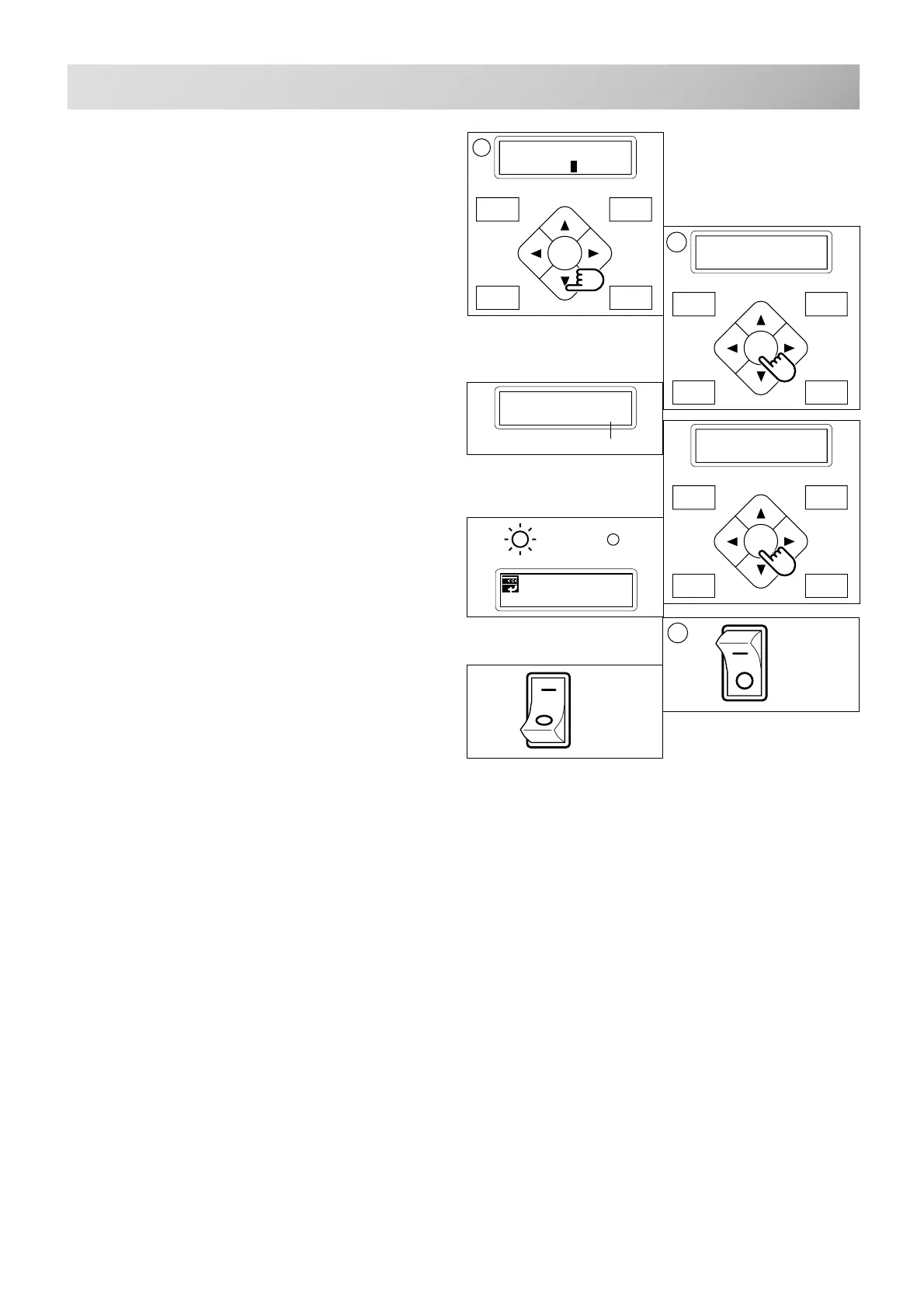
10.To initialize, press the ”Down” arrow button
and move cursor to "OK".
Press the "ENT." button to cancel.
The display returns to drive mode.
11.Press the "ENT." button.
The machine will show a notice then start turning
the main shaft automatically and the speed will
slowly increase.
The speed will increase to maximum and then
stop automatically and indicate " -- Complete --".
12.Turn off the power switch and turn on the
power switch again.
P.FOOT T.CUT
MENU
FORWARD
ENT.
ID: 5 Nd: 4
BIRD
G
[SPEED] Cancel
OK
P.FOOT T.CUT
MENU
FORWARD
ENT.
Caution !! main
shaft truns
[SPEED]
1000
P.FOOT T.CUT
MENU
FORWARD
ENT.
[SPEED]
-- Complete --
Revolution speed
11
ON
OFF
ON
OFF
12



 To Next Page