-CS -68
9-5
SEWING
9_5 H701
Normal
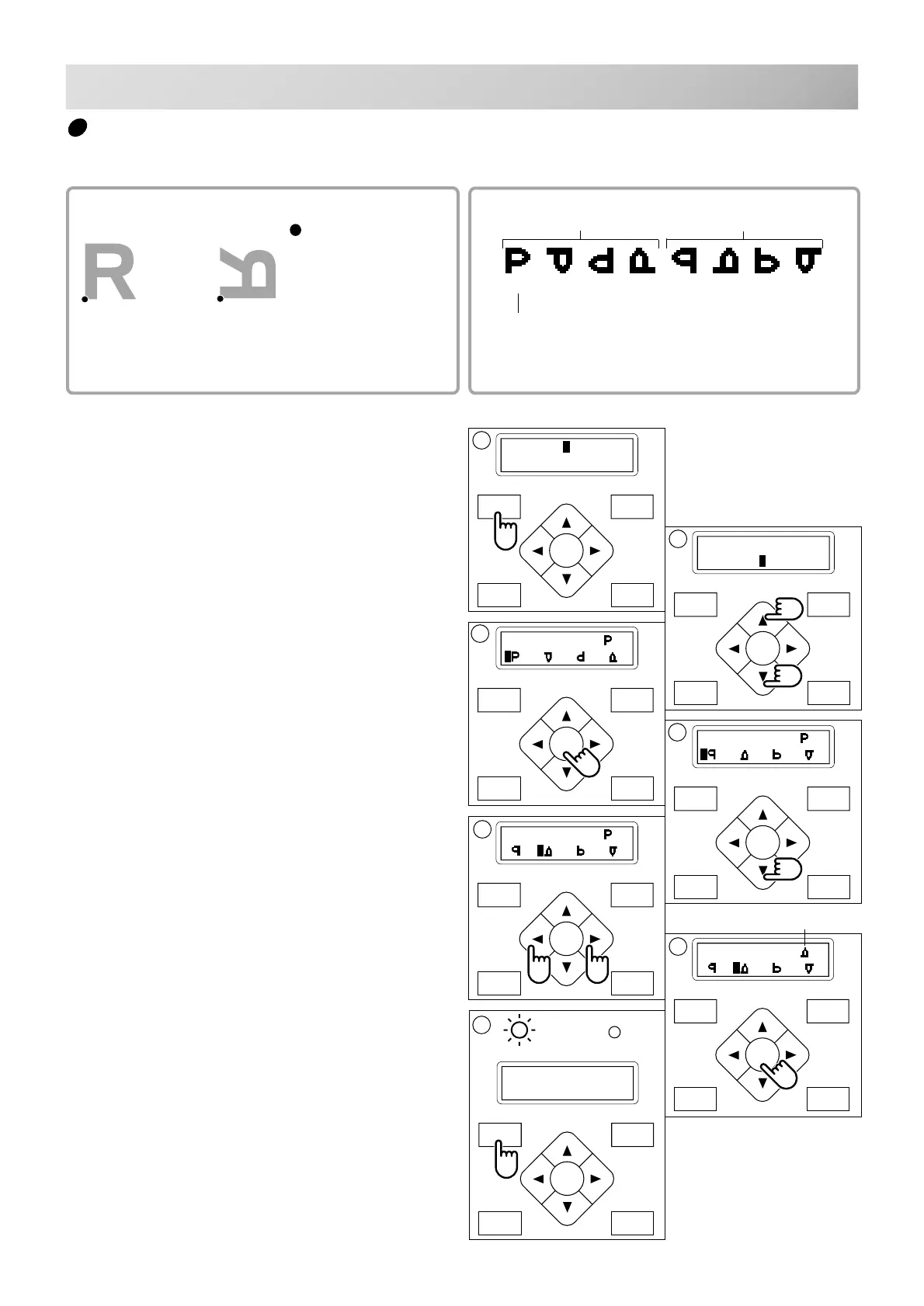
Mirror reverse
0° 90° 180° 270° 0° 90° 180° 270°
Normal angle
Normal
Setting example
Mirror reverse + 90°
With start point of pattern as pivot,
the machine changes angle in 90
degree increments through reversed.
Rotating and mirroring designs (Convert)
Convert selected pattern data.
FORW ARD
P.FOOT T.CUT
MENU
ENT.
P.FOOT T.CUT
MENU
FORW ARD
ENT.
P.FOOT T.CUT
MENU
FORW ARD
ENT.
P.FOOT T.CUT
MENU
FORW ARD
ENT.
P.FOOT T.CUT
MENU
FORW ARD
ENT.
P.FOOT T.CUT
MENU
FORW ARD
ENT.
P.FOOT T.CUT
MENU
FORW ARD
ENT.
ID:10 Nd: 4
1230
[MENU] Pattern
Needle
[MENU] Read
Convert
2
[CONVERT] ( )
3
[CONVERT] ( )
4
[CONVERT] ( )
5
[CONVERT] ( )
1. Press the "MENU" button until [MENU] is
shown when the machine is stopped.
2. Press the “Up” or “Down” arrow button until
the cursor points to "Convert".
3. Press the "ENT." button when showing
[CONVERT].
The control box displays standard pattern adjust-
ment.
4. Press the down "Arrow" button.
The control box displays mirror reverse.
5. Press the ”Left” or “Right” arrow button, to
select which you would like.
6. Press the "ENT." button.
The current setting changes to the desired
setting.
7. Finally, Press "MENU" button until the
green lamp on control box is lit.
You can start embroidering.
: Start point of pattern
6
presently setting



 To Next Page