-CS -78
11-1
INITIALIZING MACHINE SETTINGS
11_1 D610
If you have E-18, E-30, E-51 or E-52 while sewing, Please try initializing the machine settings.
You will always need to initialize the machine speed when you initialize the settings.
Initialize of machine system
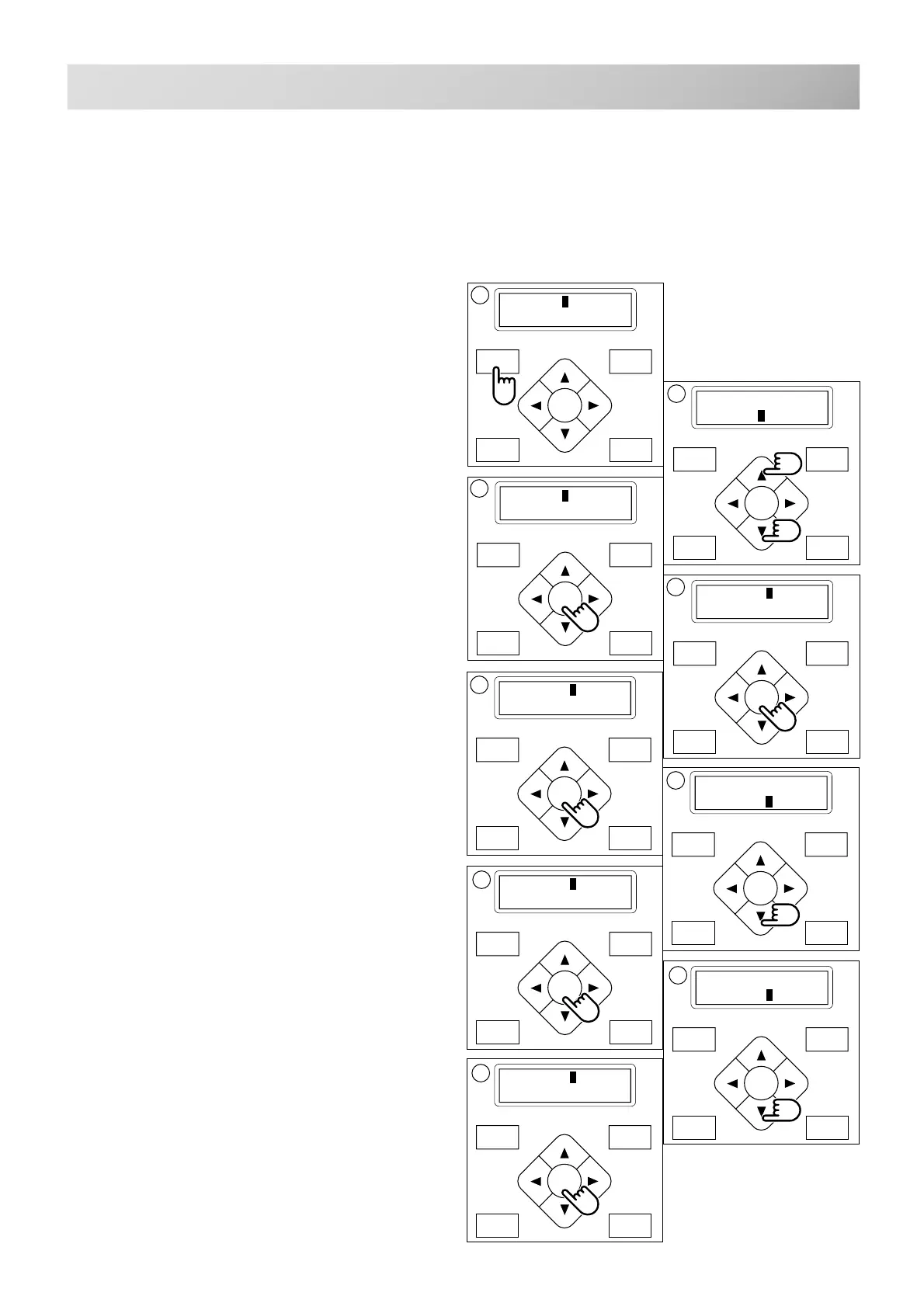
1. Press the "MENU" button until [MENU] is
showing when the machine is stopped.
2. Press the ”Up” or “Down” arrow button until
the cursor points to "Other".
3. Press the "ENT." button when showing
[OTHER].
4. Press the "ENT." button.
5. Press the "ENT." button.
Choose either “Cancel” or “OK”.
6. Press the “Down” arrow button and move
the cursor to "OK".
Press the "ENT." button to cancel.
The display will return to drive mode.
7. Press the "ENT." button.
Formatting of the machines systems are carried
out.
Initializing of machine speed
8. Press the “Down” arrow button until the
cursor points to "Speed".
9. Press the "ENT." button.
Choose either “Cancel” or “OK”.
P.FOOT T.CUT
MENU
FORWARD
ENT.
P.FOOT T.CUT
MENU
FORWARD
ENT.
P.FOOT T.CUT
MENU
FORWARD
ENT.
P.FOOT T.CUT
MENU
FORWARD
ENT.
P.FOOT T.CUT
MENU
FORWARD
ENT.
P.FOOT T.CUT
MENU
FORWARD
ENT.
[MENU] Pattern
Needle
1
[MENU] Letter
Other
2
[OTHER] Setup
Clock
[SETUP] System
Speed
4
[SYSTEM] Cancel
OK
[SYSTEM] Cancel
OK
6
P.FOOT T.CUT
MENU
FORWARD
ENT.
[SETUP] System
Speed
P.FOOT T.CUT
MENU
FORWARD
ENT.
[SETUP] System
Speed
8
P.FOOT T.CUT
MENU
FORWARD
ENT.
[SPEED] Cancel
OK
9



 To Next Page