-CS -38
5-9b
PREPARATION OF PATTERN DATA
5_9b H701
Export memorized pattern from memory
You can write out of machine memory to a memory media.
FORW ARD
P.FOOT T.CUT
MENU
ENT.
[MENU] Pattern
Needle
FORW ARD
P.FOOT T.CUT
MENU
ENT.
[MENU] Pattern
Needle
2
FORW ARD
P.FOOT T.CUT
MENU
ENT.
Name:FLOWER_
0123456789 -!
FORW ARD
P.FOOT T.CUT
MENU
ENT.
[PAT.] Select
Erase
3
FORW ARD
P.FOOT T.CUT
MENU
ENT.
[PAT.] All clr
Write
FORW ARD
P.FOOT T.CUT
MENU
ENT.
[WRITE] (ID:10)
10 CAT
4
FORW ARD
P.FOOT T.CUT
MENU
ENT.
[WRITE] (ID:10)
14 FLOWER
FORW ARD
P.FOOT T.CUT
MENU
ENT.
[WRITE] Card
USB
FORW ARD
P.FOOT T.CUT
MENU
ENT.
[WRITE] Card
USB
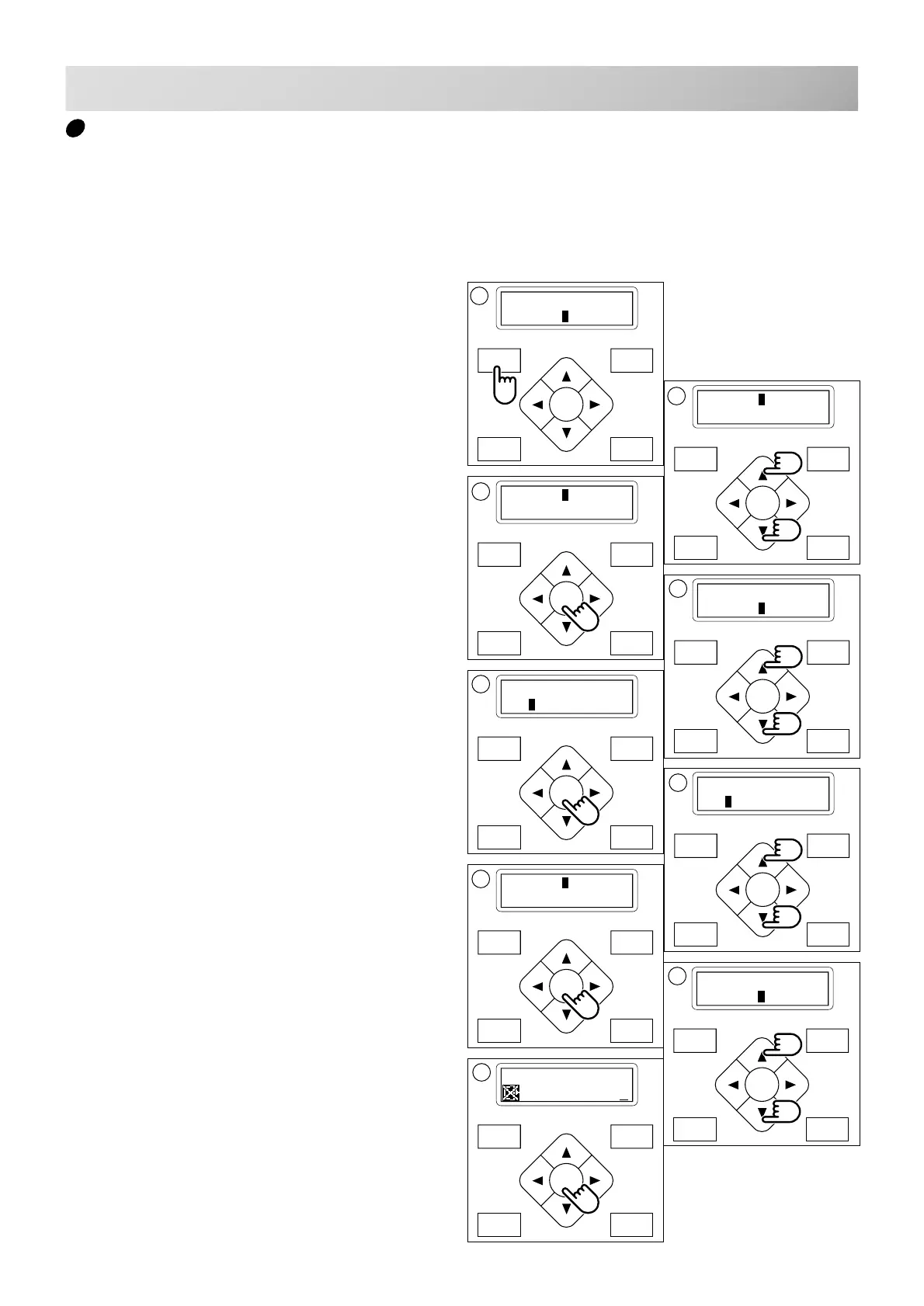
1. Press the "MENU" button until [MENU] is
showing when machine is stopped.
2. Press the “Up” or “Down” arrow button until
the cursor points to "Pattern".
3. Press the "ENT." button.
4. Press the “Down” Arrow button until the
cursor points to "Write".
5. Press the "ENT." button when showing
[WRITE].
The display will show the ID no. and the name of
the current design.
6. Press the “Up” or “Down” Arrow button to
choose the embroidery pattern you wish to
write.
7. Press the "ENT. button".
Section for select of memory card reading and
USB memory reading.
8. Press up and down "Arrow" button to
choose "Card" or "USB".
9. Press the "ENT. button".
After displaying it as "Writing data-" , showing
design name and letter pallet on top of line and
lower line of the display.
5
6
8
7



 To Next Page