-CS -26
P.FOOT T.CUT
MENU
FORWARD
ENT.
P.FOOT T.CUT
MENU
FORWARD
ENT.
P.FOOT T.CUT
MENU
FORWARD
ENT.
P.FOOT T.CUT
MENU
FORWARD
ENT.
P.FOOT T.CUT
MENU
FORWARD
ENT.
P.FOOT T.CUT
MENU
FORWARD
ENT.
P.FOOT T.CUT
MENU
FORWARD
ENT.
yalpsiD.oN
gnitteS
denilrednusitlufiD
stnetnoC
llunpeeK1
).GHC(
seY
oN
rolocerofeberayehtsasehctitsorezdaerenihcamehtstelnoitcnufsihT
egnahc.atadnrettapgnidaernehw
llunpikS2
hctits
seY
oN
sehctitsorezehtllagnirongiybatadnrettapsdaersihT nrettapgnidaernehw
.atad
MACHINE SETTINGS
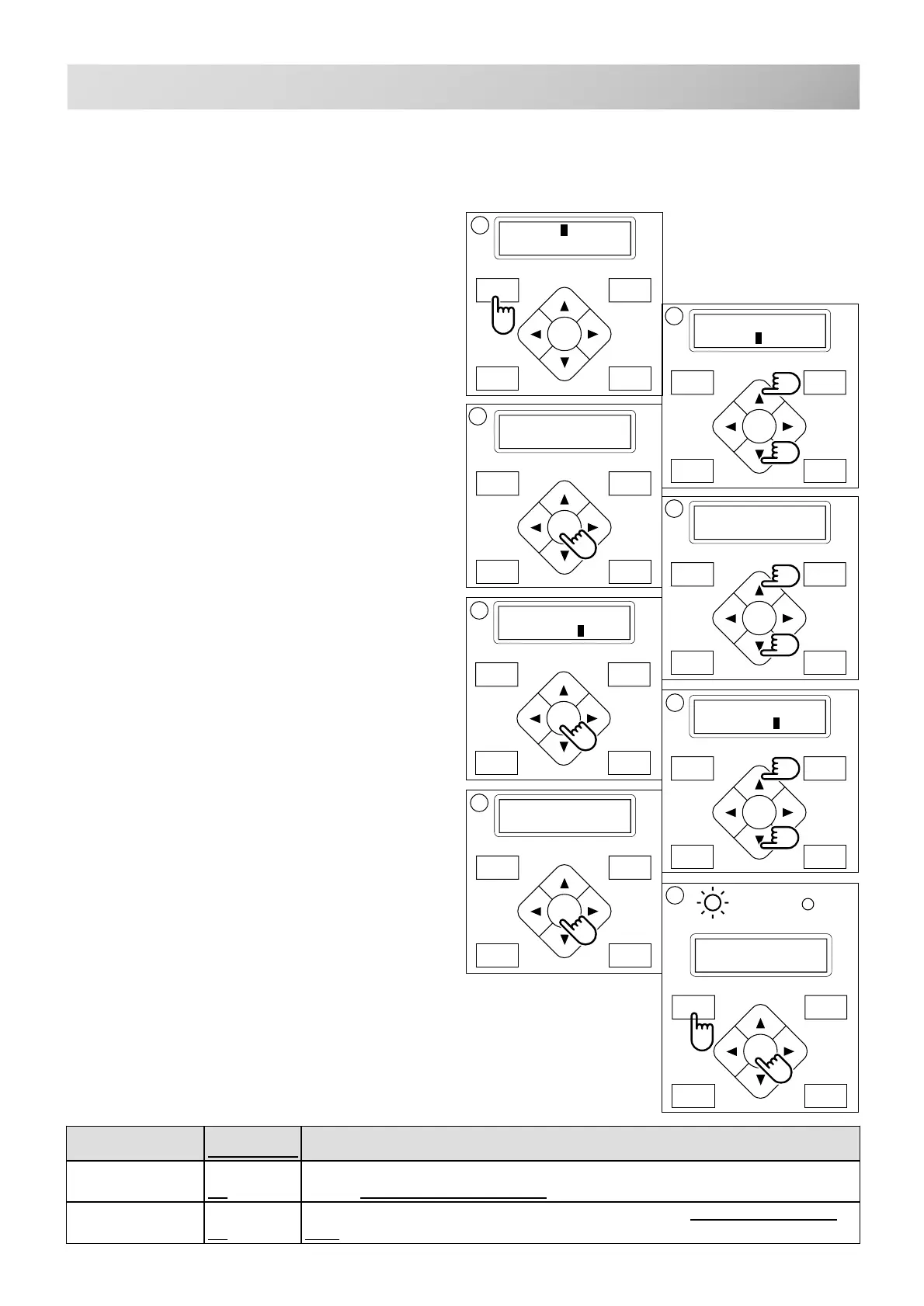
1. Press the "MENU" button until [MENU] is
showing when the machine is stopped.
2. Select "Create" by using the up and down
"Arrow" buttons.
3. Press "ENT." button. The indicator will dis-
play a machine setting.
4. Press up and down "Arrow" button until it
comes to the setting you wish to change.
5. Press "ENT." button to display a cursor on
the indicator.
Now you can change the setting.
6. Press up and down "Arrow" button to
choose "YES" , "NO" or other choice as
available.
7. Press "ENT." button to retain this new set-
ting.
If you desire to change other settings, please
repeat the steps 4 through 7 above.
8. Finally, Press the "MENU" button until the
green lamp is showing on the control box.
When the green lamp is glowing, you are in Drive
mode and can begin sewing.
5-1
5_1 G420
[MENU] Pattern
Needle
[MENU] F•Posi
Create
1 Keep null
(CHG.): No
20 232C speed
: 38400
20 232C speed
: 38400
20 232C speed
: 57600
20 232C speed
: 57600
1
4
2
3
6
8
FORWARD
P.FOOT T.CUT
MENU
ENT.
Nd:12
HAPPY
G
Before embroidering, set the basic settings of the machine.
Please set the No. 21 (232C speed) when you connect with the PC.
The rest of the setting should be defaults (indicated by underline) normally.



 To Next Page