-CS -65
P.FOOT T.CUT
MENU
FORWARD
ENT.
P.FOOT T.CUT
MENU
FORWARD
ENT.
P.FOOT T.CUT
MENU
FORWARD
ENT.
P.FOOT T.CUT
MENU
FORWARD
ENT.
P.FOOT T.CUT
MENU
FORWARD
ENT.
P.FOOT T.CUT
MENU
FORWARD
ENT.
[MENU] Pattern
Needle
1
[MENU] F•Posi
Create
2
[F•POSI]
Stitch: 0
[F•POSI]
Change: 0
4
[F•POSI]
Change: 1
5
[F•POSI]
Change: 10
P.FOOT T.CUT
MENU
FORWARD
ENT.
[F•POSI]
Change: 10
6
7
P.FOOT T.CUT
MENU
FORWARD
ENT.
- Calculating -
8
9-7
SEWING
9_7 D610
CAUTION: To prevent accidents.
The frame moves quickly.
Keep hands away from the frame.
ID:10 Nd: 4
5643
Change
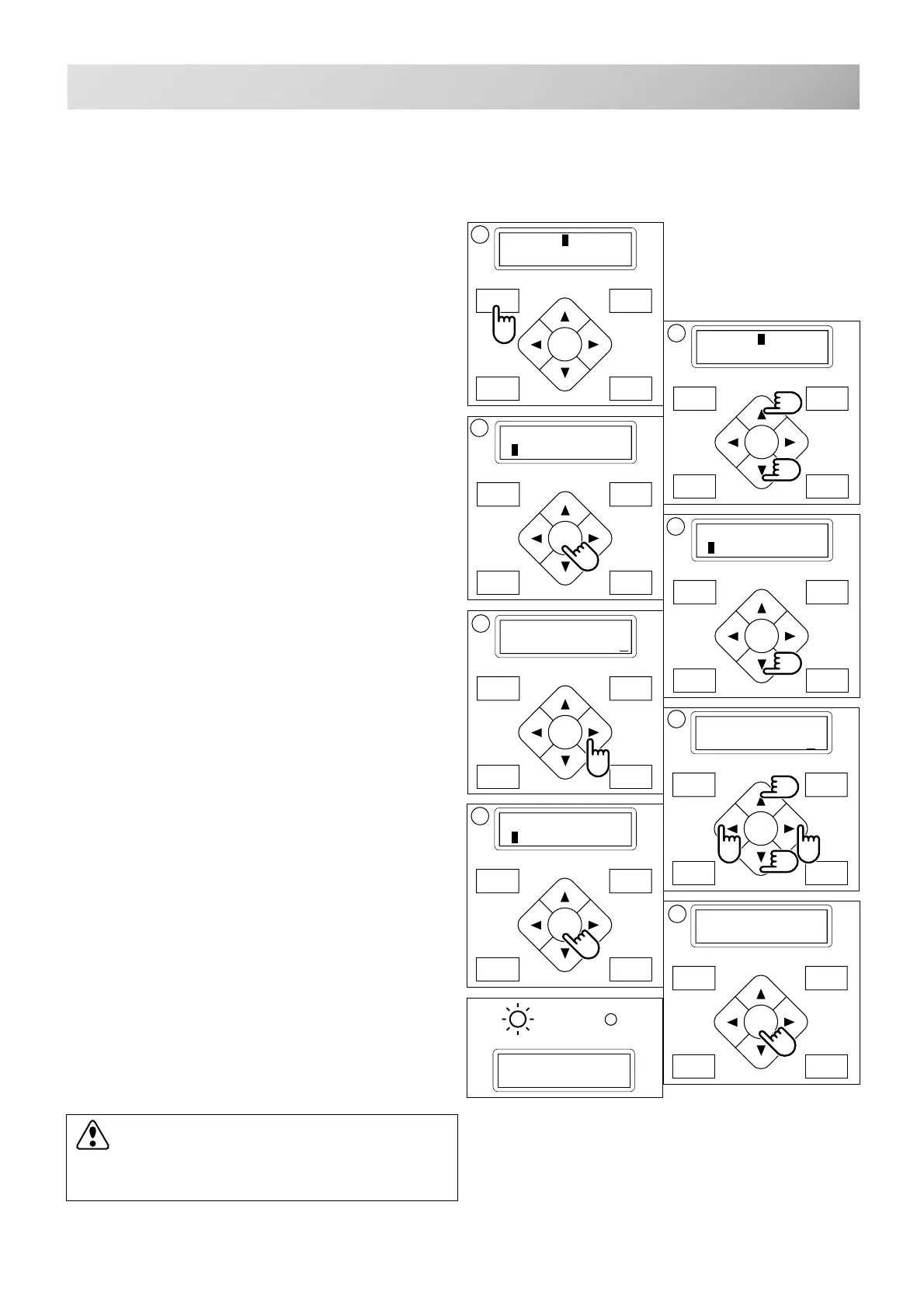
Starting from a midpoint in the design by color
No.
1. Press the "MENU" button until [MENU] is
shown when machine is stopped.
2. Press the “Up” or “Down” arrow button until
the cursor points to "F •Posi".
3. Press the "ENT." button when showing
[F •POSI].
4. Press the “Down” arrow button until the
cursor points to "Change".
5. Press the ”Right” arrow button.
The cursor moves to be under the color number.
6. Pressing the “Left” or ”Right” arrow button,
moves the cursor to the selected number.
Press the ”Up” or ”Down” arrow button to
set the number.
The number will increase by pressing the ”Up”
arrow button.
The number will decrease by pressing the
“Down” arrow button.
7. Press the "ENT." button.
The cursor will return to the left side of the
display.
8. Press the "ENT." button.
After the controller displays "- Calculating -", the
frame moves to the selected color position.
G



 To Next Page