Harman EASY Touch Control Owners Manual
35
Cleaning Prompts, Messages and Errors, Continued
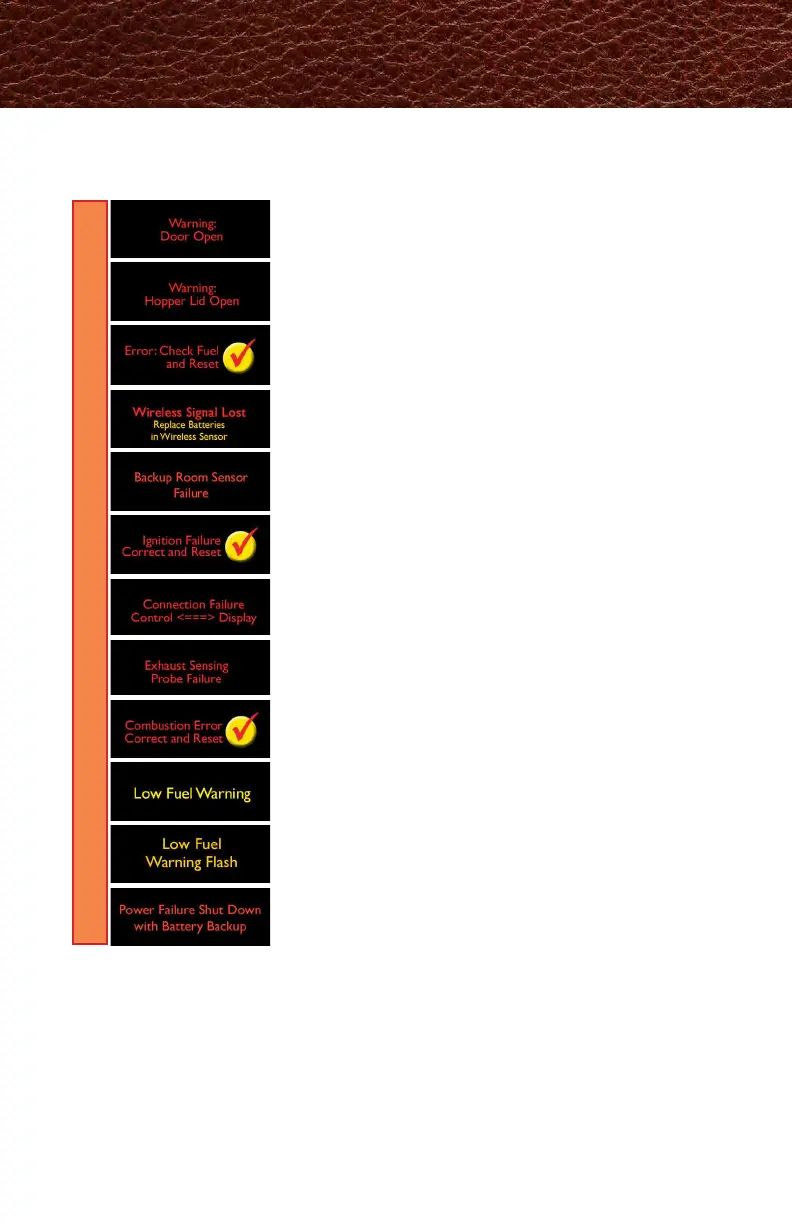
ERRORS
Exhaust Sensing Probe (ESP) has failed. Clean the ESP. If issue
persists, call your Harman dealer.
Check and close the front and ash doors for the stove to
continue to heat.
Close the hopper lid for the stove to continue to heat.
Fill the hopper with pellets. Press checkmark to reset. If you
did not ll the hopper, the message will stop after 30 seconds.
Batteries in wireless room sensor have expired. Replace the
two AA batteries.
Backup room sensor has failed. Call your Harman dealer.
Unit has failed to ignite. Scrape the burnpot. Call your
Harman dealer if problem persists.
EASY Touch Control has lost communication. Unplug unit
and plug back in. If no change, call your Harman dealer.
Clean your stove. Call your Harman dealer if problem
persists.
Once fuel level reaches 15% capacity this will show on the
touch display. This error only appears if Fuel Gauge is enabled.
Once fuel level reaches 15% capacity the light located on the
underside of the touch display will ash if the home screen
options do not have Flash enabled.
An error message means attention must be given to the message for proper
stove performance.
Will show on display when power loss is sensed and
Continue Operation is enabled in the power failure menu.
Only displays when a battery backup is present.



 To Next Page