USE ONLY GENUINE REPLACEMENT PARTS
Page 13 of 20 Control Station Rev. A
measures
pH
7.5 OFF
OFF7.0
7.2
Rx
mV
700 OFF
TANK
700
man
off
man
off
12:30
25º
1 2 3 4
FL1
man
aut
hea
smt
int
7.5
7.0
ON/OFF
AL3
700
FL 1
ON/OFF
man aut
TANK
OPERATION
The device is designed to be connected to a protected outlet at all times. The Control Station must not be disconnected unless the pool
equipment is undergoing maintenance or the pool is to be closed (wintering).
Assuming that the chemical balance of the water is within the recommended ranges, the device can be started up.
Configuration
Settings
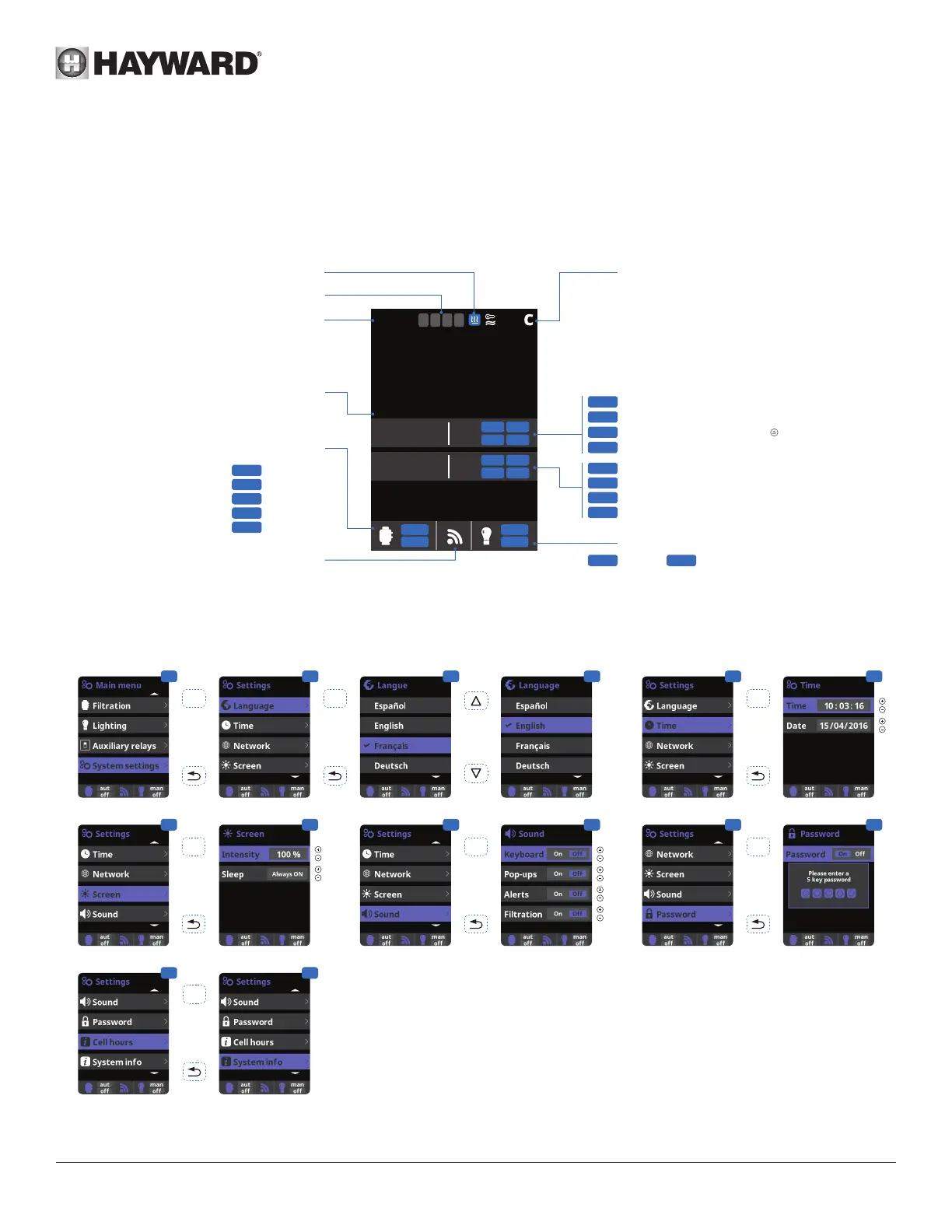
3 Settings: preferred language.
5 Settings: date and time.
7 Settings: screen lighting intensity (0-100%) and
screen timed On/Off programming.
9 Sound: Programming the sound transmission
system for the following functions: Keyboard
(press a key), Pop-ups (urgent messages),
Alerts (operational alarm), Filtration (start of
ltration).
11 Password: Protects access to the user menu by
activating a password. To enter your password,
press a 5-key combination to be memorized by
the system.
13 System info : Information about the software
version available on the TFT screen and the
Power module. The system records the run-time
count for the different modules and displays it on
this screen.
1 2 3 3
4 5
OK OK OK
6
OK
7 8
OK
9 10 11
12
OK
13
OK
Heater ON/OFF
Time
Automatic measuring
pH / redox
Filtration relay state
Manual
Automatic
Heater
Smart
Intelligent
Communication
Red = Communication fault
Water temperature
Max. pH set point (Acid)
Min. pH set point (Base)
Peristaltic pump operation
Maximum injection time reached
( Alarm reset)
Liquid chlorine pump operation
Redox set point
Insufcient ow
Lighting relay state
Manual Automatic
State of auxiliary relays (On/Off)
Empty acid tank detection




 To Next Page