USE ONLY GENUINE REPLACEMENT PARTS
Page 18 of 20 Control Station Rev. A
Setting the redox level
The redox level tells you the oxidation potential, i.e. the disinfectant capacity of the water.
Setting the redox set point is the last step in setting the Control Station.
To nd the optimum redox level for your pool, follow the steps below:
1) Start up the pool ltration system.
2) Add chlorine to the swimming pool until it reaches 1 to 1.5 ppm. This level is achieved with (approximately 1 to 1.5 g/m
3
of water).
The pH level must vary between 7.2 and 7.5.
3) After 30 min. Check whether the level of free chlorine in the pool (manual DPD1 test kit) is between 0.8 and 1.0 ppm.
4) Look at the redox value on the screen and enter it as the redox set point.
5) The next day, check the free chlorine levels (manual DPD1 test kit) and the redox level. Increase / reduce the setting, if
required.
Remember to check all your water parameters at regular intervals (2-3 months) (see table) and adjust the redox set point
according to the steps listed above.
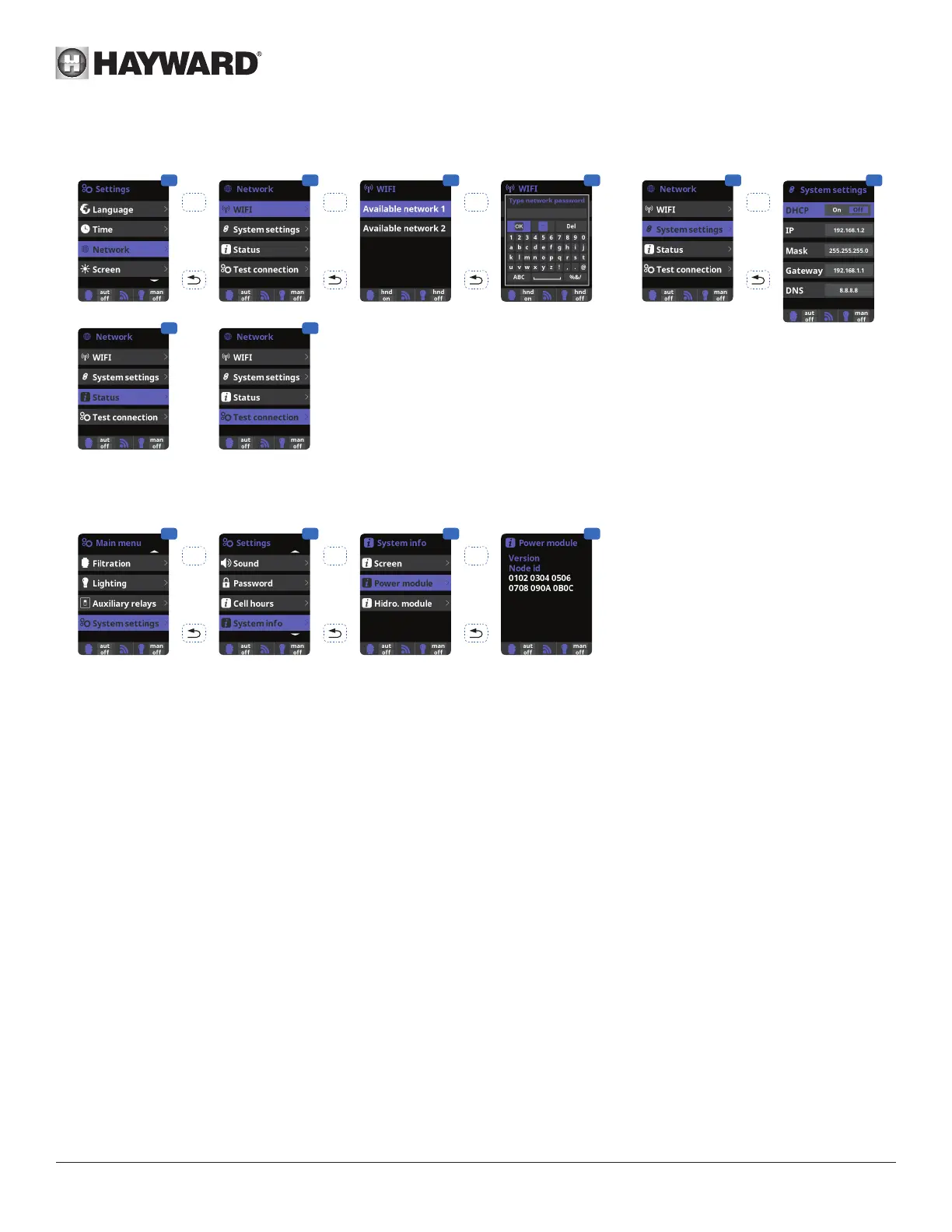
Setting the Wifi module
1 2 3 4
5
OK OK
OK
7 8
OK
1 Internet: Once the module is
connected, switch on the device.
A Network menu appears in the
Settings menu.
2 Wi: Select the Wi menu to
start an automatic search for
available networks.
3 Choose the relevant available
network.
4 Enter the password for this
network via the keyboard. Use
the up/down arrows to move
the cursor vertically and the
+/- buttons to move the cursor
horizontally. To conrm, press
OK.
5 Conguration: If you want
to congure your connection
manually or if automatic
conguration fails, you can
change the network parameters
in this menu.
7 Status: Displays information
about your current connection.
8 Test connection: Checks
that your connection has been
established.
6
When the module is connected to the Wi network and the two LEDs are on continuously (steady), you can register at poolwatch.hayward.fr.
Get your ID Node (see below) and follow the registration process.
Once you have registered, you can monitor all your Control Station parameters remotely.
9 10 11 12
OK
OKOK




 To Next Page