USE ONLY GENUINE REPLACEMENT PARTS
Page 16 of 20 Control Station Rev. A
Lighting
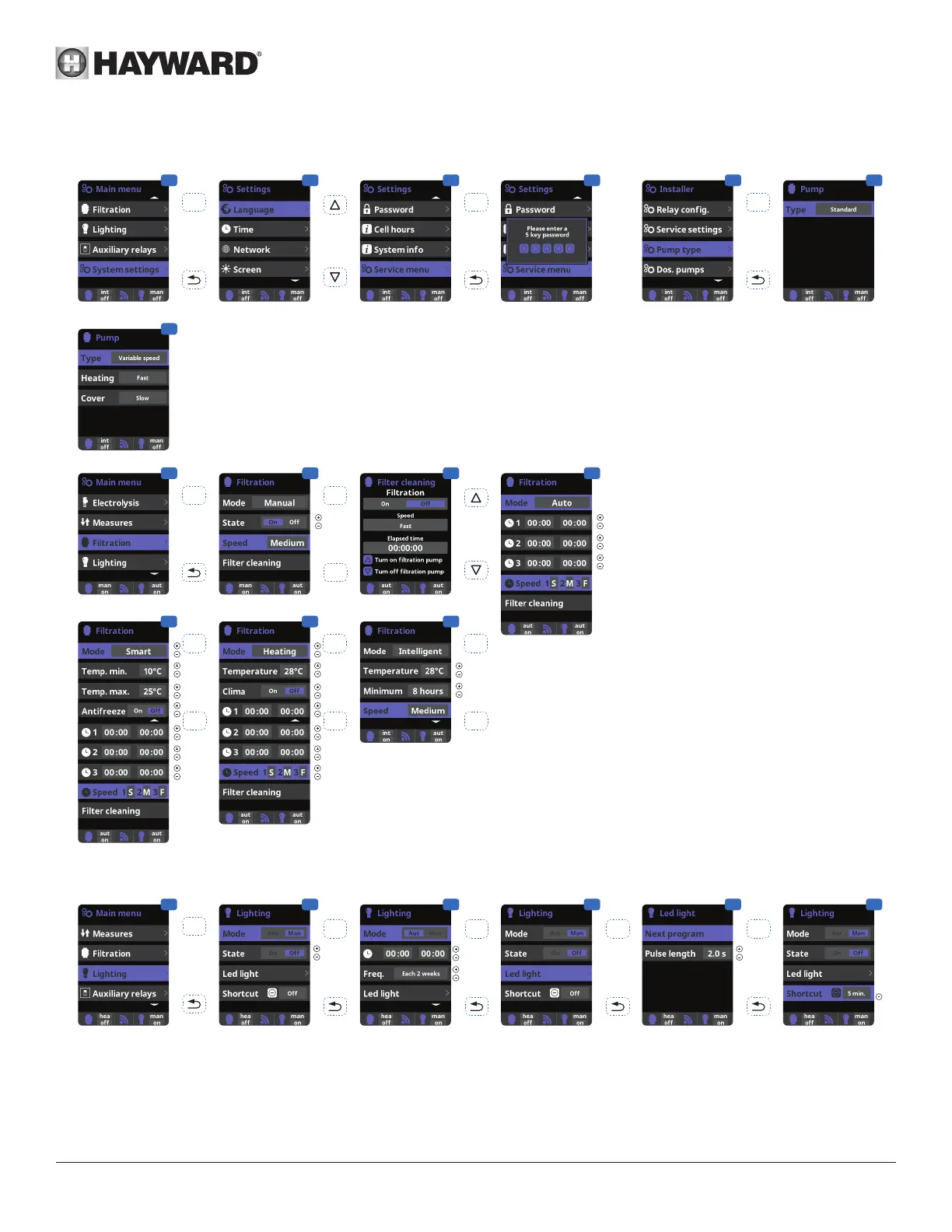
Setting the pump type
1 2 3 4
5 6
OK OK
OK
3 Enter the Service menu from the
conguration menu.
4 Enter the password (contact Hayward’s
technical support for the code)
5 Enter the Pump type menu.
6 Select the type of pump.
The default pump type is “standard”
(single-speed).
If you are using a variable-speed pump,
select “Variable speed”.
In this case, one of the 3 speeds (V1,
V2, V3) can be assigned to the heating
and when the cover is closed.
6
1 2 3 4
OK
+
7
5 6
-
+
-
+
-
+
-
After connecting a variable speed pump, you can
assign a different speed individually to each ltration
period, as required.
V1: S, V2: M, V3: F
Filter cleaning: To clean the lter with a variable-
speed pump, it is best to use the highest speed
(V3).
1 Lighting.
2 Manual mode (ON/OFF).
3 Automatic mode: Starts up according to the time
slots used to set the lighting start and end times.
The time slots can be congured with the following
frequencies: daily, every 2 days,
every 3 days, every 4 days, every 5 days, weekly,
every 2 weeks, every 3 weeks, every 4 weeks.
4 LED light: If you are using a coloured LED light, go
to the menu to congure it.
5 Colour selection: This menu allows you to change
the colours manually and, according to the type
of LED light, program the pulse length required to
cycle through the colours and programs (by default,
0.5 s, maximum 10 s).
6 Timed manual lighting (Shortcut): this menu
allows you to set the maximum time the lights
remain on before they switch off automatically after
a predened time.
The lighting can be switched on manually from the
main screen by pressing the (-) button
1
4 5
OK
OKOK
2
3
OK
6
OK




 To Next Page