8
MPC Platinum Installation and Operation Manual
HT# 059085-00 F
INSTALLATION
MOUNTING THE ENCLOSURE
• Select a location near the equipment to be controlled.
•
the MPC Platinum.
• Keep the MPC Platinum control away from extreme heat, cold, or
humidity. Ambient operating temperature is from 20 to 120°F.
• Remove the control from the metal enclosure by removing the top
center screw and loosening the two bottom screws. Then, lift the
control out of the enclosure.
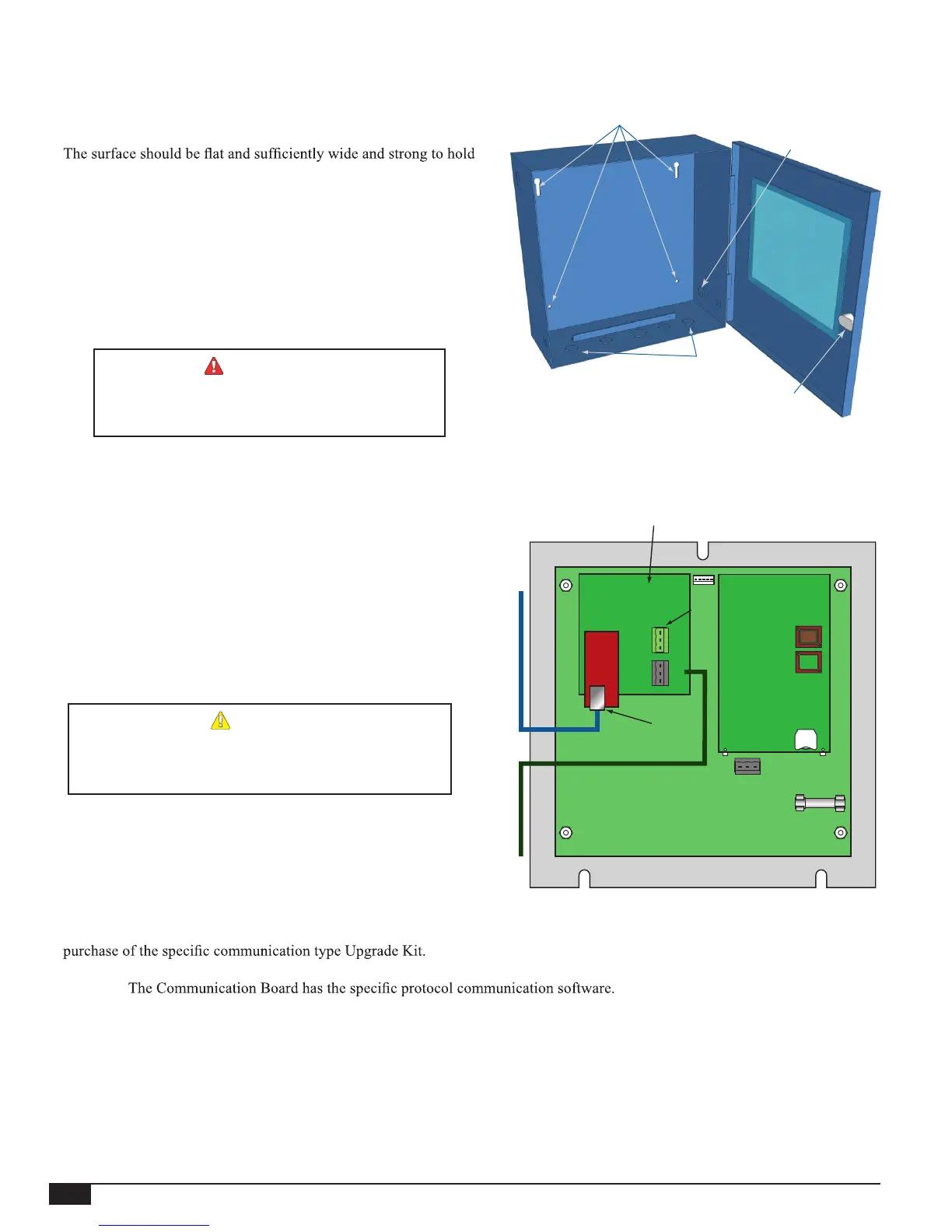
• Screw the enclosure to the surface through its back mounting holes.
• Return the control to the enclosure, replace the top screw, and
tighten the bottom two screws.
WARNING
Use only the provided Enclosure Knockouts. DO
NOT DRILL HOLES THROUGH THE ENCLOSURE
AS IT WILL VOID CONTROL WARRANTY.
Mounting Holes
Communication
Knockout
Wiring
Knockouts
Enclosure
Lock
REAR OF CONTROL
Activate the Battery
• Turn the MPC Platinum control over to reveal the piggyback
circuit board (CPU board).
• Remove the plastic strap that covers the battery. The contacts
should be touching the battery.
• The control has a coin Lithium battery (CR2032)
(HT# 020002-00) that is used to maintain the control's date and
time during power outages. This battery can maintain the clock
for up to a total of 100 days.
ALERT
Do not install the battery unless you plan to keep the
control continuously powered. If the control has no power,
the battery will lose its charge in 100 days.
Motherboard
CPU Board
RS485 (B)
Communication
Board
Battery
Connect to BACnet IP Network
or the Internet
CAT5 Cable
RJ45
Socket
Connect to BACnet MSTP Network
or MODBUS RTU Network
RS485 Cable
Internet Communication Board (-RINet),
BACnet Communication Board (-BAC),
or MODBUS Communication Board (-BUS)
Control Communication Upgrade
• All non-communication MPC Platinum controls are upgradable to any of the available communication options. This, requires the
• The Upgrade Kit consist of two boards, a CPU Board and a Communication Board. The CPU Board has the control operating
software.
• All communication boards have an Ethernet socket that is used for the BACnet IP or Internet communication and a RS485 socket
that is used for BACnet MS/TP or MODBUS communication.
• Both boards are mounted on the back of the Platinum control's motherboard. Thus, to install both boards you need to remove the
control from the enclosure by removing 3 facing screws. Then, turn the control over to reveal its back.
• Each of the boards is mounted on a group of standoffs that must be replaced during the upgrade. See "Remote Communication
Wiring" on page 14.
• Connect the communication cable from the side Knockout.
• Reinstall the Panel in the enclosure using 3 screws.
A(+)
G
B(-)
A(+)
G
B(-)
MSI
Use Only



 To Next Page