QuickStart Guide REX 200/250 | Version 5 | 26.05.2021 10
4.2 Login to the myREX24 V2 portal server
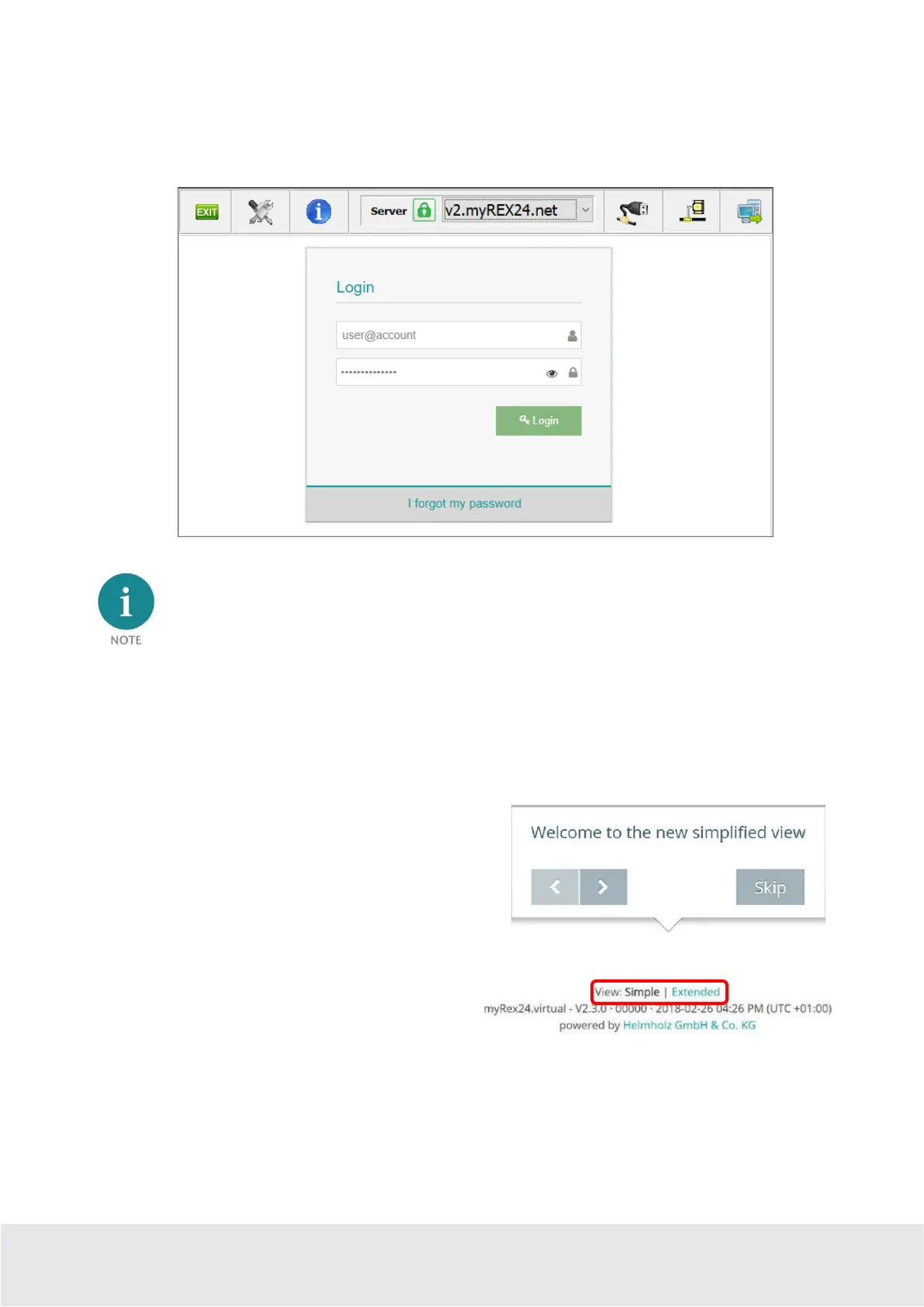
Install the shDIALUP software with administrative rights under a Windows operating system. After open-
ing the program, select the “V2.myREX24.net” server in the top menu bar and then log in to the
myREX24 V2 portal with your access data.
Your login name can be comprised of your username and company name separated by the @ symbol,
for example: admin@helmholz
Following the initial login, you will be prompted to register a new, individual password for your account.
As the account administrator, you can create and administer additional users after logging in to the
myREX24 V2 portal if necessary.
4.3 Navigation in the portal
Once a user has logged in for the first time, he or she is
guided through a tutorial. Navigation, basic settings and
switching from the simple view to the extended view are
shown.
4.4 Simple and extended views
You can choose between the two views in the menu
interface of the myREX24 V2 portal. The “simple
view” is active the first time you log in. You can
switch to the “extended view” at any time without changes being lost or losing their validity.
The simple view is mainly used throughout the rest of this Quick Start Guide. The extended view is also
presented in some places for purposes of illustration.



 To Next Page