EasyManua.ls Logo

Hemisphere GPS S320 - Unit Setup Procedures

Hemisphere GPS S320
43 pages
Print Icon
To Next Page IconTo Next Page
To Previous Page IconTo Previous Page
Loading...
S320 User Guide
PN 875-0281-000 Rev C2
Chapter 2: Installation
Ports and Connections
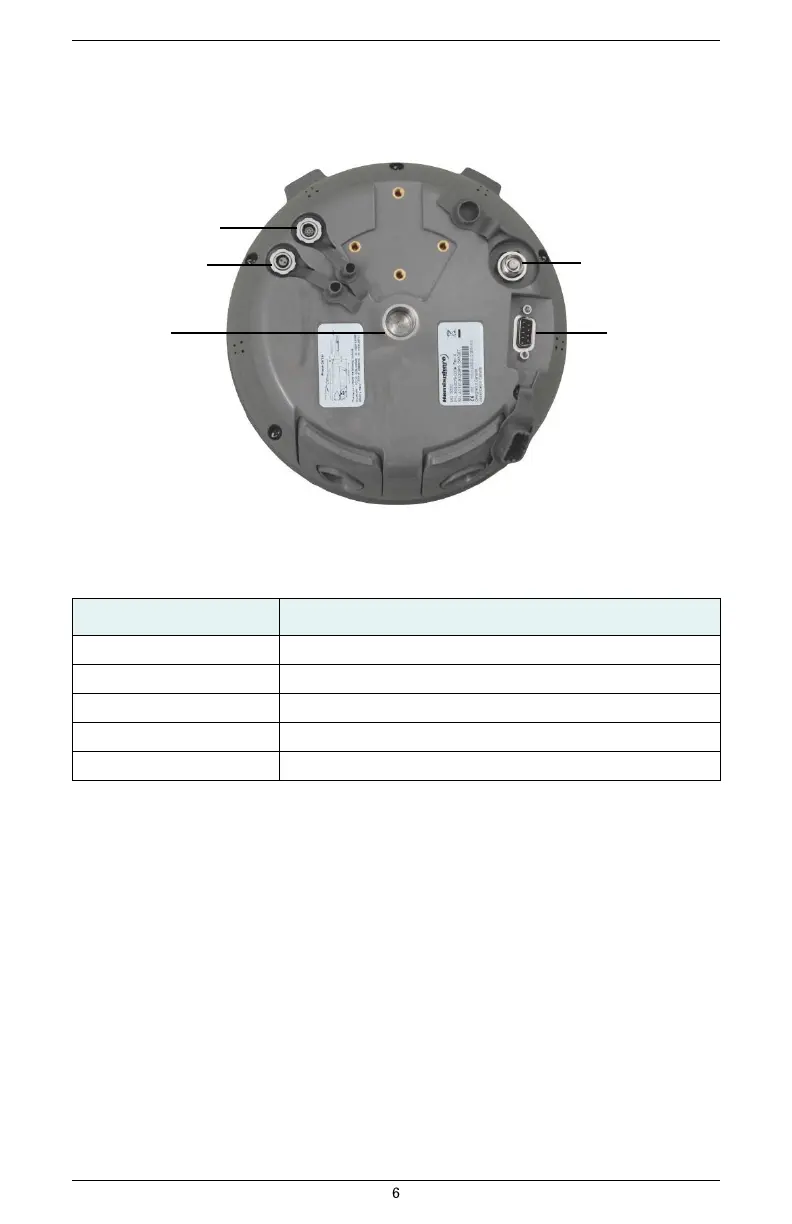
All connections and ports are located on the bottom of the unit, as shown in Figure 2-1. Table
2-1 provides additional information about each port/connection.
Data port
Power port
Antenna port
Mounting hole
Serial port
Figure 2-1: S320 ports and connectors
Table 2-1: S320 ports and connections
Port
What to connect
Data port (ODU 9-pin)
Data cable (Item H in Table 1-1 on page 3)
Power port
External power cable (Item F in Table 1-1 on page 3)
Mounting hole
Pole or tripod mount
Antenna port
External antenna (Item C in Table 1-1 on page 3)
Serial port (DB9 female)
External serial devices

Other manuals for Hemisphere GPS S320