Chapter 2: Installation
Installing/Connecting the S320
This section describes how to perform the following:
Attaching the antenna
Connecting to a power source)
Setting up the unit)
Attaching the Antenna
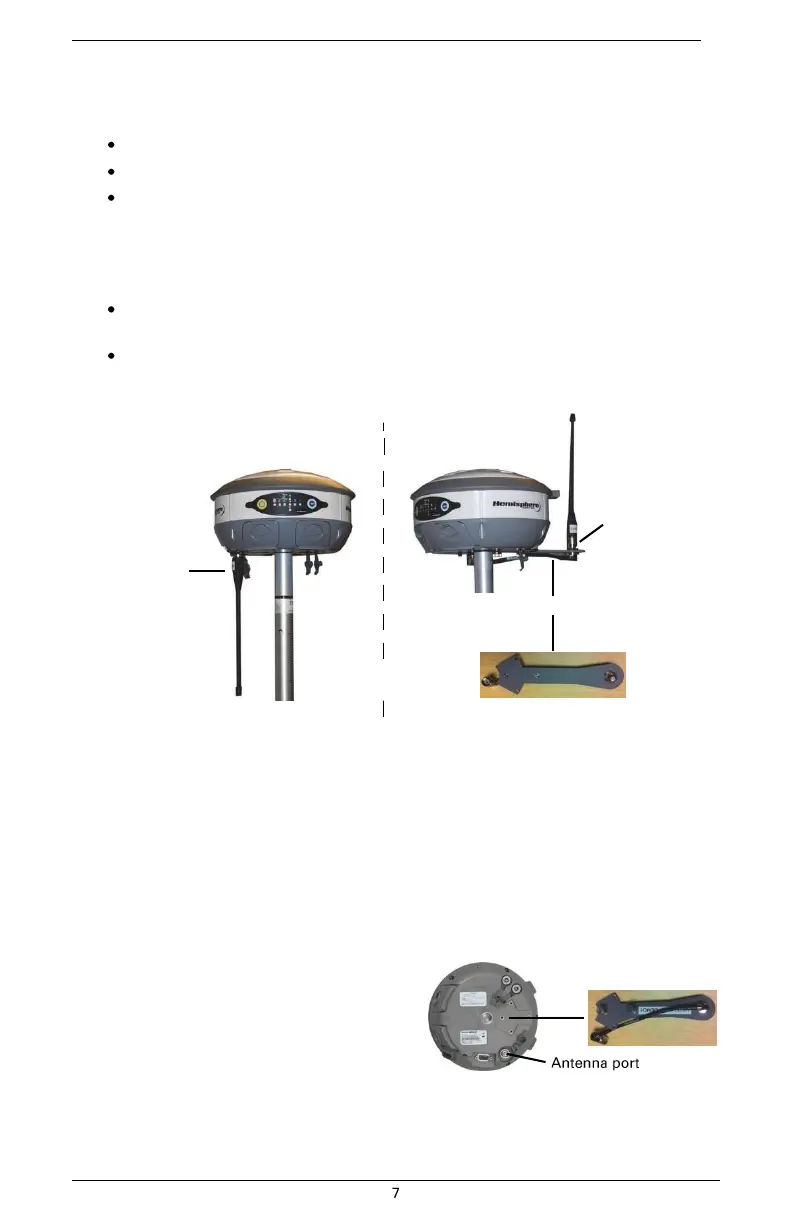
You can attach the antenna in one of two ways:
Attach the antenna directly to the antenna port on the bottom of the unit with the
antenna vertical and pointing downward (left photo in Figure 2-2)
Attach the antenna bracket to the unit and then attach the antenna to the port at the
end of the bracket with the antenna vertical and pointing upward (right photo in
Figure 2-2)
Antenna inserted
directly into unit
Antenna bracket
Bracket attached
to unit and
antenna inserted
into bracket
Figure 2-2: Antenna installation options
Tip: The antenna bracket offers an alternative solution in situations where installing the antenna on
the bottom of the unit may not provide suitable reception, such as where a small increase in
antenna height has a noticeable effect on reception.
To install the antenna directly into the unit:
1.
On the bottom of the unit remove the rubber cap covering the antenna port.
2.
Screw the antenna into the antenna port until snug. Do not overtighten. To install
the antenna using the antenna bracket:
1.
Align the bracket to fit into the
recessed area on the bottom
of the unit (as shown at right).
2.
Using the two thumbscrews on
the bracket secure the bracket
to the unit. Do not overtighten.
3.
Attach the bracket’s antenna cable to the unit’s antenna port.
4.
Screw the antenna into the bracket’s antenna port until snug. Do not
overtighten.


 To Next Page