
EasyManua.ls Logo

Hemisphere GPS S320 - User Manual

Hemisphere GPS S320
43 pages
Print Icon
To Next Page IconTo Next Page
Loading...
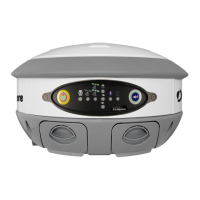
S320 GNSS Survey Receiver
User Guide
Part No. 875-0281-000 Rev. C2

Other manuals for Hemisphere GPS S320

Questions and Answers

  • A
    Ashley LawsonAug 6, 2025
    What to do if Hemisphere GPS S320 Receiver fails to power on?
    • P
      Paul HaydenAug 6, 2025
      If your Hemisphere GPS Receiver isn't powering on, several factors could be at play. First, examine the external power source, ensuring the external battery is adequately charged and the power cable's fuse is intact, if applicable. Next, verify the charge levels of the internal batteries. Inspect all power cables and pins for secure connections. Try using alternative, known-good batteries or cables to rule out faulty components. Ensure the batteries are installed correctly. Finally, make sure you press and hold the power button for at least one full second to initiate the power-on sequence.
  • J
    Jason BeasleyAug 12, 2025
    What to do if my Hemisphere GPS S320 Receiver is not logging data?
    • K
      kathleenvaughnAug 12, 2025
      If your Hemisphere GPS Receiver isn't logging data, begin by checking the receiver's power status. Then, ensure the receiver is locked onto a valid DGPS signal and at least four GPS satellites. Check the integrity and connectivity of both the power and data cable connections. Verify that the baud rate settings of your devices match. If you're connecting via Bluetooth, confirm that the Bluetooth module is powered on and the device is properly paired before opening the port.
  • T
    Traci WilliamsAug 17, 2025
    Why is my Hemisphere GPS S320 not showing a GNSS position?
    • M
      Mark RussellAug 17, 2025
      If your Hemisphere GPS Receiver isn't showing a GNSS position, start by checking the antenna's view of the sky, particularly towards SBAS satellites, which are typically south in the northern hemisphere. Next, verify the bit error rate (BER) and lock status of SBAS satellites, using the receiving device or SLXMon to monitor the BER value. Ensure that the proper application (SBASRTKB) is running on the Eclipse. Set the satellite selection to automatic mode using the command $JFREQ,AUTO and the differential mode to $JDIFF,WAAS. Finally, confirm that there is SBAS coverage available in your current location.
  • T
    tiffanyyoungAug 25, 2025
    How to fix random binary data from Eclipse OEM board on Hemisphere GPS S320?
    • S
      smithkevinAug 25, 2025
      To resolve random binary data issues from the Eclipse OEM board on your Hemisphere GPS Receiver, first verify that RCTM or Bin messages are not being accidentally output by sending a $JSHOW command. Next, ensure that the baud rate settings are correctly matched. If the problem persists, the volume of data requested for output might exceed the current baud rate's capacity; consider using a higher baud rate for communications.
  • A
    Andrea AlvarezAug 30, 2025
    What to do if there is no DGPS position in external RTCM mode on Hemisphere GPS S320 Receiver?
    • J
      Jennifer SwansonAug 30, 2025
      If you're not getting a DGPS position in external RTCM mode on your Hemisphere GPS Receiver, first verify that the baud rate of the RTCM input port matches the baud rate of the external source. Also, verify the pinout between the RTCM source and the RTCM input port: the ground pin and pinout must be connected, and the transmit from the source must connect to the receiver of the RTCM input port.

Summary

Introduction to the S320 GNSS Receiver

Product Overview and Features

Describes the S320 as an integrated GNSS survey and mapping device for mobile data collection.

Whats Included

Lists the components included in the S320 single unit and two unit kits.

S320 Installation Guide

S320 Ports and Connections

Details the various ports and connectors on the bottom of the S320 unit.

Installing and Connecting the S320 Unit

Provides instructions on how to install and connect the S320 receiver unit.

Attaching the Antenna

Explains methods for attaching the antenna to the S320 unit, with or without a bracket.

Connecting to a Power Source

Details the procedure for connecting the S320 to an external power source.

Connecting to External Devices

Instructions for connecting the S320 to external devices via serial and data ports.

Unit Setup Procedures

Illustrates typical base station and rover unit setup configurations.

S320 Setup and Configuration

Control Panel Overview

Overview of the S320's control panel, buttons, and LEDs.

Powering the S320 On and Off

Instructions for turning the S320 receiver on and off using the power button.

Modes of Operation

Lists and describes the different operating modes of the S320.

Module Status Display

How to check the status of the UHF/GSM, GPS, DGPS, Bluetooth, and SD card modules.

Changing Module Status

Procedure for changing the status (on/off) of modules using the Select and Power buttons.

Tilt Function Control

Using LEDs to level the unit and monitor antenna angle in real-time.

Alarm and Buzzer Notifications

Explains the conditions under which the S320 will beep or alarm.

Power and Battery Status

Interpreting LEDs for external power and internal battery charge status.

Battery Replacement and Swapping

Step-by-step guide for replacing or swapping the S320's batteries.

SD and SIM Card Management

Instructions for safely removing and inserting SD and SIM cards.

Bluetooth Communication

How to connect the S320 to Bluetooth-enabled devices.

S320 Firmware Upgrades

Procedures for upgrading the S320 firmware via serial port or SD card.

GSM Module Functionality

Overview of GSM, modes, and AT&T 2G network changes.

GSM Configuration for NTRIP

Steps to configure GSM for Networked Transport of RTCM via Internet Protocol.

SMS Messaging Configuration

Setting up SMS alerts and managing approved numbers.

Restoring Factory Defaults

How to reset the S320 to its factory default settings.

Appendix A: Troubleshooting

Troubleshooting Common Issues

Provides common issues and their possible resolutions for the S320 receiver.

Appendix B: Technical Specifications

GNSS Receiver Technical Specs

Details the receiver type, channels, and positioning modes.

Performance Technical Specs

Lists static and DGPS performance metrics.

Horizontal Accuracy Technical Specs

Provides RMS and 2DRMS accuracy for various modes.

Communication and Port Technical Specs

Outlines Bluetooth, baud rates, serial ports, power, and USB specifications.

End User License Agreement

Warranty Terms and Limitations

Covers disclaimers, limitations, claims, remedies, and basis of bargain for the warranty.

Intellectual Property and Infringement

Addresses Hemisphere's indemnity for IP infringement and actions if infringement occurs.

Licensee Indemnification

Licensee's obligation to indemnify Hemisphere for specific claims.

Agreement Terms and Conditions

Covers termination, export restrictions, product components, and force majeure.

Legal and Dispute Resolution

Specifies governing law, jurisdiction, and the inapplicability of CISG.

General Agreement Provisions

Outlines the entire agreement, amendments, and severability clauses.

Warranty Notice

Warranty Coverage and Exclusions

Defines covered products and details warranty terms, limitations, and exclusions.

Purchaser Responsibilities and Limitations

Outlines purchaser's duties, Hemisphere's non-responsibility, and liability limits.

Governing Law and Warranty Service

Specifies governing law and procedures for obtaining warranty service.

Hemisphere GPS S320 Specifications

General IconGeneral
CategoryReceiver
FrequenciesL1, L2, L5
SBASYes
Horizontal Accuracy (RTK)8 mm + 1 ppm
Vertical Accuracy (RTK)15 mm + 1 ppm
Static Accuracy - Horizontal3 mm + 0.5 ppm
Static Accuracy - Vertical5 mm + 0.5 ppm
Data Output RateUp to 50 Hz
Ingress ProtectionIP67
ConstellationsGPS, GLONASS, BeiDou, Galileo, QZSS
Post-Processing Accuracy3 mm + 0.5 ppm
Communication InterfacesBluetooth, Serial, USB
Operating Temperature-40°C to +65°C (-40°F to +149°F)